
DeepDojo.AIPublished 2026-11-13Updated 2026-11-13中文
Running Claude Code Subagents in Parallel Safely
As tasks pile up, it's natural to want several Claude Code subagents working at once: one on the order API, one on inventory logic, each on its own. To keep them from breaking each other's files, you give both isolation: worktree, so each writes code on its own worktree and branch.
Then the integration tests start acting strange: test data appears and disappears, and assertions fail at random. Eventually you find that both agents connect to the same PostgreSQL on local port 5432 and keep overwriting each other's test data.
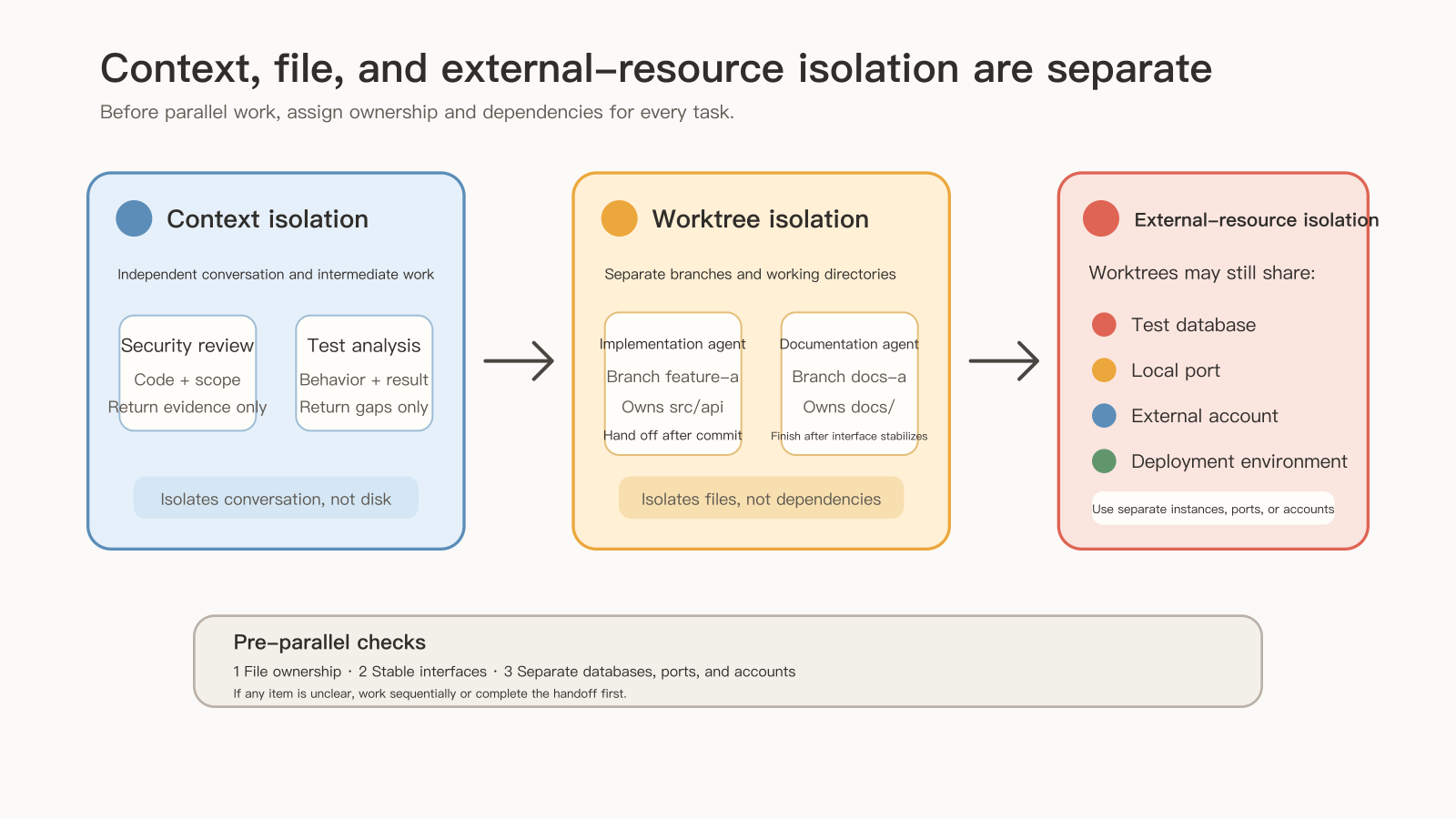
The code is separated by directory, but the database, ports, and remote resources didn't split along with it. Subagent "isolation" comes in several kinds, each covering its own piece:
- An ordinary subagent isolates only the conversation context, keeping specialist detail out of the main session.
isolation: worktreealso isolates file changes, branches, and working-tree state.- Databases, ports, and test tokens are external resources that no setting separates for you automatically.
So before running agents in parallel, draw a resource ownership map: which files each agent edits, which database name and port it uses, and which external services they share. Also find the work that depends on a decision nobody has made yet; if the API parameters aren't settled, tests and docs have to wait. What can run in parallel is the part that's already settled.
01 Context isolation and worktree isolation
An ordinary subagent isolates only the conversation context. According to the Claude Code subagents documentation, setting isolation: worktree in the definition runs the subagent in a temporary git worktree, an isolated copy of the repository branched by default from your default branch, so its file changes stay apart from the main working tree.
---
name: feature-implementer
description: Implements features in an isolated git worktree.
tools: Read, Write, Edit, Bash, Grep, Glob
isolation: worktree
---
Keep the two ideas apart:
| Concept | What it isolates |
|---|---|
| Context isolation | Conversation, prompts, task context |
| Worktree isolation | File changes, branches, working-tree state |
Worktree isolation suits high-risk changes, parallel implementation, exploratory refactoring, and any task that needs its own file ownership. Bring the work back from a separate worktree in this order:
- The subagent edits and tests on its own branch and worktree, then returns the branch, files, and check results.
- The main session confirms the actual baseline, reviews the branch's committed diff, and checks any uncommitted changes in the worktree.
- Once reviewed, merge or rebase the changes onto the main line.
- After merging, clean up the finished branch and worktree.
An isolated working tree lowers the risk of breaking the main line directly, but the changes still need review before merging.
02 The files are separate; the external resources aren't
Once worktrees separate the files, many people assume two subagents can safely run at once. Step back and ask:
- When both run integration tests, are they still hitting the same PostgreSQL on local port 5432?
- When the frontend starts a dev server, are they both fighting for port 3000?
- Do the third-party services they call share the same test token?
The code no longer collides in the file system, but network ports, database state, and remote resources didn't split along with it.
A git worktree only looks after the code files. Everything else still needs to be allocated up front, the way you would for multiple deployed instances: separate database names, port numbers, or emulators. Without that resource map before parallel launch, two agents will soon be overwriting each other's test data in the background.
03 No file overlap, but interface dependencies still need ordering
Say a docs agent writes docs/api.md and an implementation agent writes src/api/. The files don't overlap, yet there's still an interface dependency:
Interface contract settled → test design and doc structure can start
Implementation available   → run tests to verify the new behavior
Parameters finalized       → fill in the parameter docs
The two agents never edit the same file, but they still can't each guess their own set of parameters. Once the interface contract is stable, tests and docs can follow. What can run in parallel is what's already settled; work that depends on the same open decision has to wait.
If two agents do end up editing the same file, stop the conflicting writes, review each diff, and merge them one at a time; independent work without conflicts can continue.
04 Background runs need agreed deliverables
Some long tasks suit background execution: scanning a large codebase, long test runs, large-scale doc cleanup, multi-file impact analysis. The docs say subagents spawned from the main conversation start in the background by default. When Claude is waiting on a task, press Ctrl+B in the terminal to move it to the background, then check progress with /tasks. Setting background: true in a definition keeps that subagent in the background even when Claude asks to wait for it.
---
name: long-researcher
description: Performs long-running research tasks in the background.
tools: Read, Grep, Bash
background: true
---
The big benefit of the background is that the main session doesn't sit idle and you can work on something else. A task in the background isn't a finished task, though. Agree up front on what files it should deliver and how they'll be accepted, then come back to the result when it's done. Otherwise the main session pushes ahead and only later finds the background output unusable.
05 Should it inherit the discussion, or judge afresh?
Start by listing what information the subtask lacks. An ordinary subagent works from the brief, its role prompt, and the files it reads; whatever is missing goes into the handoff.
Then ask: should it carry forward the main session's judgments, or check everything anew? Forking the current conversation, for instance with /subtask to spawn a subagent that inherits the full conversation, carries the earlier discussion along, which helps when continuing an architecture trade-off. Any wrong assumptions in the main session come along too. If you want an independent review, hand over only the code, the goal, and the necessary evidence, and let it form its own judgment.
Three different mechanisms:
| Mechanism | Problem it solves |
|---|---|
| An ordinary subagent's separate context | Isolates specialist analysis so the main session doesn't fill with detail |
| Forking the current conversation | Carries existing discussion forward; availability and defaults depend on version and run mode |
A skill's context: fork | Runs the skill in a subagent, which doesn't see the earlier conversation |
Seeing context: fork in a skill, it's easy to infer from the name that it copies the full history. The docs say specifically that, despite the name, it doesn't run in a fork of the current conversation; when a task depends on that history, fork the conversation instead. What the agent actually received can be checked against the brief and its output; add to the handoff wherever something's missing.
06 Persistent memory and nested delegation
The memory field gives a subagent its own persistent memory scope:
| memory | Location | Good for |
|---|---|---|
user | ~/.claude/agent-memory/<name>/ | Personal memory across projects |
project | .claude/agent-memory/<name>/ | Project knowledge shared with the team |
local | .claude/agent-memory-local/<name>/ | Local project knowledge, not committed |
Choose it the same way as regular memory: shared team knowledge goes in project, personal habits in user, local experiments in local. Persistent memory shapes later behavior, so save only stable, reliable information tied to the role.
A subagent with the Agent tool can delegate further. The type allowlist below applies under narrower conditions:
---
name: coordinator
description: Coordinates work between specialized agents.
tools: Agent(worker, researcher), Read, Bash
---
Per the docs, the allowlist restricts which subagent types this definition can spawn when it runs as the main thread via claude --agent coordinator. Before giving it to an ordinary subagent, confirm how it runs to know what the setting does. When the work ends with this agent, remove Agent; when further delegation is needed, set the scope, depth, and deliverables so the same work isn't repeated layer after layer.
07 Subagents in plugins, and Agent Teams
Plugins can ship subagents, which calls for close attention to permissions, tool scope, and boundaries. The docs say that, for security reasons, plugin subagents ignore the hooks, mcpServers, and permissionMode fields, so a plugin can't quietly gain excessive control once installed. Before enabling a plugin with agents, check three things:
- Tools: do Bash, Write, and similar capabilities match the role, and do they need limits?
- The prompt body: does it include steps beyond the description, such as network access, sending data, or changing config?
- Credentials: do the tokens or environment variables it asks for cover only what it needs?
If you've checked all that and still aren't sure what a step will do, watch it first on a controlled one-off task, confirm what it actually reads, writes, and calls, then decide whether to keep it as an everyday role.
Agent Teams are a more advanced mode, for several roles collaborating on one complex task:
| Dimension | Subagents | Agent Teams |
|---|---|---|
| Focus | Delegating one specialist task | Multi-role collaboration |
| Complexity | Lower | Higher |
| Coordination | The main agent delegates and merges | Team-style task assignment and messaging |
| Risk | Context and permission management | Coordination cost, duplicate work, complex state |
Run a real task with one or two subagents that have clear boundaries first. If delegating and collecting results through the main agent is enough, keep that setup. Consider Agent Teams only when roles truly need to work at the same time and report to each other.
For writing briefs and handoff formats, see writing subagent briefs you can actually verify. Changes a subagent makes in its own worktree usually can't be restored by Rewind and come back through Git; how checkpoints and Git divide that work is in using Claude Code checkpoints to compare approaches.
Before agents start in parallel, spend a few minutes on a table: which files each one edits, which database name and port each uses, and which interface each is waiting on. With that table in place, they won't trample each other's data.