
DeepDojo.AIPublished 2026-11-13Updated 2026-11-13中文
How to Brief a Claude Code Subagent
Before a feature ships, it's tempting to get everything done in one pass: check the changes for business regressions, dig into auth holes, and run the unit tests and performance benchmarks too. Working through it all in one main session is convenient at first. Then the context fills up with route definitions and test logs, a single obscure security edge case takes dozens of rounds, and the main task stalls.
So you hand auth to a subagent: "Take a look at the auth code." A while later it returns, "Review complete, no obvious issues." The main agent still doesn't know which call might break, or whether that sentence can be trusted.
Delegating isn't the hard part. The hard part is making sure both the brief you send and the result you get back are usable. The common problems:
- The brief is too broad, so the subagent doesn't know which files to read, whether it may edit, or what to return.
- The result is only a conclusion, with no location, trigger condition, or code evidence the main agent can check.
- In a chained handoff only conclusions pass along, and assumptions the previous agent never verified quietly become facts for the next one.
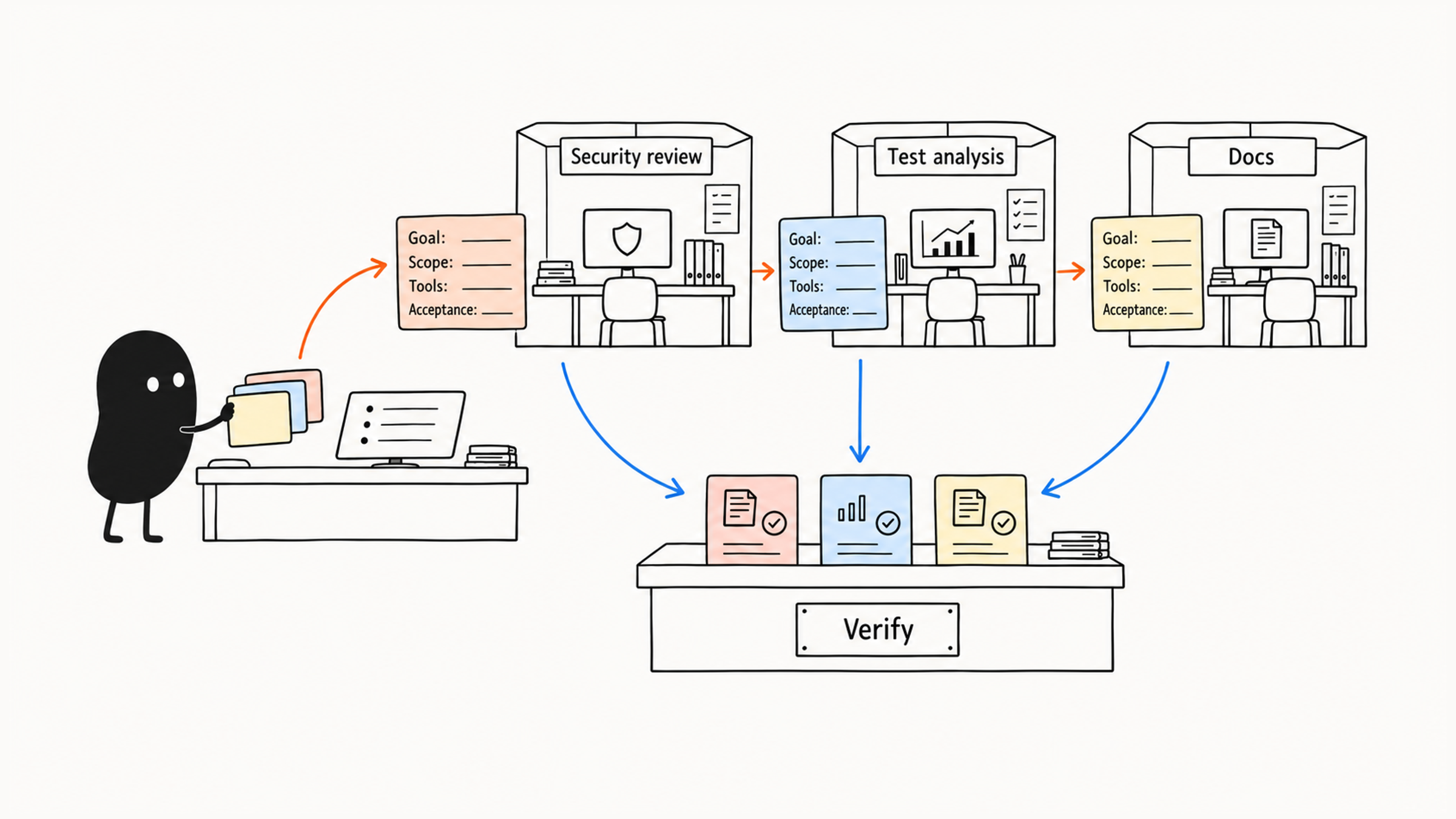
Before handing work off, spell out five things: the job, the input scope, tool permissions, the output format, and how results come back to the main agent. In handoffs, keep confirmed facts and unconfirmed assumptions apart. And before delegating at all, weigh whether the coordination cost is worth the context you'll save.
01 A subagent is a specialist investigator with limits
A subagent is like a specialist investigator the lead engineer sends out for one job. It works in its own context with restricted tool permissions and, when done, returns only distilled conclusions and evidence to the main session. The main agent keeps the overall direction and verifies the facts each one reports.
The vague "take a look at the auth code" could become:
Read `src/auth/` and its tests, and check whether this diff lets unauthenticated requests bypass auth.
Read-only: don't change files or access live data. Explain why before reading any other module.
For each finding, give the location, trigger condition, code evidence, and a suggested way to verify it; separate confirmed issues from hypotheses to check.
If the diff is missing or the comparison baseline is unclear, report the gap instead of guessing.
Now think about what the main agent receives. With only "review complete," it still doesn't know which call fails. A location, trigger condition, and code evidence let it go back to the file, check, and decide whether to fix.
Each limit has a purpose. Read-only keeps the review at the discovery stage, no live access narrows the data scope, and separating facts from hypotheses tells the main agent what's confirmed. Reporting a missing diff first avoids a complete-looking report built on the wrong baseline.
02 Weigh coordination cost before delegating
Use this table to decide:
| Scenario | Suggested approach |
|---|---|
| One fixed prompt does it | Slash Command |
| Needs a fixed workflow, templates, and references | Skill |
| Needs automatic checks before or after tool calls | Hook |
| Needs external systems and live data | MCP |
| Needs an independent role for a complex subtask | Subagent |
| Needs several roles working in parallel and reporting to each other | Agent Team |
Choose from simplest to most complex: if one sentence covers it, a command is enough; if only the method and templates are fixed, build a skill; if you want a gate before or after some system action, add a hook.
Delegation also has a coordination cost:
- You have to define the input boundaries clearly.
- When the subagent finishes, you have to review what it returns.
- You still have to stitch the roles' conclusions together.
If the context you save by delegating is smaller than the effort spent on the handoff, do the work in the main session; it'll be faster.
Long specialist analysis, different tool permissions, background or resumable work, independent file edits, and multi-perspective follow-ups can all call for subagents. When a task is short, the main session can finish it directly, several agents would duplicate the work, or you only want the model to "think again," staying in the main session is more direct.
03 The definition file: job, trigger, and tools
Subagent definitions are Markdown files: project-level in .claude/agents/, user-level in ~/.claude/agents/. Each has YAML frontmatter and a Markdown system prompt; the frontmatter defines invocation and permissions, the prompt defines the role and method.
---
name: code-reviewer
description: Review code quality, behavior regressions, test gaps, and security risks. Use when the user asks for a review, wants a diff checked, is preparing a merge, or is evaluating recent changes.
tools: Read, Grep, Glob
model: inherit
---

# Code Reviewer

## Role

You are a code review agent. Look first for concrete problems that cause wrong behavior, data issues, security risks, or test gaps.

## Workflow

1. Confirm the scope of the change.
2. Read the related code and tests.
3. Look first for clear bugs and behavior regressions.
4. Order findings by severity.
5. Every finding must include the file location, cause, impact, and suggested fix.

## Output

- Findings
- Open questions
- Verification
Add fields as needed:
| Need | Settings |
|---|---|
| Name, trigger, minimum tools | name, description, tools |
| Remove capabilities, choose a model, limit execution | disallowedTools, model, permissionMode, maxTurns |
| Add methods, external services, or memory | skills, mcpServers, memory |
| Background runs, isolated files | background, isolation |
Same-named definitions override by priority. According to the Claude Code subagents documentation, from highest to lowest: organization managed settings, the CLI's temporary --agents definitions, the project's .claude/agents/, the user's ~/.claude/agents/, and a plugin's agents/. When debugging, first confirm which definition actually loaded.
description should say what it does, when to delegate to it, and where its job ends; the main agent relies on it to pick subagents automatically. Say code-reviewer covers behavior and tests, while secure-reviewer covers auth, injection, and sensitive data. Faced with "is anything wrong with these changes?", both descriptions might match. Go back to the boundaries: who handles a general review, when does it go to the security role, and how is a mixed task handed over?
Try a general request, a security request, and a mixed request once each, then look at actual coverage. An agent's name in the log only shows it was called; whether it read the right code and left checkable findings still means checking the result. Besides automatic delegation, you can name one explicitly, such as "use the code-reviewer subagent to review my recent changes," or run claude --agent code-reviewer to make it the main agent for the whole session.
04 Start tool permissions at the minimum
Tool permissions decide what a subagent can do. Start with the smallest set the task needs and add only for real gaps:
| How it's written | What it can do | Good for |
|---|---|---|
tools omitted | May inherit broad capabilities | Implementation tasks that truly need full access |
tools: Read, Grep, Glob | Read and search only | Security review, code review, architecture analysis, reading docs |
tools: Read, Write, Grep | Read and write docs | A docs agent; decide on Bash based on the actual work |
tools: Read, Edit, Bash, Grep, Glob | Run and fix tests | A test agent; control Bash's range separately |
Looking at the last row, ask once more: with Bash left in, what can it actually do? tools only decides whether a tool is available; command range needs permission rules or a PreToolUse hook. Remove Write and Edit, and Bash can still write files. Even if you only plan to run npm test, check what the project script does before judging whether the permissions fit.
Claude Code usually ships built-in roles too, such as Explore for fast read-only codebase exploration, Plan for researching approaches in plan mode, and general-purpose for complex multi-step tasks. Built-in agents suit general work; define your own when a task carries stable project rules, team processes, or fixed output, so the team reuses the same boundaries.
05 Chained handoffs: confirmed, unconfirmed, suggested
Several agents can work in sequence:
First use the code-analyzer subagent to find performance issues,
then use the optimizer subagent to propose fixes,
then use the test-engineer subagent to design verification.
Define the handoff format first. When the previous agent outputs structured evidence and conclusions, the next one can pick up reliably. A minimal handoff looks like this:
## Handoff: performance analysis
Confirmed facts:
- Hot function `renderList` rebuilds every DOM node on each render (profile screenshot, `src/List.tsx:42`)
- With 5,000 items, rendering takes 1.8s (benchmark script output)
Unconfirmed assumptions:
- Virtual scrolling might fix it, but whether row height is fixed hasn't been measured
Suggested for the next agent:
- Design an optimization only for `renderList`; don't change the data layer (data fetching already ruled out)
When optimizer takes over, it first checks the conditions behind that evidence:
- A profile from the same version and input can be reused; if conditions changed, measure again.
- The data layer has been ruled out and is outside this change, so keep that boundary.
- Virtual scrolling is still only a suggestion, with preconditions like row height unverified.
That lets it continue from what's already settled and know where it can't conclude yet. Hand over only "optimize with virtual scrolling," and the next agent will likely implement it directly, with the unverified conditions quietly gone.
A long task can also be started and later resumed with the same subagent, extending its analysis to new areas, which suits large analyses, long research, and multi-stage debugging.
06 Keep reviewing, fixing, and accepting separate
Many people love configuring an all-in-one super-reviewer: it finds problems while fixing them, reviews its own patches, and finally announces "all issues fixed."
When review, fixing, and acceptance blur together, the original findings are harder to check against the changes. Keep a read-only report first, then fix within the authorization you have. You can split it into two roles or have one role work in two passes; what matters is that the original findings stay checkable. After changes, keep checking the actual result; "all fixed" isn't evidence on its own.
Common roles, with tools configured by job:
| Role | Job | Suggested tools | Output requirements |
|---|---|---|---|
| Code Reviewer | Find bugs, behavior regressions, error handling, edge cases, missing tests | Read, Grep, Glob | Location, cause, impact, fix, and verification |
| Secure Reviewer | Read-only check of permissions, auth, input validation, sensitive data, injection | Read, Grep | Risks and evidence; the main agent verifies before scheduling fixes |
| Test Engineer | Analyze gaps, design strategy, add tests, run them and explain failures | Read, Write, Bash, Grep | Follows the project's existing test framework |
| Documentation Writer | Update API docs, feature docs, and user guides from code | Read, Write, Grep | Clear doc type, readers, structure, and example format |
| Implementation Agent | Implement features, change code, add tests, run verification | Read, Write, Edit, Bash, Grep, Glob | Paired with worktree isolation, file ownership, or approval points |
| Debugger | Narrow the scope through reproduction and logs, propose and verify a fix | Read, Edit, Bash, Grep, Glob | Hypothesis, evidence, root cause, fix, and verification |
| Data Scientist | Write SQL, analyze data, produce statistics | Bash, Read, Write | Read-only first, with limits on query scope, rows, and sensitive fields |
The security agent reports risks read-only first; if it needs test results or a diff, the main agent can supply them, or you can open a restricted command. The implementation agent has broad permissions; for isolating files and resources when agents run in parallel, see context vs. worktree isolation for subagents.
07 When delegation doesn't help, check how you split the work
Each agent makes its own model and tool calls. As tasks multiply, record agent and parent names, tools used, background status, and whether results were merged, and watch for tasks that never end. If frequent delegation isn't improving results, revisit the split:
| Symptom | Check first |
|---|---|
| Findings keep getting overturned | Scope and judgment criteria |
| The handoff is harder than the work | Whether it depends on too much main-session background |
| Merging takes longer than doing it directly | Whether coordination cost cancels the benefit |
If you've configured a crowd of subagents and overall development is slower, with more problems than a single session, check the task split first. Two symptoms are the most telling:
- Writing a brief for a subagent takes 20 minutes, more effort than writing the code yourself.
- Subagent reports come back full of holes, and the main session rereads the source to check half-plausible guesses.
When coordination and handoff costs eat up the gain, pull the small tasks that depend on main-thread context back into the main session, and keep one or two subagents with clear boundaries that can deliver independently, such as a read-only security audit or long-form doc generation. Fewer subagents mean a shorter communication chain, which leaves the lead engineer time to check the key code evidence. For merging results from several subagents, see reporting honestly when a Claude Code workflow fails.
Once you've written a brief, read it from the main agent's seat: given the result it might send back, could you go straight to the code and check it? If so, the brief is good enough.