
DeepDojo.AIPublished 2026-11-13Updated 2026-11-13中文
Claude Code Undid the Code but Not the Database
Claude Code has a reassuring feature: if a change goes wrong, you can roll it back. Press Esc twice to open Rewind, pick an earlier point, and the code edits since then are undone.
That makes people bolder about trying things, until one rollback turns out less simple than expected. Say you were chasing a caching bug: you had Claude Code change two pieces of business logic, ran a psql script in the terminal that created three temporary test tables, then ran pnpm install to add a debugging library.
The approach failed, so you rewound every code edit to try another idea. But the test tables are still in the database, and the dependencies in node_modules have changed. The code is back at the starting point; the experiment environment isn't.
On refactors, migrations, or performance work, people tend to swing between two habits:
- Moving so carefully that they only touch a line or two at the edges, afraid of breaking the whole project.
- Following a hunch through a dozen files until errors pile up, only to realize the last clean, working state is gone.
Checkpoints give that kind of experimentation a way back. Using them well comes down to two things: know what they can and can't restore, then give every experiment a shared starting point so comparing approaches actually means something.
01 Checkpoint, rewind, and the starting point
Start with three terms:
| Term | Meaning | Good for |
|---|---|---|
| Checkpoint | A restore point tied to a session message, holding the pre-edit state of tracked files | Starting a new round of work, before switching approaches |
| Rewind | Going back to a checkpoint and restoring the conversation, the code, or both | A failed approach, a wrong edit, getting back to a clean state |
| Branch Point | The shared starting point you choose when comparing approaches; an experiment-design idea | Comparing cache strategies, database designs, UI layouts |
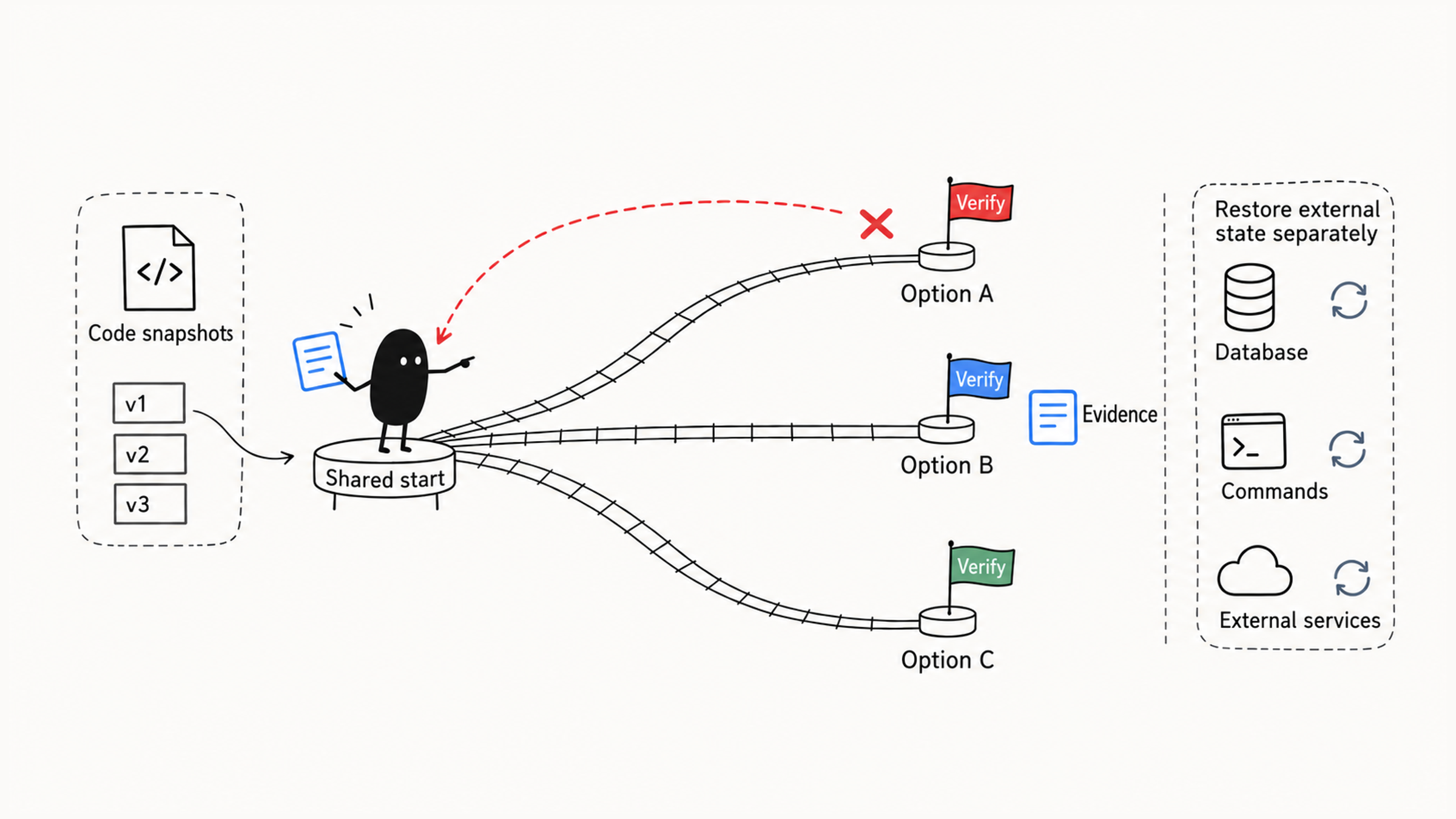
A checkpoint is a save point, rewind is the restore action, and the branch point is the shared start you pick. The branch point doesn't mean the system keeps every experimental route for you; when you need to keep several implementations long term, save them as Git branches or commits.
02 Restore scope depends on what made the change
Checkpoints aren't a time machine for the whole machine. According to the Claude Code checkpointing documentation, they track changes Claude made with its file editing tools:
| What changed | How to restore it |
|---|---|
| Files changed by the main session's file editing tools | Rewind with the restore-code option |
| Files changed only by Bash commands, by most subagents, or by other sessions | Git, a patch, or another file recovery method |
| Databases and external services, including messages already sent | The matching backup or a compensating action |
The docs add a detail: once Claude has edited a file with its editing tools, Rewind also undoes later Bash changes to that file. A file that only Bash ever touched isn't tracked and has to be restored with version control such as Git.
Apply this table to the opening experiment. Rewind undid the two code edits, but the three tables from psql and the dependency changes from pnpm install are still there. So before each experiment, work out what could get polluted:
- Database state.
- Local environment variables.
- Lockfile changes.
- Network messages sent out.
Prepare a recovery script for each, or run the whole thing in a sandbox container you can delete and rebuild. Rolling back the code is only the first step in restoring the experiment; leftover data from the last round can skew the next one.
03 Open the rewind menu and pick a scope
There are two ways in. The fastest is pressing Esc twice when the input box is empty, which opens the rewind menu. You can also type /rewind, which has the aliases /checkpoint and /undo. The menu lists every prompt you sent in this session, in order.
Once the list is open, decide what you want to keep, then find the matching state. Look at the files changed nearby and how far the conversation had gone, and confirm it's the moment before the experiment started. The most recent point may already contain the bad edit; an earlier one may also wipe out discussion you wanted to keep.
When rolling back, first decide whether the problem is in the code, the conversation, or both, then choose the scope:
| Option | What it restores | Good for |
|---|---|---|
| Restore code and conversation | Tracked file edits and the conversation return to the chosen point | The whole approach failed and you want to restart from the old point |
| Restore conversation | Only the messages roll back; current code stays | The conversation went the wrong way but the code is worth keeping |
| Restore code | Only tracked file changes roll back; the conversation stays | The files got broken but the discussion is still valuable |
| Summarize from here | Compresses the conversation after this point into a summary | The conversation is long and you want the conclusions with less context pressure |
| Never mind | Restores nothing | You were only looking and aren't sure about rolling back |
Facing these options, ask: what from the last attempt is worth keeping?
- If your questions pinned down the business boundaries and algorithm details but the last two code changes are full of holes, choose "restore code" and keep the whole analysis.
- If the code mostly works but the conversation wandered and filled the context, choose "restore conversation."
- If the whole route was wrong from the start, restore both code and conversation to the original point.
If nothing tracked was written after the chosen point, the two code-restore options won't appear. After rolling back, make a habit of running git diff to confirm the code you have is the clean baseline you expected.
04 Automatic checkpoints and how long they last
Claude Code creates a checkpoint automatically each time you send a prompt that starts a new turn. Messages you add while it's still working don't necessarily get their own restore point, so trust the /rewind list.
Checkpoints survive resuming a session, but file snapshots are limited in number and cleaned up over time: the docs say a session keeps snapshots for its 100 most recent checkpoints, and the default cleanup runs about 30 days after a session last saved one. Commit the starting points and results you need long term to Git instead of relying on the default retention.
Before a big change, review the current diff and any existing edits in the working tree, then set the experiment's starting point. A checkpoint isn't a "wipe every change" button.
05 Save approach A before trying approach B
The classic use of checkpoints is exploring alternatives:
Start from a clean state
  |
  v
Try approach A
  |
  v
Roll back to the start
  |
  v
Try approach B
  |
  v
Compare A and B
Say you're adding a cache to an API and want to try Redis, then an in-memory cache. Before leaving the Redis approach, save its implementation and test results so you can compare later. After restoring the starting point, check what's left in Redis too. Only with the same input, load, and starting data, and with the external cache cleared or isolated, does the second run give you something to compare.
Save A's implementation and results before leaving it:
| How you save | What else to check |
|---|---|
| Git commit | Includes only staged, tracked files; save database state, untracked files, and the conversation separately |
git diff > /tmp/plan-a.patch | By default holds only unstaged changes to tracked files; check git status and save staged content and new files separately |
| Experiment notes | Record conclusions only; they can't restore the implementation |
Temporary commits can live on a separate branch and be tidied into team history after validation. Confirm you can recover the files and external state you need, then switch approaches.
06 Common comparison scenarios
For a safe refactor, split the work into steps and run the tests after each one. Keep going when they pass; if they fail and the problem probably came from the last few steps, roll back to the last stable point and clear the bad edits quickly.
For error recovery, suppose Claude Code refactored the auth module and broke the OAuth integration. Go back to the stable state before the refactor and try a safer approach, instead of stacking patches on top.
For a database migration, suppose you want to compare a direct migration with gradual dual writes in a test environment you can reset. You're comparing migration code and test results here, not experimenting on production data:
1. State the goal: compare direct migration with dual-write migration.
2. From the current state, have Claude Code implement the direct migration.
3. Run the tests and save the code, failure points, and risks.
4. Restore the tracked code and reset the test database to the same baseline separately.
5. Have Claude Code implement the dual-write migration.
6. Run the tests again.
7. Compare code complexity, risk, test results, and rollback cost.
Once both routes are tested, go back to the problem the migration has to solve. Is the data consistent? Can failures be retried? Can you still switch back to the old system? Dual writes add the chance of the two sides drifting apart, and one passing test run doesn't answer those questions. Compare complexity, risk, results, and recovery cost together; once you choose, keep the implementation in Git and save the database recovery steps separately.
For performance work, first confirm the experiment can be repeated, then compare how much faster each approach is. The numbers below are hypothetical: the API averages 450ms, and you compare a Redis cache, query optimization, and response compression.
Baseline: 450ms
  |
  |-- Redis cache: 280ms
  |
  |-- Query optimization: 180ms
  |
  |-- Response compression: 320ms
Query optimization looks best. But if the cache was already warm and the connection pool already built when you measured it, that result also reflects a changed environment. Return each approach to the same starting point, use the same load, data, warm-up rounds, and concurrency, and measure several times before attributing the change to the implementation.
If query optimization really does win, restore the Git commit or patch you saved for it and add caching on top. The improvements worth keeping are the ones with clear conditions that you can measure again; one impressive number isn't enough.
For interface design, when redesigning a dashboard you can try a sidebar, top navigation, and a card grid from the same starting point, using screenshots to judge crowding and grouping. Save screenshots and code for each route, then roll back. If the card grid works best and the top navigation is worth keeping, restore the saved grid version and add the navigation. You're combining designs you've checked, not patching on top of a messy experimental state.
For debugging hypotheses, suppose the app leaks memory and you have a few guesses: event listeners aren't cleaned up, the database connection pool isn't released, or the cache holds objects that are no longer used. Edit along all of them at once and you can't tell which change helped. Test each hypothesis from the same starting point:
Before debugging
  |
  |-- Hypothesis 1: fix event listeners
  |     |-- memory profile still fails
  |
  |-- Rewind
  |
  |-- Hypothesis 2: fix the connection pool
  |     |-- memory profile still fails
  |
  |-- Rewind
  |
  |-- Hypothesis 3: check cached objects that aren't released
        |-- memory leak fixed
What counts as evidence for "fixed"? Run the same request sequence each time and watch whether memory keeps climbing. There's also an easily missed starting condition: the code went back, but a running process may still hold the last round's cached objects. Restart the test process, use the same number of requests and the same observation window, then compare. Confirm the code is restored, then confirm the conditions are restored, and only then move to the next hypothesis.
API design, configuration migration, and test strategy can be compared the same way. To compare REST with GraphQL, save the REST implementation in Git first, then use Rewind to restore the start, and run both routes against the same set of endpoint requirements and tests. Environment variables, secrets, and deployment state in a config migration can't be undone by checkpoints; restore them in their own environments.
07 Tidy the conversation after a long debugging session
Long debugging builds up a lot of context. After several attempts, failed paths and useful findings get mixed together, and it becomes harder to tell which information to rely on.
The "Summarize from here" option in the rewind menu fits this situation. It compresses the conversation after a chosen point into a summary; the original messages stay in the session transcript while the visible context gets lighter. You can tell it what to focus on:
Keep these in the summary:
1. Which approaches we tried.
2. Which ones failed, and why.
3. Which approach works best so far.
4. What to do next.
This keeps the debugging conclusions and slims the context before the next phase. It only manages the conversation; it doesn't roll back code.
08 How checkpoints and Git divide the work
Checkpoints and Git both help you go back, but their boundaries differ:
| Tool | Good for | Not suited for |
|---|---|---|
| Checkpoints | In-session trial and error, exploration, undoing a recent approach, comparing routes | Keeping long-term official code history |
| Git | Auditable code history, team collaboration, releases and rollback | Saving every conversational experiment |
When should something go into Git? Ask whether you'll need this state later. Checkpoints are limited in number and cleaned up over time, and may be gone in a few weeks; commit code you plan to keep. During exploration you can save to a separate branch or a WIP commit, then clean up the code and tests once you find an acceptable approach and fold it into team history.
Patches piled onto a failed approach make recovery and debugging harder. When the fix is more complicated than the original business logic, go back to a clean start and adjust the approach. Consider rolling back when you see these signals:
- The approach keeps getting more complex and you still haven't settled on a direction.
- Tests just failed, and the cause is probably in the last step or two.
- You want to compare two implementations.
- You notice Claude Code changed files it shouldn't have.
- The conversation has drifted, and explaining further costs more than going back.
Before rolling back, confirm three things: this checkpoint is the state you want; whether you're restoring code, conversation, or both; and whether the current state holds findings worth writing down first.
When something breaks, trace it this way:
Can't find a checkpoint → check the current session, separate turns, whether snapshots remain
Messages but no code-restore option → check whether the change came from a tracked file editing tool
Restore fails after selecting → check whether the checkpoint is valid, then the file system and permissions
To see where checkpoints sit among the other features, look at the four-layer path in which Claude Code features to learn first. When one change spans files, commands, and a database across several phases, building a Claude Code workflow from one small loop covers how to record the recovery plan for each phase.
Before you try a second approach next time, ask two questions. Is the code back at the start? Are the database, dependencies, and external state back too? Only when you can answer both does the comparison count.