
DeepDojo.AIPublished 2026-11-13Updated 2026-11-13中文
Cleaning Up a Messy CLAUDE.md
The longer you use Claude Code, the more rules pile up in CLAUDE.md: the tech stack, the test command, which directories are off-limits. The day you wrote them down, they saved you a lot of repeating yourself.
The trouble shows up later. Last year the team wrote "run tests with npm test"; this year the project moved to pnpm and Vitest, and nobody updated the file. In a new session, Claude dutifully runs npm, hits an error, and then carefully analyzes npm compatibility for you, steering the task somewhere it doesn't need to go.
Rules go into files because conversations forget: a new window starts with nothing you agreed on before, and compaction in a long session can trim earlier details. Once rules live in files, though, three problems show up:
- Rules land on the wrong layer: personal preferences end up in the team file, or team rules exist only on one person's machine.
- Rules read like a project wiki: hundreds of words of background that change nothing about the next action.
- Rules are written but never loaded, or loaded but contradicted by another file.
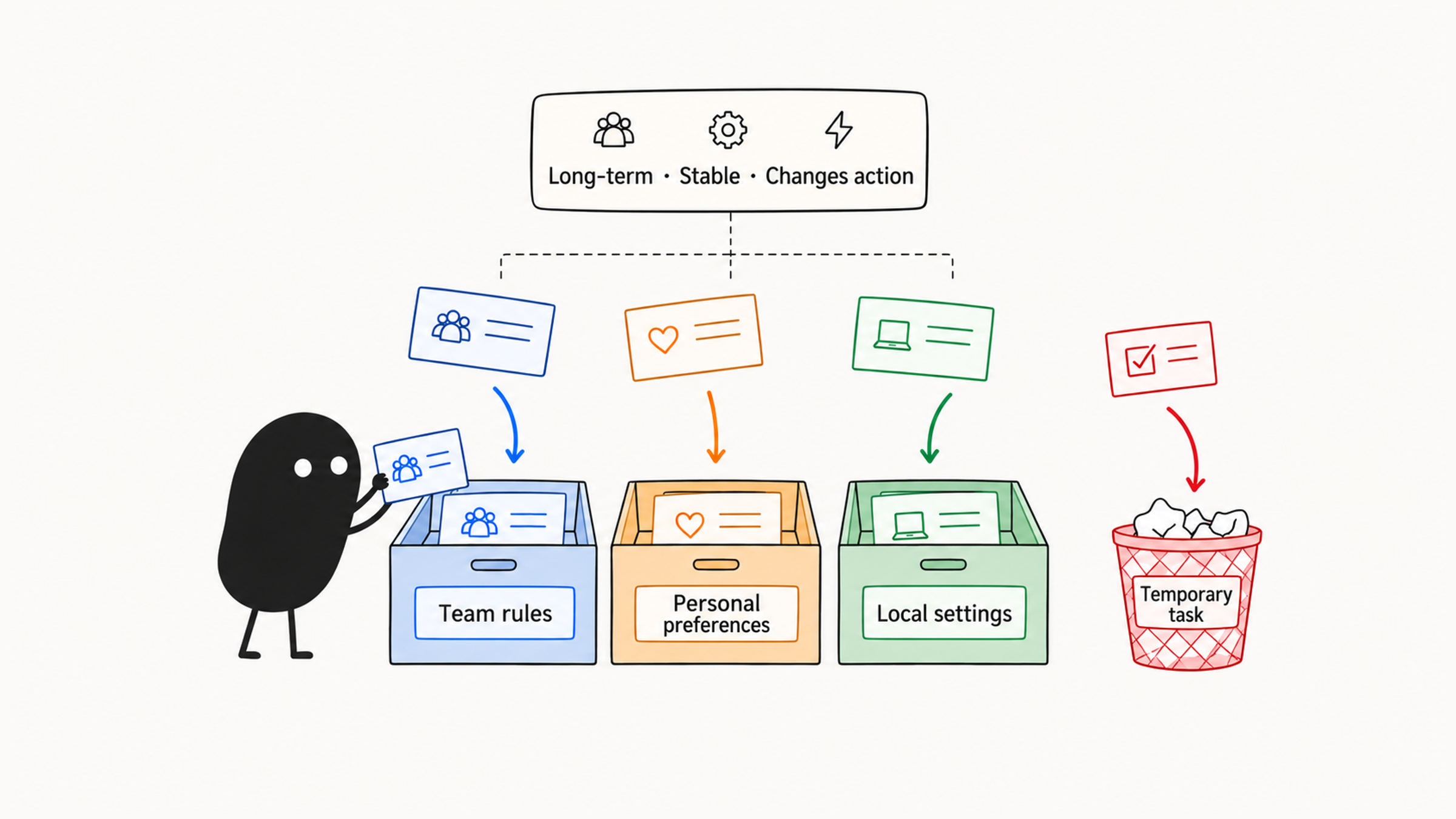
The fix: choose a layer by asking who needs the rule and which files it applies to, filter content by asking whether it changes the next action, and confirm with /context and a small task that the rule is actually loaded and followed.
01 Sort rules by purpose first
Memory exists to keep long-lived rules in files, and CLAUDE.md is the classic place for them. Before writing any rule, sort it by purpose:
| Content | Where it goes |
|---|---|
| Tech stack, commands, architecture, directories, and change boundaries | Project or directory memory |
| Coding, naming, testing, commit, deployment, and team security rules | Shared team rules |
| Personal habits like reply length or listing risks first | Personal memory |
| Which button to change this time, unconfirmed experiments | The current task |
| Long background that rarely affects behavior, existing long docs | The original project docs |
| Keys, accounts, private tokens, and credentials | Never in memory |
Writing rules down saves you from retyping them, but if you never revisit them, you get the stale rule from the opening. When Claude keeps doing something that doesn't match reality, first check which rules it loaded, verify them against the current project setup, clear out stale entries, and run the same kind of task again. Long-lived rules come with a maintenance duty: a rule earns its place only while it stays true and useful.
02 Create, view, and add to memory
The first time you organize project memory, run /init at the project root. Claude Code generates or extends a project-level CLAUDE.md based on the current project. The generated file usually covers an overview, development conventions, and common commands. Keep the rules that most affect coding, and add the rest as you need them.
For everyday maintenance, use /memory, which opens an editor for memory files on different layers. It's best for three jobs:
- Reviewing existing memory for stale entries.
- Reorganizing messy rules onto the right layer.
- Deleting preferences and constraints that no longer apply.
To add a rule, edit the file directly or tell Claude exactly where to write it:
Add "run `npm test` before committing" to the project root `CLAUDE.md`. If a rule with the same meaning exists, update it instead of adding a duplicate.Confirm it really is a project convention before writing it. Just saying "remember this" may send it to auto memory. Rules the team should share need an explicit project file, and you should check the actual change.
03 Pick a layer: who needs it, and for which files
Claude Code memory can come from several layers. Think of them as rules running from organization to individual and from project to directory:
| Layer | Common location | Good for | Shared? |
|---|---|---|---|
| Managed policy | Organization config | Compliance, security, unified processes | Organization-wide |
| Project memory | ./CLAUDE.md or ./.claude/CLAUDE.md | Team standards, architecture, common commands | Usually shared with the project |
| Project rules | .claude/rules/*.md | Modular project conventions | Usually shared with the project |
| User memory | ~/.claude/CLAUDE.md | Personal preferences, communication habits | Personal |
| User rules | ~/.claude/rules/*.md | Reusable personal rules | Personal |
| Local memory | ./CLAUDE.local.md | Machine-specific settings, local paths | This machine |
| Auto memory | ~/.claude/projects/<project>/memory/ | Feedback, preferences, and findings Claude saves | This machine, per project |
To pick a location, take one concrete rule and ask who needs it. A unified API response wrapper is a team convention, so it goes in the project layer. "Conclusion first, details after" is a personal preference, so it goes in the user layer. ~/data/dev-seed is a path on this machine, so it stays local.
Then look at where it applies. "src/legacy/ is read-only until the migration finishes" is still a team rule, but it covers only one part of the code. Put it in that directory's CLAUDE.md or in a rule scoped with paths. Once you know who uses it and on which files, the location follows.
Being closer doesn't make one sentence override another. According to the Claude Code memory documentation, files found across layers are concatenated into context rather than overriding each other, and if two instructions contradict, Claude may pick either one. So resolve conflicts at the source or spell out the conditions, and use permissions or hooks when access must be blocked.
Directory rules add up. If the root requires a unified response format for every API and src/api/CLAUDE.md requires Zod input validation, both apply when working in that module.
04 What to write: does it change the next action?
Write the project-level CLAUDE.md as a short working agreement. History and background stay in existing docs; this file holds requirements that shape the next action. A usable structure:
# Project Memory

## Project Overview

This is a Next.js application using TypeScript and PostgreSQL.

## Architecture

- `app/` contains route handlers and UI entry points.
- `server/` contains application services.
- `domain/` contains business types and pure logic.
- Do not import adapters into domain code.

## Development Commands

- Install: `npm install`
- Test: `npm test`
- Lint: `npm run lint`
- Build: `npm run build`

## Coding Rules

- Keep changes scoped to the requested task.
- Use async/await.
- Do not edit generated files.
- Add or update tests for behavior changes.

## Git Workflow

- Review `git diff` before summarizing changes.
- Do not commit unless explicitly asked.
Every item in the template affects an action: where the database is accessed, which directories have boundaries, what to run after a change, whether it may commit on its own. Save these frequent decisions first, then see whether the project also needs naming, API, migration, deployment, known-issue, or related-project rules.
When you're tempted to paste in another paragraph of background, ask yourself: after reading these few hundred words, will its next code action be any different?
"This project is a core business system" gives no guidance for the next edit. "Every file under generated/ is managed by a code generator; don't edit it by hand" marks exactly what it shouldn't touch directly. Filtering by "does it change the action?" beats pasting the project wiki in word for word.
Use this table when cleaning up:
| Common problem | How to fix it |
|---|---|
| Written like a project wiki | Keep history, team intros, and long background in docs |
| Whole existing docs copied in | Reference the source, or extract only the rules that affect actions |
| "Skip tests this time" saved as a long-term rule | Move it back to the current task |
| Team rules mixed with personal tone | Store them separately by who shares them |
| Only "write high-quality code" | Name actions: add tests for business changes, keep adapters out of domain, run the real commands before committing |
| Never cleaned up after a migration | Update old rules along with directories and test commands |
05 Directory rules and personal rules
Different directories in a large project often have different constraints. Putting everything in the root file makes it long and feeds Claude Code noise on unrelated tasks. A directory-level CLAUDE.md suits local rules, for example in the API directory:
# API Module Rules

This file applies to files under `src/api/`.

## Request Validation

- Use Zod schemas for request validation.
- Always validate input before business logic.
- Return 400 for validation failures.
- Include field-level error details.

## Response Format

All responses should follow this shape:

```json
{
  "success": true,
  "data": {},
  "timestamp": "2026-01-01T00:00:00Z",
  "version": "1.0"
}
```
After placing the file near the code, confirm when it loads. If you start from the root, a subdirectory's memory loads only once Claude reads, writes, or edits a file in that subdirectory. If you start directly in src/api/, you get that directory's rules plus every parent directory's. Where the file lives and whether this session loaded it are two separate things to check.
Personal memory holds your working preferences; project memory holds team rules. For example, in ~/.claude/CLAUDE.md:
# Personal Preferences

## Response Style

- Keep summaries concise.
- Put risks before nice-to-have suggestions.
- When reviewing code, list findings before general comments.

## Development Preference

- Prefer small, scoped changes.
- Ask before destructive operations.
These only shape your own experience. Put personal preferences in the project-level CLAUDE.md and everyone else inherits your tone, tool habits, and working style, making it hard to tell what the team actually requires. To turn a personal habit into a team standard, confirm it first, then write it into the shared file.
Keep personal preferences consistent with project rules. If your preference says npm and the project requires pnpm, add "when the project doesn't specify" to your preference so the two files don't ask for different actions.
06 How imports, rules, and auto memory load
CLAUDE.md can reference other files with @path, replacing copied long docs with one real source:
# Project Memory

See @docs/setup.md for project setup.
See @docs/architecture.md for architecture rules.
See @docs/testing.md for test commands and policy.
A single source avoids copies drifting out of sync. Before adding an @ import, though, check when it will be used.
Suppose you have a 500-line architecture document. Writing See @docs/architecture.md expands the imported file into context alongside CLAUDE.md, so those 500 lines are there no matter how small the question. If you write the plain relative path and add "read only when changing cross-layer dependencies," Claude consults it only on relevant tasks. With a full import, CLAUDE.md looks like a single line, but the context it uses is just as large.
Needed by most tasks          → import with @path
Needed only for cross-layer work → write a plain path and say when to read it
As project rules grow, split them into .claude/rules/*.md, one topic per file: architecture, testing, deployment, frontend styles, or security boundaries. A rule file can carry short frontmatter:
---
paths:
  - "src/api/**/*.ts"
---

# API Development Rules

- Validate all request input.
- Keep route handlers thin.
- Put business rules in services or domain logic.
The file name only groups topics; paths decides when it loads:
| Written as | When it loads |
|---|---|
| The API paths above | When matching TypeScript files are read |
No paths | At startup |
Only a description or a new file name | It doesn't become on-demand because of that |
Think about when a rule must be seen. "Don't read sensitive directories" has to be visible before access and enforced with permissions; loading it once the directory is read is too late. Path-scoped loading suits local development details.
Some content comes from notes Claude saves itself, known as auto memory: preferences you corrected or decisions it carries forward. That's a separate source from the directory-based CLAUDE.md lookup. The MEMORY.md in that directory is an index, with details stored in topic files.
Say auto memory recorded "don't use any," and later the team allowed it in test files but only updated the chat and PR description. When a new session still insists on the old rule, look at the memory it's drawing on instead of restating the new decision. Edit or delete the old entry with /memory, and later sessions read the updated version.
07 Excluding irrelevant rules and working across directories
Large projects may load CLAUDE.md files unrelated to your current work. Use claudeMdExcludes to skip them and reclaim context:
{
  "claudeMdExcludes": [
    "**/packages/legacy-app/CLAUDE.md",
    "**/examples/experimental/CLAUDE.md"
  ]
}
claudeMdExcludes matches absolute paths, so the **/ prefix covers the leading directories. After excluding, check what actually loaded with /context. Exclusion fits cases like:
- Old project rules that are out of date.
- Example directory rules that conflict with the main project.
- A package in a monorepo whose rules shouldn't affect the current one.
- So much auto-loaded memory that context noise rises noticeably.
When a task spans directories, add the extra one with --add-dir, for example when the main project and a shared component library live apart:
claude --add-dir ../shared-components--add-dir widens file access but doesn't load the extra directory's CLAUDE.md by default. If you need its rules, set CLAUDE_CODE_ADDITIONAL_DIRECTORIES_CLAUDE_MD=1 at launch. Add extra directories per task, so access widens when needed while long-term memory stays stable.
08 Verify that memory works
After writing memory, run a small task to see whether Claude Code actually follows the rules. Small tasks give fast feedback and make problems easy to locate:
- Open a fresh Claude Code session and check with
/contextthat the relevant memory loaded. - Ask it to explain the project structure and see whether it names the key directories' roles.
- Ask it to change a small file and see whether it follows the coding rules.
- Ask it to draft a commit message and see whether it follows the commit conventions.
- Ask a question from a subdirectory and see whether the directory rules are used.
When it doesn't comply, trace it this way:
File missing from /context
  → check location, launch directory, exclusions
Already loaded
  → check scope, the specific action, and conflicting sources
Tried to run but failed
  → check the command and the runtime environment
For example, the file is loaded but the rule only says "test when necessary." Now check the trigger: if the team agrees that server-side business changes must be tested, write that condition down, then confirm the command and result on a relevant change.
If it tried to run but the environment wouldn't start, the next step is to check the environment and report the blocker; adding stronger wording won't help. Go through the record step by step: did it just repeat the rule, or load the file? Did it try to run, or actually finish? Then you know which part to fix.
Memory and commands each cover their own ground: long-term rules go in memory, fixed procedures become commands. For how the two divide the work, see which Claude Code features to learn first. As team configuration grows, the same rule tends to get written separately into memory, commands, and hooks; building a Claude Code workflow from one small loop shows how to keep a single source.
Maintenance starts the day a rule goes into a file. When the project switches package managers or changes its test command, open /memory and delete the stale entry. It takes less effort than correcting Claude in chat over and over.