
DeepDojo.AIPublished 2026-11-13Updated 2026-11-13中文
Grow Your Team's Claude Code Setup From One Command
After a team has used Claude Code for a while, its configuration ends up spread across several places: slash commands, hook scripts, CLAUDE.md, each written its own way. It all gets along fine until you switch tools.
Say /commit says "check with npm lint," a hook runs eslint --fix, and CLAUDE.md says "format everything with Biome." When the team switches fully to Biome, you update the memory file and the command but miss the hook. From then on, every commit gets formatted by Biome and then reformatted back by the hook with the old ESLint.
There's another common stumble when first building this setup: trying to ship the commit command, PR review, subagents, automation hooks, external MCP, and a packaged plugin all on day one. You spend the day fighting config paths and permissions, and when it errors, you can't tell which piece is stuck.
Both problems share one fix:
- Get one minimal business flow working, then add components one gap at a time, so every new layer's failures can be located.
- Give each feature a single job, keep one source of truth for each task, and have every other entry point call it.
- When a gap appears, fix the shared source component rather than patching one entry point.
01 Start with the plainest possible code review
However grand the final blueprint, on day one focus on one small, concrete scenario: a plain code review that reads the current branch's diff, finds two logic flaws according to project conventions, and reproduces them accurately in the code.
Verify that basic flow first, then add automation as real needs appear. From that small flow, extend by gap:
- Write the test command and directory boundaries in
CLAUDE.md, and verify/review-change. - When commit prep, formatting, or independent review keeps coming up, add
/commit, a hook, or a review agent. - When you need to check live PRs, connect a code-hosting MCP; use planning for cross-module refactors; package a plugin when sharing across teams.
Add a capability at whichever step you find it missing. The directory below is a reference for an extended setup; you should be able to explain what each added component solves and which ones you don't need yet:
.claude/
├── commands/
│   ├── commit.md
│   ├── prepare-pr.md
│   └── review-change.md
├── agents/
│   ├── code-reviewer.md
│   └── security-reviewer.md
├── hooks/
│   ├── pre-tool-check.sh
│   ├── format-code.sh
│   └── security-scan.py
├── settings.json
└── skills/
    ├── review-report/
    │   └── SKILL.md
    └── technical-writing/
        └── SKILL.md

CLAUDE.md
.mcp.json
Keep a small set of configuration whose purpose you can explain. Components you don't use still need maintenance and debugging, even when idle.
02 Each feature does one job
Map out the division of labor before writing config. That surfaces overlapping responsibilities early and stops you from enabling extra components just for completeness:
| Need | Feature | Why |
|---|---|---|
| Quickly start a common workflow | Slash Commands | Manual trigger, clear entry point |
| Keep project rules and team conventions | Memory / CLAUDE.md | Stable long-term context |
| Think through steps before a big change | Planning Mode | Lowers the risk of complex changes |
| Roll back after an experiment | Checkpoints / Rewind | Keeps safe restore points |
| Scripted batch work | CLI Print Mode | Fits automation and CI |
| Package review, writing, and other specialized methods | Skills | Reusable workflows, templates, and references |
| Automatic formatting, scanning, blocking | Hooks | Event-driven, runs automatically |
| Query live external data | MCP | External tools and live data |
| Security, testing, docs, and other specialist roles | Subagents | Context isolation and separated responsibilities |
| Team-wide installation | Plugins | Packaging, versions, and distribution |
Find the need, then choose the feature; combine only when one isn't enough. Maintenance follows the same division.
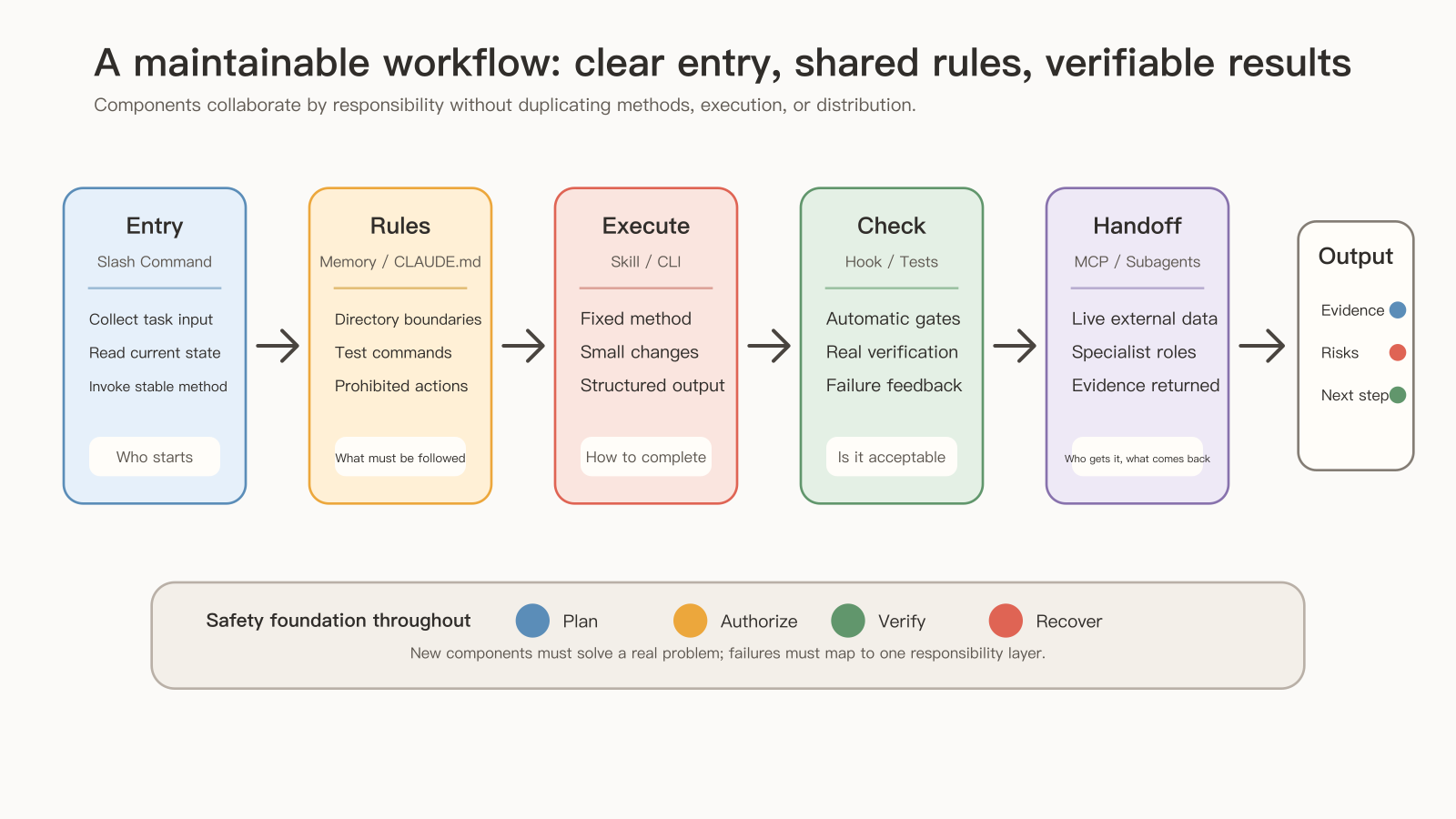
03 One job, one source of truth
Back to Biome and ESLint fighting each other. The way out of that conflict is a single source of truth:
- Put the actual command in the project's
package.jsonscripts. - Have
CLAUDE.mdsay only "run the checks before committing." - Have every hook and shortcut command call that one project script,
npm run lint.
However the underlying toolchain changes, you edit one project script and every entry point and gate lines up. The Claude Code best practices guide makes a similar point: if your repo already has a test, build, or lint command, the single most useful line in CLAUDE.md is the command that runs it.
The same guide separates two kinds of instruction. CLAUDE.md, prompts, and skills are read by the model, which then decides what to do and may judge that a guideline doesn't apply. Hooks, deny rules, and managed settings are enforced by Claude Code every time. Things that must happen every time, like formatting after edits, belong in hooks or permission rules; guidelines that can bend to context stay in CLAUDE.md.
Write CLAUDE.md first, so every later entry point shares the same stable project rules:
# Project Instructions

## Project Shape

- This is a TypeScript web application.
- Use the existing architecture and helper APIs before adding new abstractions.
- Keep changes scoped to the requested feature or fix.

## Commands

- Install dependencies: `npm install`
- Run tests: `npm test`
- Run lint: `npm run lint`
- Run typecheck: `npm run typecheck`

## Git Workflow

- Review `git status` before committing.
- Do not include secrets, build artifacts or local files.
- Use conventional commit style.

## Testing

- Add focused tests for behavior changes.
- Run the smallest relevant test first.
- For shared logic, run broader tests before finishing.
In a larger project, put more specific memory files in subdirectories like src/api/, src/ui/, and docs/. Memory holds only information that stays stable across sessions; current task details, temporary plans, and one-off conclusions stay in the conversation so they don't affect later work.
04 Entry points orchestrate; methods live in shared components
Next, give daily repeated work a clear entry point so people know where to start:
| Command | What it does |
|---|---|
/commit | Analyzes changes and runs a safe commit flow |
/prepare-pr | Runs checks and drafts a PR summary |
/review-change | Reviews the current diff or a given range |
/generate-docs | Generates or updates docs from code |
/deploy-check | Checks environment, changes, tests, and risk before deploying |
These five are candidates; start with the one that genuinely repeats. An entry point fetches context, starts the method, and merges results; reviewing, writing, and checking belong to the matching components. /prepare-pr might look like this:
---
allowed-tools: Bash(git status *) Bash(git diff *) Bash(npm test *) Bash(npm run lint *) Bash(npm run typecheck *)
description: Prepare a PR summary and pre-merge checks
---

## Workflow

1. Review the scope of the current changes.
2. Run the relevant tests, lint, and typecheck.
3. Draft a PR summary:
   - What changed
   - Why it changed
   - What was verified
   - What the risks are
4. Delegate reviews as the changes require, asking for read-only reports; in this flow, test-engineer only analyzes test gaps and doesn't edit tests.
5. Merge must-fix items and optional improvements.
Say review-change gains a security checklist, testing standards, and a report template, and then prepare-pr needs them too. You could copy them over, but next time the standard changes you'd have two copies to find. What's worth extracting is the repeated method: save it as a skill both entry points share, with related materials loaded on condition.
Whether to split depends on reuse and loading needs. An entry point that's a bit long but handles its own complete flow doesn't need another layer.
05 Add the other components one gap at a time
Planning and recovery come first for cross-module features, data models, auth, shared-logic refactors, and migrations or deployments: use /plan to think the approach through. A plan should cover the current structure, what changes, the risks, staged steps, testing, and rollback. Before starting, look at the current diff and know which edits are already yours and which restore points exist. Prepare recovery by source: tracked edits use Rewind; file changes from Bash and subagents need Git or a patch; databases and external services recover in their own systems.
Imagine the first phase edits files and the second runs a command that updates the database. When later tests fail, rolling back the files restores only the first part, and the database stays in its new state. So record each phase separately: what it did, how it was verified, and how to recover if it fails. The phases can be: read-only analysis and planning, minimal implementation, added tests, docs and cleanup, final verification. Move on only after a phase's checks pass, so you know which phase introduced a change.
Hooks put short, deterministic automatic checks on event boundaries: block risky commands at PreToolUse, format and scan written files at PostToolUse. Seeing formatting listed before scanning in the config array, it's easy to assume that's the run order. Hooks matching the same event can run at the same time; if the scan must see the formatted file, put both steps in one script that runs them in sequence.
For MCP, first see which external information the flow really lacks. If you only need PRs, connect code hosting first; add a read-only database when you need business state. When local files can be read directly, skip the file system MCP. Separate each server's job so you can tighten permissions, check logs, and disable each one on its own when it fails.
For subagents, split out the one responsibility that most needs independent review first, such as a read-only code-reviewer or security-reviewer. Before delegating, the main agent passes along the diff scope and existing test results; when the report comes back, it checks the evidence in the code. If the delegated work involves writing, assign who owns which files, and allocate databases, ports, and external services separately.
Use the CLI and claude -p for scripts once inputs, outputs, and failure handling can all be defined up front, such as generating review summaries in CI or tidying docs in bulk. Set an explicit output format, cap the cost, set tool permissions, keep logs, and keep sensitive content out of public CI logs.
06 Choose advanced features by problem, and leave the reasoning behind
Advanced features are chosen by problem too:
| Current problem | Consider |
|---|---|
| Complex judgment | Extended Thinking |
| Execution risk needs control | Auto Mode, Permission Modes |
| Long tasks or tracking across compaction | Background Tasks, Task List |
| File changes need parallel isolation | Worktrees |
| Continuing on another device, remote viewing or takeover | Web Session, Desktop, Remote Control |
A complex feature, for example, might go like this: plan mode drafts the approach, confirm the code baseline and recovery path, an implementation agent builds it in a worktree, test-engineer adds tests, code-reviewer and security-reviewer review, hooks format and scan, the CLI produces a JSON verification report, and the main agent merges the results.
Try pulling one part out of that chain and see whether the task still runs smoothly:
- Bring in Remote Control only when you need to switch sessions across devices.
- A one- or two-minute task can stay in the foreground.
- If running serially is already safe and file ownership isn't sorted out, stay serial.
Advanced features add permission, state management, and collaboration costs, so choose them by actual need. Leave the reasoning for new teammates: when cross-device work or truly independent parallel tasks show up later, revisit the original trade-off and judge again.
After the configuration has actually run a few times in one project, keep adjusting it there while the method is still changing; once the workflow is stable and another project needs it, package it as a plugin.
07 When a gap appears, fix the shared source
Once the system is in use, assign each component an owner and a cleanup schedule. Rules, commands, permissions, and toolchains all go stale, and team members should know how to disable and debug them. Check and update by layer of responsibility:
| Where the change is | What to update and check |
|---|---|
| Entry points | Commands against the team's current process, deprecated arguments |
| Project rules | Memory against current code and toolchain |
| Methods and materials | Skills, templates, and doc style |
| Automatic checks | Whether hooks catch the wrong things, whether scripts are compatible |
| External data | MCP connections and permission scope |
| Specialist roles | Whether subagents duplicate each other |
| Distribution | Plugin versions and changelog |
The most common reflex in maintenance: someone reports that a /review-change run missed a serious SQL injection, and whoever maintains it adds "always check for SQL injection" to that command's prompt.
Stop and think one step further: does the team's other frequent command, /prepare-pr, and the automated review in the CI script have the same gap? Patching a single entry point is only a temporary fix. Next time someone uses a different entry point or calls the CLI from the pipeline, the same flaw still reaches the main branch.
Go after the real shared source instead. If every review entry point relies on the same security-reviewer subagent or security-check skill, update the rule in that shared component. Fix it there, and every command, script, and automated flow that calls it benefits at once. Tracing responsibilities back to shared components during maintenance keeps the division of labor and configuration from slowly turning into a mess.
Once the work system is built, the real test is whether it reports honestly when a step fails midway; that's covered in reporting honestly when a Claude Code workflow fails. For how to choose features by problem in the first place, see which Claude Code features to learn first.
The question you'll ask most while maintaining a work system is: where does this live? Formatting lives in the project script, security rules in the shared review component, project conventions in CLAUDE.md. With one source for each, a single edit brings everything into line.