
DeepDojo.AIPublished 2026-11-13Updated 2026-11-13中文
Why Didn't My Claude Code Hook Block That?
Once a hook that blocks risky commands is set up, most people test it: they deliberately trigger a command it should stop, see a non-zero exit code in the terminal, and relax.
That conclusion comes too early. Move to a new machine without jq, and the check script starts, prints jq: command not found, and exits with code 127. The safety check never ran, and under Claude Code's rules a script that errors out like this counts as a non-blocking error, so the call it was supposed to stop goes ahead.
When a gate looks present but doesn't stop anything, the cause is usually one of three:
- The wrong exit code, so a crashed script reads as a normal pass.
- Rules built on a string blocklist, bypassed by writing the command differently.
- A completion check that loops, or keeps blocking tasks it doesn't apply to.
The fixes: separate "the gate decided to refuse" from "the script itself failed" in your logic; put the real security boundary in tool allowlists, sandboxes, and low-privilege accounts; and give Stop checks an applicability test and a graceful way out. Verify in two steps: test the script with synthetic JSON first, then attach it to a real event and test the configuration.
01 Exit codes decide pass, block, or error
A hook's exit code shapes what Claude Code does next:
| Exit code | Meaning |
|---|---|
0 | The script finished normally; structured output can still ask to deny or continue |
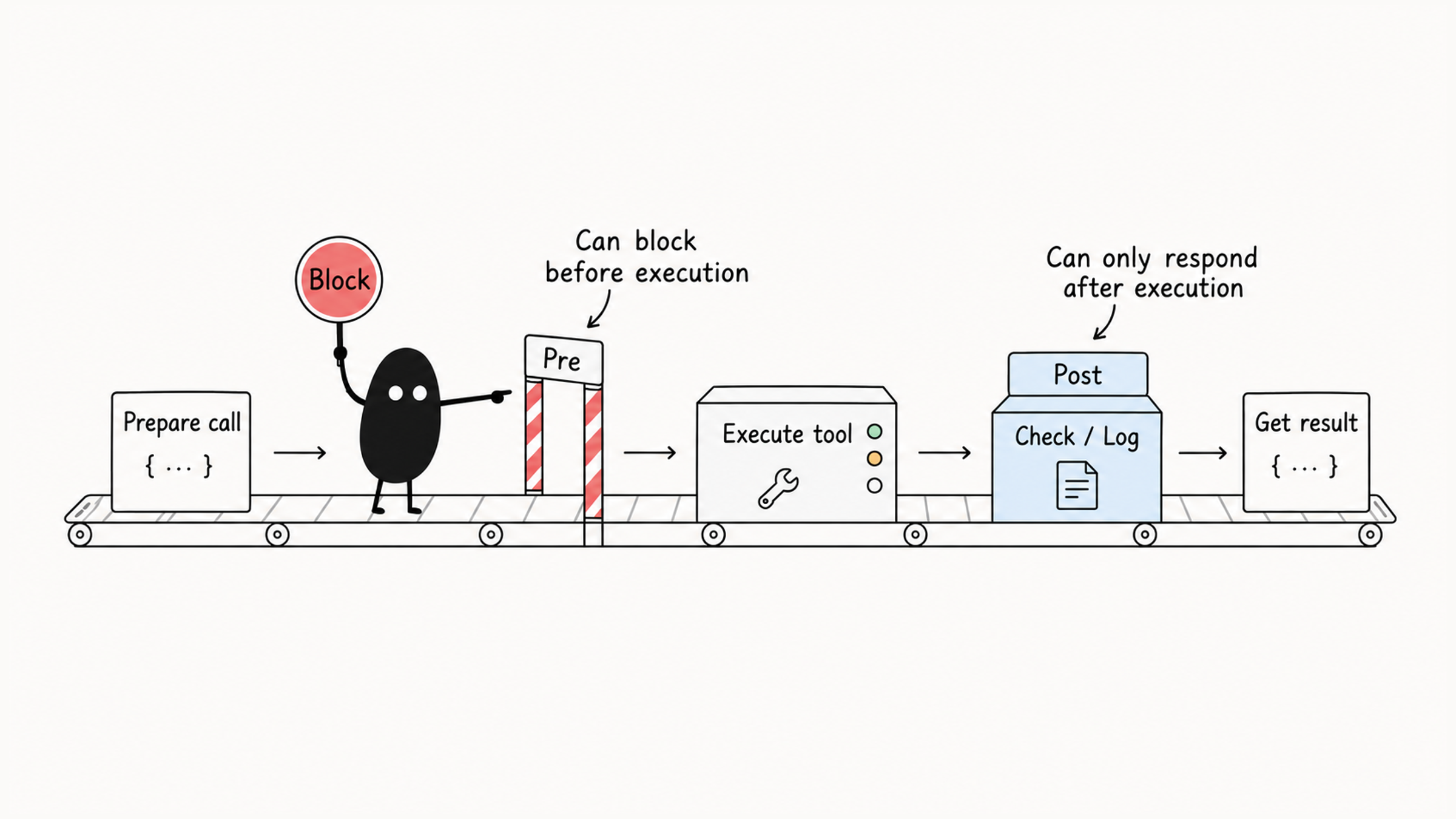
2 | Blocks or reports according to the event; PreToolUse can stop the call, PostToolUse can't undo a finished action |
| Any other non-zero | A non-blocking error; the action goes ahead and must not be read as a gate refusal |
The Claude Code hooks reference is explicit about the third case: a script that exits with any other code, fails to start, or prints JSON that can't be parsed is a non-blocking error, the action goes ahead, and you only see a "hook error" notice. A timed-out hook on PreToolUse doesn't block the call either.
So a policy hook with a wrong path or a missing dependency lets every call through. The docs offer a switch for this: set "onFailure": "block" on a command or http hook (Claude Code v2.1.295 or later), and the action is blocked when the hook fails or times out. For hooks that act as safety gates, it's worth considering.
When testing a hook script, cover four cases in turn:
- A normal pass (returns 0).
- A deliberate block (returns 2 per the spec).
- A missing dependency or syntax error (the script itself crashes).
- Malformed input.
Keep "the gate recognized the problem and refused" and "the check script errored" as separate outcomes in your logic.
02 Test the script first, then the attachment
Before attaching a hook to a real event, the most reliable check is to feed a few fake JSON payloads into the script's stdin and watch it emit a block signal when a rule matches.
Once the script logic is right, configure the real event in Claude Code and use a harmless test command to confirm it actually stops the tool call in the full chain. Splitting "the script logic works" from "the system attachment works" means you won't be staring at a pile of configuration when something goes wrong.
Decide what to return by working back from the purpose. If you only want an audit record, write a log. If you want Claude Code to act on a scan result, return JSON in the event's protocol. A script printing an explanation doesn't guarantee the model receives it the way you expect. Common output fields:
| Field | Purpose |
|---|---|
continue | Whether to continue |
stopReason | Reason for stopping |
suppressOutput | Whether to suppress output |
systemMessage | System message |
hookSpecificOutput | Event-specific output |
In PreToolUse, hookSpecificOutput can include permissionDecision, permissionDecisionReason, and updatedInput. In PostToolUse, it can include additionalContext and updatedToolOutput: the first hands scan results to Claude for follow-up, the second replaces the tool output and must match that tool's output shape.
03 A blocklist of risky commands only demonstrates the mechanism
Risky commands must be stopped before they run, so this uses PreToolUse with a Bash matcher. The script:
#!/usr/bin/env bash
set -euo pipefail

INPUT="$(cat)"
if ! COMMAND="$(printf '%s' "$INPUT" | jq -er '.tool_input.command | select(type == "string")')"; then
  echo "Cannot inspect command input; refusing this call." >&2
  exit 2
fi
LOG_DIR="${CLAUDE_PROJECT_DIR:-$PWD}/.claude/hooks"
if ! mkdir -p "$LOG_DIR"; then
  echo "Cannot create audit directory; refusing this call." >&2
  exit 2
fi
LOG_FILE="$LOG_DIR/audit.log"

log_decision() {
  printf '%s\t%s\n' "$(date -u +%Y-%m-%dT%H:%M:%SZ)" "$1" >> "$LOG_FILE"
}

DANGEROUS_PATTERNS=(
  "rm -rf /"
  "sudo rm"
  "mkfs."
  "format c:"
  ":(){ :|:& };:"
)

for pattern in "${DANGEROUS_PATTERNS[@]}"; do
  if printf '%s' "$COMMAND" | grep -Fiq -- "$pattern"; then
    log_decision "BLOCK:$pattern" || true
    echo "Blocked command matching a dangerous literal pattern." >&2
    exit 2
  fi
done

if ! log_decision "NO_MATCH"; then
  echo "Cannot record the check; refusing this call." >&2
  exit 2
fi
exit 0
One detail is worth noting: when the input can't be parsed or the log can't be written, the script refuses with exit code 2 instead of letting the error become a pass.
Run it on synthetic input and you'll see these risky commands caught and blocked with exit code 2. Try a few other spellings, though, and the limits appear: rm -rf $TARGET_DIR, a reordered rm -f -r /, or anything wrapped in eval, xargs, or another interpreter will slip past these patterns.
So this example shows how event triggering and exit-code blocking work together. A production security boundary needs restricted tool allowlists, system-level sandboxing, and low-privilege accounts layered together; a few lines of string matching can't hold that line.
The same goes for audit logs: record the key metadata of the blocking decision. Writing the full captured command to a text file without redaction can leave a plain-text database connection string or API key in your logs. The same applies when using PostToolUse to record Bash commands that actually ran; before the team enables it, settle redaction, access permissions, and retention.
04 Secret scanning: the file is already written
Security scanning goes on PostToolUse because it checks files that were just written or edited. Targets can include password = "...", "api_key": "...", secret = "...", private key fragments, tokens, and connection strings. When something suspicious turns up, report it to Claude Code with additionalContext:
#!/usr/bin/env python3
import json
from pathlib import Path
import re
import sys

try:
    data = json.load(sys.stdin)
    file_path = data.get("tool_input", {}).get("file_path")
    if not file_path or not Path(file_path).is_file():
        sys.exit(0)
    content = Path(file_path).read_text(encoding="utf-8")
except (ValueError, OSError, UnicodeError) as error:
    print(f"Security scan could not complete: {type(error).__name__}", file=sys.stderr)
    sys.exit(1)

pattern = re.compile(r"(?:password|api[_-]?key|secret|token)[\"']?\s*[:=]\s*[\"']", re.I)
lines = [str(number) for number, line in enumerate(content.splitlines(), 1)
         if pattern.search(line)]
if lines:
    message = ("Possible hardcoded credential assignment at lines " + ", ".join(lines[:20])
               + ". Inspect locally; do not repeat credential values in the response.")
    print(json.dumps({"hookSpecificOutput": {
        "hookEventName": "PostToolUse", "additionalContext": message
    }}))
When you get a line number, go back to the file and look: is it a real credential or a placeholder in an example? The regex only finds similar-looking text; it hasn't made that call. It also deliberately avoids returning the value, so follow-up messages can keep referring to the line number. Say line 14 is flagged:
PostToolUse returns additionalContext
  → Claude checks line 14
  → switches to an environment variable reference if needed
  → checks the actual file and notes any rotation needed for exposed credentials
If you only write a log, the current turn may carry on until someone reviews it by hand. Adding context hands the line number back to Claude right away. The order of events doesn't change, though: the file is already written, and after fixing it you still check the actual result. Keep running an independent scan before commits and releases, and if a credential really leaked, revoke or rotate it; editing the file doesn't make the credential safe again.
05 Checking request text gives you one layer of signal
UserPromptSubmit fires before Claude handles user input, which suits request-level checks, such as stopping obvious risky requests like "delete the database," "format the disk," or "disable security." A script might look like this:
#!/usr/bin/env bash
set -euo pipefail

INPUT="$(cat)"
PROMPT="$(printf '%s' "$INPUT" | jq -r '.prompt // ""')"

BLOCK_PATTERNS=(
  "delete.*database"
  "drop.*production"
  "rm -rf /"
  "format disk"
)

for pattern in "${BLOCK_PATTERNS[@]}"; do
  if printf '%s' "$PROMPT" | grep -Eiq -- "$pattern"; then
    echo "This request looks dangerous. Please clarify the target environment and safety plan." >&2
    exit 2
  fi
done

exit 0
Phrase the same request differently and the regex may miss it; ask "how do I avoid deleting the database?" and it may get blocked for sharing keywords. Request text gives you one layer of signal. Before enabling it, test both requests that should be blocked and ordinary discussion; when a tool actually runs, check its real arguments too, because text validation can't serve as the final boundary.
06 A Stop check must first decide whether it applies
Stop fires when the main reply ends, which suits checking whether the output meets requirements: were the necessary tests run, were verification results given, was anything the user asked for missed? Prompt hooks or agent hooks can do this.
Walk through a rule like "every reply must end with full test results." When changing backend payment logic, it does protect the quality bar. But if this turn only fixes a typo in the README, no tests are needed: Claude tries to finish, the hook blocks; Claude retries, still has no test results, and the hook blocks again. The task goes around in a loop.
The docs cap that loop: after Stop hooks have continued the same turn eight times in a row, Claude Code overrides the next block and ends the turn, and the count resets whenever Claude calls a tool. You can raise the cap with CLAUDE_CODE_STOP_HOOK_BLOCK_CAP. The cap only ends a loop; the check logic still has to make sense.
So a completion gate should first decide whether this task even calls for the standard. Even when business code changed and tests are needed, if the local database happens to be down or the network is unreachable, a hook that still demands "all tests pass" traps the session in a cycle of run, fail, block, retry.
That's where stop_hook_active helps: it's true when Claude is already continuing because of an earlier Stop hook. When you see a retry after a block, let the model report the facts, such as "I tried to run the tests, but the local port is in use and they can't start," and end the turn with the tests unfinished and the reason stated plainly.
For output, Stop supports blocking the end with exit code 0 plus decision: "block" and a specific reason, or adding guidance with additionalContext to keep the turn going. Choose output according to Stop's event protocol, check the loop state first, and use each event's feedback fields under its own protocol.
07 Debug in order: config, matching, script, output
When a hook misbehaves, check configuration loading, event matching, argument filtering, script execution, and output parsing in that order:
- Is the script path right, and does it have execute permission?
- Is
settings.jsonvalid JSON? - Is the event name spelled right, and does
matcherhit the right tool? - Is
ifat the right level? - Can the script read JSON from stdin, and does it write user-visible errors to stderr?
- Are the exit codes what you expect?
- Are local dependencies present, such as
jq,prettier,black,gofmt?
Start with a minimal debug hook:
#!/usr/bin/env bash
set -euo pipefail

mkdir -p "$HOME/.claude"
jq -c '{hook_event_name, tool_name, session_id}' >> "$HOME/.claude/hook-debug.log"
printf '\n---\n' >> "$HOME/.claude/hook-debug.log"
exit 0
Begin with the script itself: feed synthetic JSON into stdin, check the exit code and JSON output, and cover a normal call, a rule match, bad input, and a missing dependency. Pass risky commands as input strings during tests; never actually run them.
Once those results look right, attach the script to the target event and confirm it triggers with a harmless call. If synthetic input blocks but real calls don't react, keep the detection rules as they are and trace back through the event name, matching conditions, and config source. Confirm the binding with a harmless dedicated condition, then come back to test the business rules. Otherwise you may keep rewriting risky-command patterns when the real problem is a config that never loaded.
For choosing events and matching conditions, see picking the right hook event. When several hooks, commands, and rules on a team call formatting or check tools, building a Claude Code workflow from one small loop shows how to avoid writing each one separately.
Before a gate hook goes live, it's worth running a deliberate breakage test: remove a dependency, break a path, feed it bad JSON, and watch whether it stops the call or quietly lets it through.