
DeepDojo.AIPublished 2026-11-13Updated 2026-11-13中文
Which Event Should a Claude Code Hook Use?
After a while with Claude Code, you may want a safety net: when it's about to run something like rm -rf, stop it automatically. That's what hooks are for. A hook runs a check script you write at a specific moment in Claude Code's workflow.
Many people writing their first block attach the script to the event that fires after a tool finishes. However detailed the error log or red the warning, the files are already gone, and all the script can do is remind you to find a backup.
These are all "automatic checks," but the moment they run makes a huge difference:
- Right after code is written to disk, a hook can run the formatter or scan for hard-coded API keys.
- Just before a Bash command runs, a hook can inspect its arguments for destructive instructions.
- Right after the user submits a prompt, before Claude starts on it, a hook can run request-level checks.
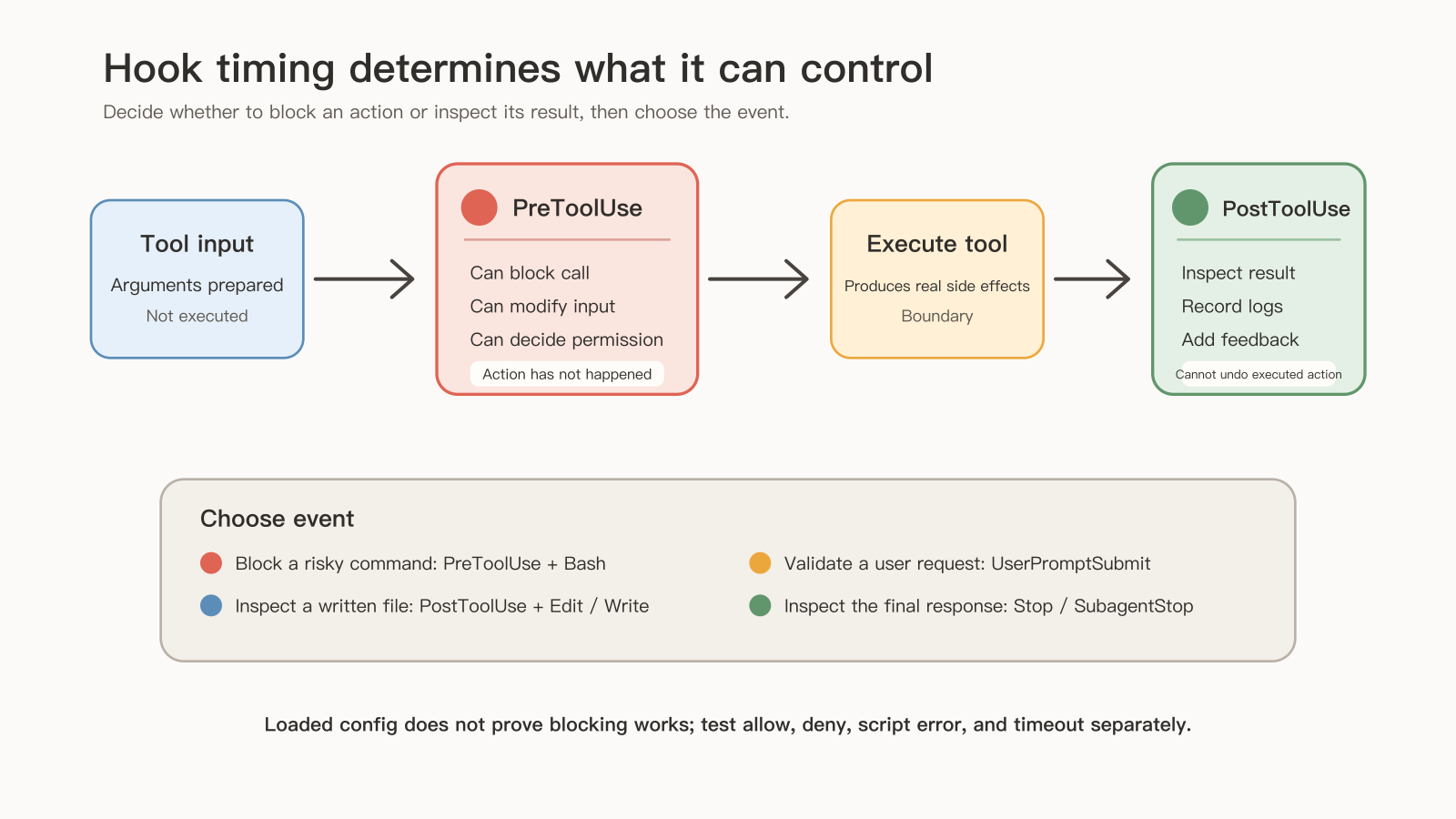
So the first step in writing a hook is deciding what the check should change. To stop an action that hasn't happened, pick an event that fires before it. To inspect a result that already exists, pick one that fires after. Once the timing is set, narrow the scope with matcher and if and choose the right handler type.
01 Ask what the check should change
Before choosing an event, ask what this check is meant to change:
Stop a command that hasn't run yet
  → PreToolUse matching Bash → inspect arguments → return a denial
Inspect the result after it ran
  → PostToolUse → report the problem, suggest a fix
Put the same risky-command rule on PostToolUse and the deletion has already happened. The Claude Code hooks reference puts it plainly: PostToolUse fires after a tool has already run successfully, so Claude can see what the hook returns, but the tool already ran. To block an action, choose an event before it; to inspect results, choose one after.
The main workflow is still organized by a skill, an agent, or a person. A hook only checks, logs, adds information, or blocks at the event you chose.
02 Find the event by what you're controlling
Claude Code has many hook events. Start by grouping them by what they control: tool actions are tool hooks (such as PreToolUse, PostToolUse, PermissionRequest); session wrap-up is session hooks (such as SessionStart, Stop, SubagentStop); user input is task events like UserPromptSubmit; and changes to config, directories, files, context compaction, and worktrees are lifecycle events.
The most common events:
| Event | When it fires | Common uses |
|---|---|---|
PreToolUse | After Claude builds tool arguments, before the tool runs | Block risky commands, modify tool input, permission policy |
PostToolUse | After a tool succeeds | Formatting, scanning, logging, adding feedback |
PostToolUseFailure | After a tool fails | Error logging, failure diagnosis, recovery suggestions |
UserPromptSubmit | After the user submits a prompt, before Claude handles it | Validate requests, add context, block risky requests |
Stop | When the main reply finishes | Completion checks, quality gates |
SubagentStop | When a subagent finishes | Check subagent output quality |
SessionStart | When a session starts | Initialize logs, load environment hints |
SessionEnd | When a session ends | Cleanup, stats, final logs |
Notification | When a notification appears | Permission prompts, idle reminders |
PermissionRequest | When a permission request appears | Automatically allow or deny specific requests |
Settle the timing before writing a hook: blocking uses a before-event, checking results uses an after-event, and summaries or wrap-up use Stop, SubagentStop, or SessionEnd.
SessionEnd fires only when the session ends, which suits wrap-up records such as which modules were touched, what problems came up, and what to continue next time. It can't stop the session from closing, so it handles logging and cleanup; mandatory quality gates belong at an earlier point you can still control. Stop fires at the end of every reply, which suits turn-level checks better.
03 Where configuration lives, and why the script must exist first
Hook scripts usually live in your user directory or the project. Configuration can go in three places: the project's .claude/settings.json, your local .claude/settings.local.json, and the user-level ~/.claude/settings.json.
The basic structure:
{
  "hooks": {
    "PreToolUse": [
      {
        "matcher": "Bash",
        "hooks": [
          {
            "type": "command",
            "command": "~/.claude/hooks/pre-tool-check.sh"
          }
        ]
      }
    ],
    "PostToolUse": [
      {
        "matcher": "Write|Edit",
        "hooks": [
          {
            "type": "command",
            "command": "~/.claude/hooks/format-code.sh"
          }
        ]
      }
    ]
  }
}
A script path in the config is only useful if the script exists. Save and review the script before loading the config, so there's something to run. Creating a directory alone changes nothing.
Next, ask whether two checks depend on each other. Formatting and scanning both sit on the same event and look ordered by the array, but the docs say that when an event fires, all matching hooks run in parallel. If the scan must read the formatted file, have one script call them in sequence, so the dependency is built into how they run.
04 matcher picks the tool; if looks at arguments
matcher matches a tool name or event value. Common forms:
matcher | Meaning |
|---|---|
Write | Only the Write tool |
Edit|Write | Edit or Write |
Bash | The Bash tool |
* | Every tool |
mcp__memory__.* | A group of tools on one MCP server |
Use matcher to pick the tool first, for example Edit|Write for either one, then use if to look at paths, arguments, or command content. if takes a single permission rule, written in permission-rule syntax. For example, to check only Write calls under src/ in the working directory:
{
  "hooks": {
    "PreToolUse": [
      {
        "matcher": "Edit|Write",
        "hooks": [
          {
            "type": "command",
            "command": "~/.claude/hooks/check-source-write.sh",
            "if": "Write(src/**)"
          }
        ]
      }
    ]
  }
}
Trace one call through this config and the two layers become clear. matcher selects Edit and Write, then if: "Write(src/**)" on the handler filters again, leaving only Write calls in that range. If you assume the matcher already covers Edit, you'll miss those edits. When you need them, add a second handler with if: "Edit(src/**)".
if sits at the same level as type and command. On older versions without this field, do the argument check inside the script. Scripts receive absolute file paths, so ^src/ won't match directly; resolve the path first, then check whether it's in the target directory.
Say 20 of 60 calls are Bash; matcher filters out the other tools first. To check only Git commits and pushes, give two handlers the if rules Bash(git commit *) and Bash(git push *). Each if holds one permission rule, and a comma doesn't mean "or." Other commands that can write to a remote still need permissions and account limits.
05 Choose among five handler types by what the check needs
Pick a handler by the kind of judgment required. Use command for local checks you can write as rules, and other types only when you need a service, semantic judgment, or investigation:
| Type | Good for |
|---|---|
command | Shell commands or scripts: local checks, formatting, logging |
http | Calling an HTTP service: notifications, external audits, remote policy |
prompt | Asking a model to judge from a prompt: natural-language quality checks |
mcp_tool | Calling an MCP tool: external tools and data sources |
agent | Calling an agent: complex judgment or specialist review |
Take commit message checks:
| Standard | How to handle it |
|---|---|
| First-line length, type prefix, blank line | A command script |
| Whether it explains the reason for the change | A prompt judgment, watching cost and edge cases |
| Both | One flow that checks format first, then meaning |
Command hooks are the most common:
{
  "type": "command",
  "command": "python3 ~/.claude/hooks/security-scan.py",
  "timeout": 30
}
timeout limits run time. A hook runs on every matching action, so keep the logic short to reduce waiting on tool calls. Prompt hooks often go on Stop or SubagentStop to ask "is this task done?" or "does the output meet the requirements?" Agent hooks suit heavier reviews, such as having a security agent check a subagent's output.
06 Scripts read event data from stdin
Claude Code passes event information to a hook as JSON. Fields vary by event; common ones include:
| Field | Meaning |
|---|---|
session_id | Session ID |
transcript_path | Path to the session transcript |
cwd | Current working directory |
permission_mode | Current permission mode |
hook_event_name | Name of the triggering event |
tool_name | Tool name |
tool_input | Tool input arguments |
tool_use_id | Tool call ID |
Before writing a real parser, choose the event you want and learn which fields it provides. Tool calls include tool_input; ordinary session lifecycle events don't. Validate the parsing with synthetic JSON that holds nothing sensitive, then confirm the required fields with a real event.
Scripts usually read JSON from stdin:
#!/usr/bin/env bash
set -euo pipefail

INPUT="$(cat)"
EVENT="$(printf '%s' "$INPUT" | jq -r '.hook_event_name // ""')"
TOOL_NAME="$(printf '%s' "$INPUT" | jq -r '.tool_name // ""')"

echo "event=$EVENT tool=$TOOL_NAME" >> "$HOME/.claude/hook-debug.log"
Without jq, Python's json.load(sys.stdin) works too.
07 Formatting after writes: a PostToolUse example
Auto-formatting needs to read the file after it's written, so it goes on PostToolUse with the matcher Write|Edit. The script picks a tool by file extension:
#!/usr/bin/env bash
set -euo pipefail

INPUT="$(cat)"
FILE_PATH="$(printf '%s' "$INPUT" | jq -r '.tool_input.file_path // ""')"

if [ -z "$FILE_PATH" ] || [ ! -f "$FILE_PATH" ]; then
  exit 0
fi

case "$FILE_PATH" in
  *.js|*.jsx|*.ts|*.tsx|*.json|*.css|*.md)
    if command -v prettier >/dev/null 2>&1; then
      prettier --write "$FILE_PATH" >/dev/null || { echo "Formatter failed; inspect the file." >&2; exit 1; }
    fi
    ;;
  *.py)
    if command -v black >/dev/null 2>&1; then
      black "$FILE_PATH" >/dev/null || { echo "Formatter failed; inspect the file." >&2; exit 1; }
    fi
    ;;
  *.go)
    if command -v gofmt >/dev/null 2>&1; then
      gofmt -w "$FILE_PATH" >/dev/null || { echo "Formatter failed; inspect the file." >&2; exit 1; }
    fi
    ;;
esac

exit 0
Notice one choice in this script: when a formatter is missing, it skips silently, and it only reports an error when the tool runs and fails. So "the hook didn't complain" may only mean that machine doesn't have the tool. If the project requires formatting to pass, run a deterministic check again at commit or in CI; a skip here only means nothing was checked.
Paired hooks can also produce turn-level stats, such as recording the session text length at UserPromptSubmit and again at Stop to spot unusually long turns. Treat that as a debugging lead only: to see how much context remains, use /context; a text delta can't be converted into tokens, cost, or remaining space.
08 Component hooks, MCP matching, and pre-launch checks
Beyond global settings, components like skills and subagents can declare their own hooks, for example a security-sensitive skill that runs a check script before Bash. Component hooks have a narrower scope and affect only that component, which suits local quality gates. For subagents, a Stop hook written in the frontmatter becomes SubagentStop at runtime and fires only when that subagent finishes.
MCP tools can be matched with matcher too, usually as mcp__<server>__<tool>; mcp__memory__.* matches a group of tools on the memory server. MCP tool hooks can log external calls, restrict sensitive tools, or add auditing. Tighten permission boundaries first: external systems may reach databases, ticketing, file services, or deployment platforms, so one mistake reaches further.
Before sharing with the team, check these arrangements:
| Area | Practice |
|---|---|
| Scope and run time | One hook does one kind of short check, with a timeout |
| Blocking and side effects | Clear rules; test that normal tasks aren't caught |
| Credentials and logs | No hard-coded keys; redact before logging |
| Rollout | Verify locally, then add to project config; document what it blocks, logs, and changes |
Before sharing, count how many checks an ordinary edit triggers and how long each takes. Every call waits for a pre-tool hook to finish, and in practice keeping each run to around half a second keeps developers from losing their train of thought.
Use short command scripts for rules you can write down. Reach for prompt or agent hooks only when you truly need semantic judgment, and accept the cost and uncertainty that come with it. Long workflows still belong to skills or subagents, so a single tool call doesn't set off a whole review.
Even with the right timing and matching, a gate can still fail: the script crashes and the call goes through anyway, a string blocklist gets bypassed with different wording, or a Stop check loops. Those problems and how to test for them are covered in three reasons a Claude Code hook fails to block. allowed-tools in a slash command only skips approval; actually stopping an action beforehand takes a hook or a permission rule, as explained in why a "read-only" Claude Code command still edits.
Choosing an event comes down to three steps: decide what the check should change, then whether it runs before or after the action, and only then the matcher, if, and handler type.