
DeepDojo.AIPublished 2026-11-08Updated 2026-11-10中文
AI Drafts Usually Go Wrong at the Earliest Step
"Turn these meeting notes into a to-do list" will get you a list. Once you have it, you still have to ask: does each item come from the notes? Are the owners and dates confirmed?
Did a suggestion get written up as a decision? Answering those takes the actual notes. A three-line set of meeting notes is enough to walk through all seven steps from goal to saved result, and to see where a draft drifts and how to correct it.
Picture meeting notes that run only three lines:
- one action already assigned
- one to-do with incomplete information
- one suggestion to discuss under certain conditions
If all three get written up as "confirmed tasks," the meaning of the meeting has changed. So once the list comes back, go to the original notes and check whether each item has support, whether the owner and date were confirmed, and whether a suggestion was written up as a decision.
The whole process breaks into seven steps: goal, background, material, task, check, revision, and saving. Whichever step drifted can be found and fixed, and what worked can be kept and reused next time.
01 From an answer to a usable result
A prompt states the current request, and a workflow connects the whole path from need to usable result. Writing a good request is only the first part. You also have to plan how to check and revise the result.
The workflow has seven steps:
1. Clarify the goal.
2. Add background.
3. Provide materials.
4. State a concrete task.
5. Review the AI's output.
6. Follow up and revise.
7. Save or reuse the result.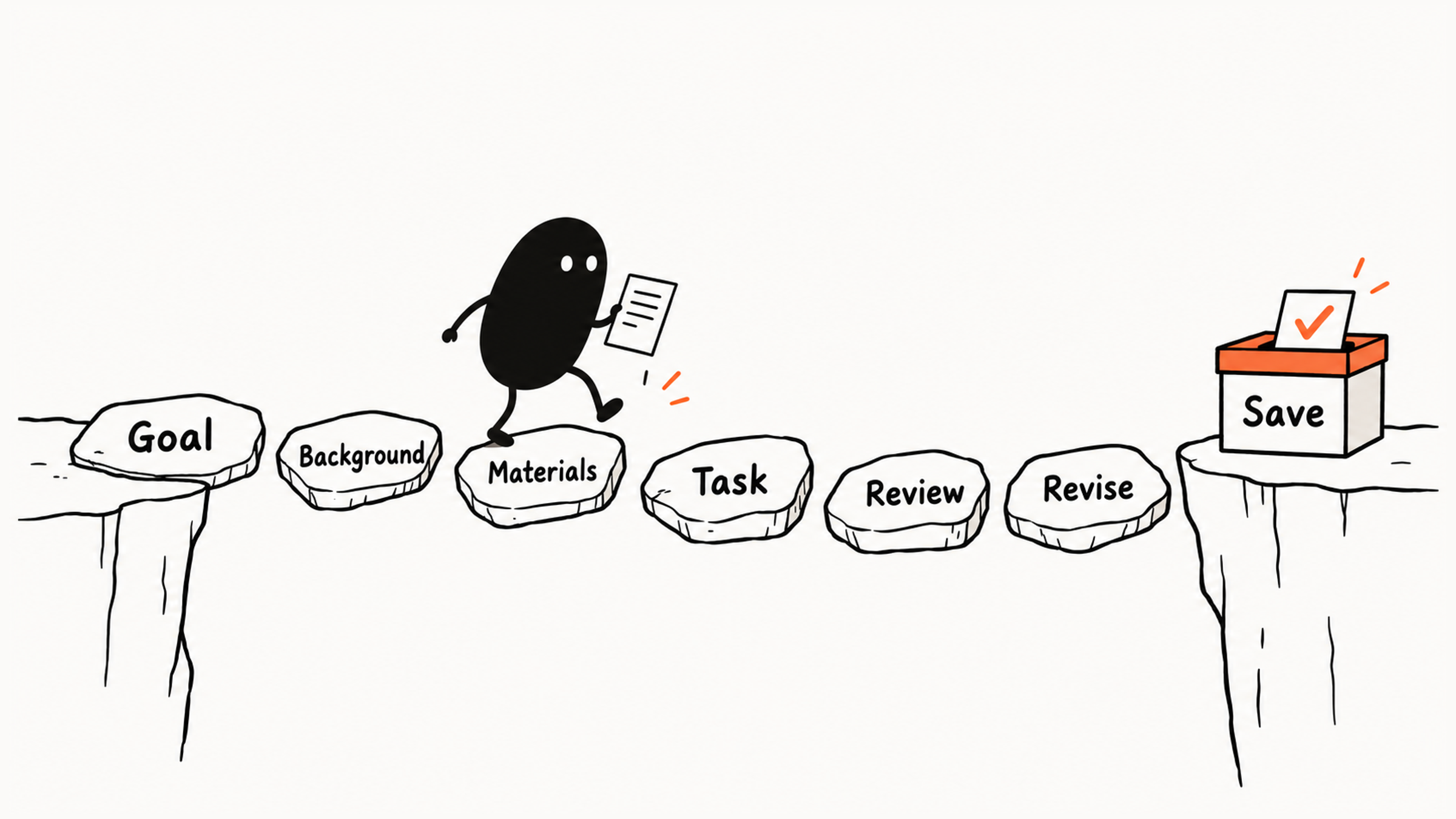
The first four steps make the task and the materials clear. Once the answer arrives, check it against the materials, follow up on any problems, and save a result you can use. The information for all seven steps can go in one message. For how to make the request itself clearer, see Vague AI Answers Usually Start With a Vague Request.
One example runs through all seven steps: a new operations employee turns event review notes into an action list for the event team to confirm. The employee is a case character, and the notes and outputs are teaching examples. To try it on your own task, find a short record, remove the sensitive details, and follow the same seven steps.
02 Clarify the goal and background first
The goal answers:
What do I ultimately want to obtain?"Organize meeting notes" could produce a summary, a decision table, or an action list, and the results differ. Here the team needs to confirm who does what next, so the result should show actions, owners, dates, and unresolved details.
The basic standard: each item has support in the notes, unresolved points stay unresolved, and the structure lets the team confirm items one by one.
That purpose tells you what to check. "The poster headline needs revising" belongs on the action list. "Perhaps we could try a livestream next time" is a suggestion nobody has approved yet.
The background answers:
What does Claude need to know to produce a result that fits my situation?"For the event team to confirm" establishes the reader and the stage, and the team decides who does what. The materials supply facts, and the background explains how those facts will be used.
03 Provide the materials and state the task
Suppose the meeting notes say:
Monday's event review:
Xiaolin will organize the registration-channel data and send it to the team before Thursday.
The poster headline needs revising, but no owner or deadline was agreed.
Xiaozhou suggested trying a livestream next time. The team decided to discuss it after the budget is confirmed.
There is an assigned action, an action with missing details, and a suggestion to revisit under a condition. If all three get written up as confirmed assignments, the meeting's meaning has changed.
You can paste the material or upload it as a file. Pick only the records this task needs, confirm they may be used for the task, and remove unnecessary sensitive details.
After uploading, any passage, layout element, or chart may be read wrongly, so check key conclusions against the readable original.
If you attach a file and say only:
Take a look at this.Claude has to guess which processing you want. For this example, a clearer request is:
Read these meeting notes and turn them into an action list.
Use a table with item, owner, deadline, and notes.
If the source does not specify an owner or date, mark it "not specified."
The source determines what can be extracted, the task determines which information to pick, and the format makes matching fields easy to compare. With all three clear, you have a basis for checking the output.
When supplying the record as a file, check the supported formats in Claude’s official upload guide, then attach it to the conversation.
04 Compare the draft with the source, then follow up
Suppose Claude turns the notes into this draft excerpt:
| Item | Owner | Deadline | Notes |
|---|---|---|---|
| Organize registration-channel data | Xiaolin | Before Thursday | Send to the team |
| Revise the poster headline | Xiaolin | Before Thursday | Coordinate with data organization |
| Run the next livestream | Xiaozhou | Next week | Improve campaign results |
The first row has support and can stay. In the second row, the owner and deadline copy the row above, but the notes never say who handles the poster or when. The third row turns "discuss after the budget is confirmed" into a decision to act, and adds a date and a goal the notes don't contain.
When you compare a draft with the source, check the facts and the status of each item first, then the tone and wording. Five questions help you go through it item by item:
| Review area | What to examine | Judgment in this example |
|---|---|---|
| Goal | Does it support the next action? | The list should help the team confirm responsibilities |
| Background | Are the role, reader, and stage correct? | The person organizing notes cannot approve a livestream for the team |
| Materials | Are facts missing, altered, or invented? | Poster details are missing, and the livestream is still conditional |
| Format | Is it practical to use? | The four-column table works and can stay |
| Factual risk | Which claims need checking? | Added names, dates, and commitments must be traced back |
Run your own draft through the same comparison, and the first place it disagrees with the source is where you start revising. You can ask Claude to mark which items come from the material and which are inferences. That makes checking easier, but the marking needs checking too. For a different way to review a draft, using two yardsticks, see Starting with AI: How to Review a First Draft.
For this draft, one focused follow-up could be:
Keep the first row and the four-column table.
Mark both the owner and deadline for revising the poster headline as "not specified."
The livestream is not an approved action. Put it in the notes, preserving the condition "discuss after the budget is confirmed." Do not add a date or expected effect.
This follow-up preserves the supported content and says how to correct each error. The revised list could look like this:
| Item | Owner | Deadline | Notes |
|---|---|---|---|
| Organize registration-channel data | Xiaolin | Before Thursday | Send to the team |
| Revise the poster headline | Not specified | Not specified | Ask the team to confirm the owner and deadline |
Record the livestream separately as "Suggestion: try a livestream next time, to be discussed after the budget is confirmed," and keep it apart from the confirmed actions.
After revising, check once more: were the added facts removed, and did the original conditions survive? Once the facts are right, work on wording and format.
The need to return to the source is also explained in Claude’s guidance on incorrect or misleading responses: convincing wording can still lack a factual basis.
05 Save the result and keep the method
When the revised list serves the goal, save it as a list awaiting confirmation and hand it to the team to confirm item by item. Unresolved items stay open until the team decides.
When you save, keep this round's facts apart from the general method. The owners and dates stay with this round's record. "Mark missing details as not specified, write items as actions, use a four-column table" can become reusable rules. For example:
Turn the following meeting notes into an action list.
Background:
The list will go to the team for confirmation.
Requirements:
1. Use a table.
2. Include item, owner, deadline, and notes.
3. Do not add information absent from the source.
4. Mark unclear details as "not specified."
5. Write each item as an action someone can carry out.
Meeting notes:
...
Replace the ellipsis with new notes each time. This template fits an action list awaiting confirmation. If next time you need a management summary, change the goal and the format. When you reuse a request, keep only the source material the purpose needs and handle sensitive details as required.
06 When the result is wrong, find the first deviation
Find where the work first went off track: did the source supply the evidence, did the request state the task, or did the output fail to follow it?
Record which step went wrong. In this example the source already contains the conditions, so extraction and output review need fixing first. If the source never gave a date, add the material or leave the unknown as unknown.
After you finish a round, keep a few notes: the request and materials you used, the sentences in the draft that were wrong, what you checked them against, and how the follow-up and revision turned out. Following them back to the first deviation tells you which step to change next time. How closely to check depends on what an error would cost, as covered in Can You Trust an AI Answer? Check by Risk.
Keep untried workflows separate from what you actually did. "Adding the reader's requirements next time might be better" is only an idea. It becomes something you can rely on once you've tried it and compared the results.
When the result meets the original goal, the facts have had the checks they need, the remaining unknowns are clear, and the conditions for reuse are stated, this small task is done.