
DeepDojo.AIPublished 2026-11-08Updated 2026-11-09中文
Picking the Right AI Feature for Each Kind of Task
Say you're maintaining a beginner's handbook for Claude that your team will use for a long time. This time you need the handbook outline and the latest feature descriptions, and you want to write a chapter you can keep editing.
Chat, files, Projects, web search, Research, and Artifacts could all play a part. Which ones to use, and whether to combine them, depends on the task. The five questions below separate how the material is organized from how the result is presented, and the sections after them say when each feature fits.
These features each have a job:
- Chat carries this round of conversation
- File supplies the material at hand
- Project suits long-running work whose background gets reused
- Web Search fills in current information
- Research handles investigations that need repeated lookups and synthesis
- Artifact gives the result its own space for continued editing
Five questions help you choose: whether the task is one-off or ongoing, where the material is, whether you need current information, how deep it has to go, and what the result will be used for.
Back to the handbook, add two more tasks to compare, and the combination is clear. A feature you can't give a job to stays off.
01 Five questions pick the work mode
Start with these five checks:
| Dimension | Question to answer now | Choice it affects |
|---|---|---|
| Duration | Is this a one-off task or an ongoing topic? | A standalone Chat or a Chat within a Project |
| Materials | What sources are available, and will they be reused? | Supply Files and, where useful, add them to project knowledge |
| Recency | Can existing material answer the current factual question? | Whether to use Web Search |
| Depth | Will a targeted lookup suffice, or must several sources be synthesized? | Search or Research |
| Output use | Will you read it once, keep editing it, or deliver a specific format? | A normal reply, Artifact, or file creation |
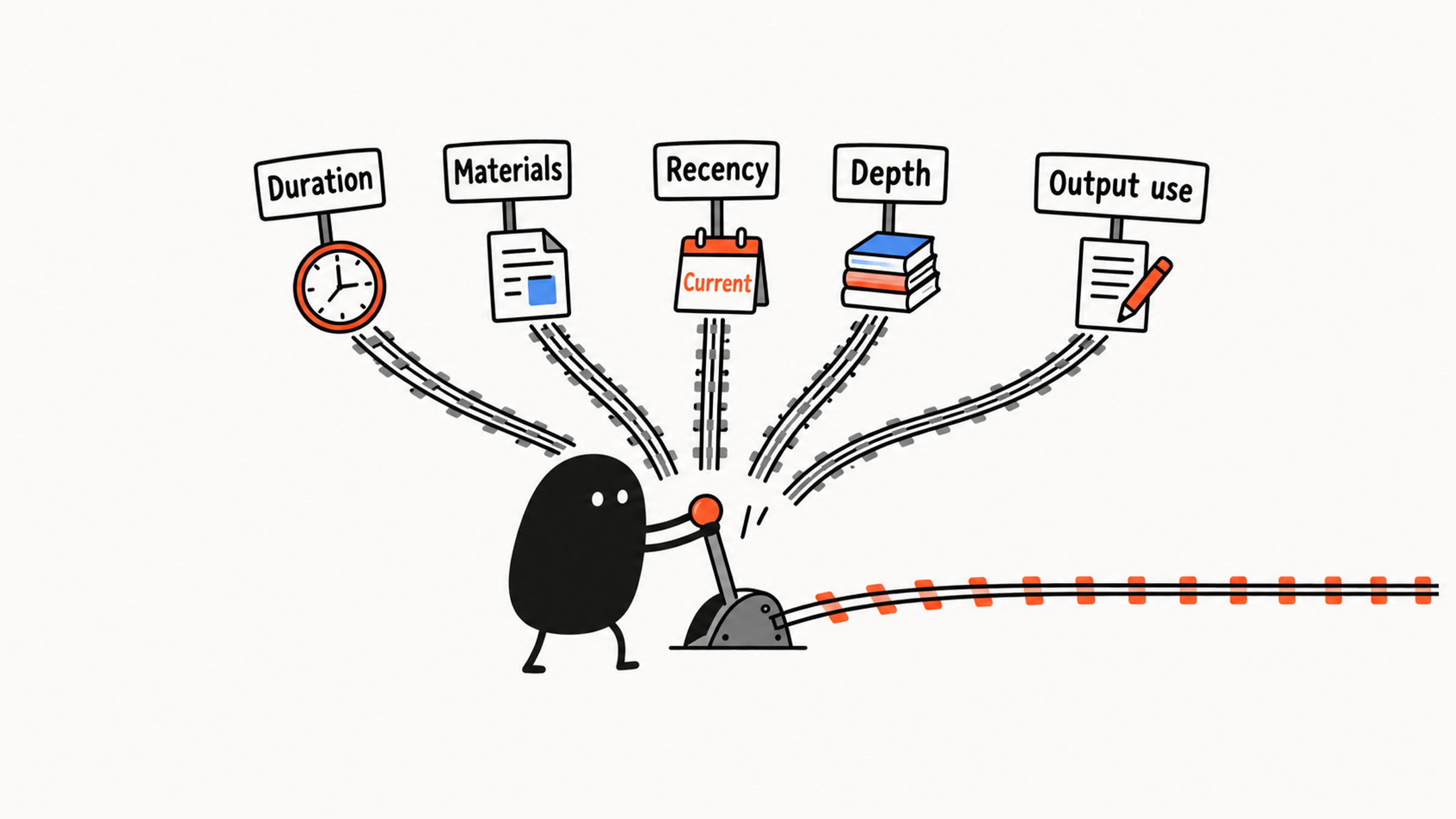
One task can combine Project, File, search, and Artifact. As you choose, ask what each capability would add. A simple note might need only a Chat, while maintaining a handbook over time may call for project materials and search. For what each of these terms means, see Prompt, Context, Project: What AI Terms Really Mean.
The sections below follow the order "where to work, what to base it on, how to deliver," using Claude as the demonstration. With another AI tool, also start from what the task needs, then check which features your account offers and how to turn them on.
02 Chat and File: start with the material at hand
Chat carries the current conversation, and File supplies the evidence to work from. For a paragraph of handbook introduction, if the text is short, paste it into a Chat and state the rewrite you want. If you need to check it against a longer outline, attach a file.
After uploading a file, make sure the content you need is readable, then say whether you want it summarized, extracted, or rewritten.
Many files can still go through a Chat. Comparing three articles at once, for example, works fine with a Chat that has files attached. Name the shared question and the relevant materials first, which is easier to check than piling every source in at once.
03 Project: organize ongoing work
Whether to use a Project mostly depends on how many times you'll reuse the background and who maintains the materials. When you maintain a handbook over time, its positioning, its readers' starting point, the outline, and the style come up again and again. Scattered across separate conversations, they have to be supplied and checked each time.
A Project holds two kinds of content, and they're worth keeping apart. Project materials supply facts, such as the handbook outline and chapters you've confirmed, while project instructions set shared ways of working, such as writing for complete beginners and which style to use. The current request then says which chapter to write today.
Name materials and versions clearly, say which one you want consulted when you ask, and remove expired rules promptly. Any one answer may use only part of what's in the project. Key evidence should be easy to locate, and the output should be checked.
Compare two workable approaches:
- If you're only revising one chapter today and the positioning and outline are already in one file, attach the file to a Chat and state the task.
- If you'll revise a different chapter every week, supplying the same background again and again adds checking work, so a Project is worth considering. Someone still has to replace old versions of the materials promptly.
Keeping materials in one place makes later use easier, but if old materials aren't updated, the project steers you wrong.
04 Web Search: use it when you need current information
A file can supply facts, and it can also be out of date. When a request involves "current price," "whether it has launched," or "recent policy," ask first: is the material I have enough to support an answer for that point in time? If current evidence is missing, use Web Search to fill it in.
Web Search retrieves current information from the web. For example:
Use Web Search to check Claude's current file upload limits.Check your account and organization settings for whether search is available and where to turn it on. According to Claude's Help Center, Team and Enterprise accounts need an organization owner to enable it in settings first. In other accounts you can switch it on from the "+" button in a chat. Newer versions of the interface have no toggle at all, and Claude searches when it helps. Wherever the switch is, send the request and then look at the actual search activity and sources to confirm it really searched.
Check the answer against the date, the relevant feature, and the conditions in current official guidance. A chat-upload limit and a project-file limit may differ. Once you find a number, confirm that it answers the question you're asking.
For ordinary concept explanations, rewrites, and summaries of material you already have, the existing material is usually enough. Add search when the task requires checking whether material is out of date. To check the sources a search turns up, see Can You Trust an AI Answer? Check by Risk.
05 Research: synthesize several questions
Research is for investigations that need repeated searching, comparing, and synthesizing. Anthropic's Help Center describes it as running several searches that build on each other, deciding what to look into next from what turns up, and working through open questions from different angles. Before choosing it, decide which sub-questions must be solved together.
Before you use it, confirm whether your account can use Research, along with its web-access conditions and usage requirements. That help page says Research is for paid plans and needs web search turned on. If you don't have the option, split the work into several targeted searches, check each one, and synthesize afterward. Record it honestly as "targeted searches." Multi-source, multi-step work takes longer and uses up your allowance faster.
For example:
Compare the roles and features of Claude, ChatGPT, and Gemini for beginner learning, and organize the findings as a selection reference for the handbook.This calls for defining beginner scenarios first, examining each tool along the same dimensions, separating what's currently supported from what's limited, and explaining the trade-offs behind a choice. How deep the research goes depends on what the question needs, not on how long the report is.
| Situation | Suitable approach | Reason |
|---|---|---|
| Verify one current file limit | Web Search | A targeted source can answer it directly |
| Summarize an article you supplied | File + Chat | The required evidence is already in the source |
| Compare several tools for a particular audience | Research | Shared dimensions, multiple sources, and synthesis are needed |
| Format a report whose content is confirmed | Output editing or file creation | The gap is delivery format |
Research that draws on many sources can still misread or miss something. Look at the evidence behind a conclusion, the source dates, and the points of uncertainty before you decide what to use.
06 How to deliver the result
Ask first what you'll do with the result. If the introduction is one short paragraph you can copy and use, a normal reply is enough. If you'll keep revising a whole chapter, an Artifact's separate area makes it easier to see the full chapter and then revise specific paragraphs.
After revising, check again that the facts and conditions survived. A separate window only makes editing easier. Before relying on it, confirm that the feature is available on your account.
File creation handles downloads and delivery in a specified format. To open something in Word, Excel, or PowerPoint, or to deliver a PDF, say which file you want and check the real contents after you download it. An Artifact may also support export. In choosing, look at whether you now need to keep editing or to get a file in a specific format.
In this example, you could confirm the chapter's content first, then create the file to the delivery requirements. Open it after you download it and check the text, the tables, and the formatting. The work is done when the content passes and the file works.
07 Three tasks, three combinations
Back to the handbook, plus two more tasks. The choices can be explained like this:
| Task | Decisive features | Choice and reason |
|---|---|---|
| Write a chapter of the beginner Claude handbook | Ongoing topic, an outline, current feature facts, continued editing | Project organizes background, File supplies material, search verifies recency, and Artifact holds the chapter |
| Check upload limits | One-off question requiring current official conditions | Use Web Search within a Chat for a targeted check |
| Produce a feature research report | Several questions and sources requiring synthesis | Research finds and compares information; after confirmation, edit or create a file for its intended use |
When a combination doesn't fit, first name which role is missing. If you keep restating background, consider whether a Project is worth setting up. If project contents conflict, sort out the versions first. For a pure rewrite where you already have enough material, just use what you have.
When you compare two workable plans, weigh maintenance cost, continuity of background, waiting time, usage, and the final purpose. If you're only revising one chapter this week, a Chat with a file attached may be simpler. If you'll revise a different chapter every week, maintaining a Project may gradually cut down repeated work.
You can decide your own task the same way: answer the five questions in one sentence each, pick a work mode, and say which gap each feature fills. A feature whose purpose you can't state can go.