
DeepDojo.AIPublished 2026-11-17中文
Codex App, IDE, CLI, or Cloud: Which to Use?
You're halfway through editing a login page on your machine, nothing staged yet, and you want OpenAI's Codex to take a look. So you start a Cloud task in the browser. It reads the code carefully, but its analysis doesn't match the files in front of you. It was working from the remote branch. Your local edits never made the trip.
The problem was the entry point. You can use Codex through the App, the IDE extension, the CLI, or Cloud. Every one of them looks like "talking to Codex," yet they read different code, allow different actions, and run commands in different places. The name on the screen tells you nothing about which copy of your code it can see.
So pick the entry point by what the task needs:
- Where the code lives: your local working copy or a remote repository.
- Which files it must read and change, and which commands it must run.
- How you'll check the result when it's done.
Answer those three, then choose. And remember one rule: the more an entry point can do, the more specific your task description needs to be.
01 Entry Points and Execution Environments Are Separate
The App, the IDE extension, and the CLI are entry points, the places you work from. Cloud is a remote execution environment. The two overlap: the same app can start a local task or a cloud task.
Before choosing, confirm these:
Just asking a question: limit it to answers or analysis.
Reading the project: make sure the right folder is open or the repo is connected.
Changing code: confirm the write scope and how you'll view the diff.
Working remotely: confirm the Cloud environment and how results come back.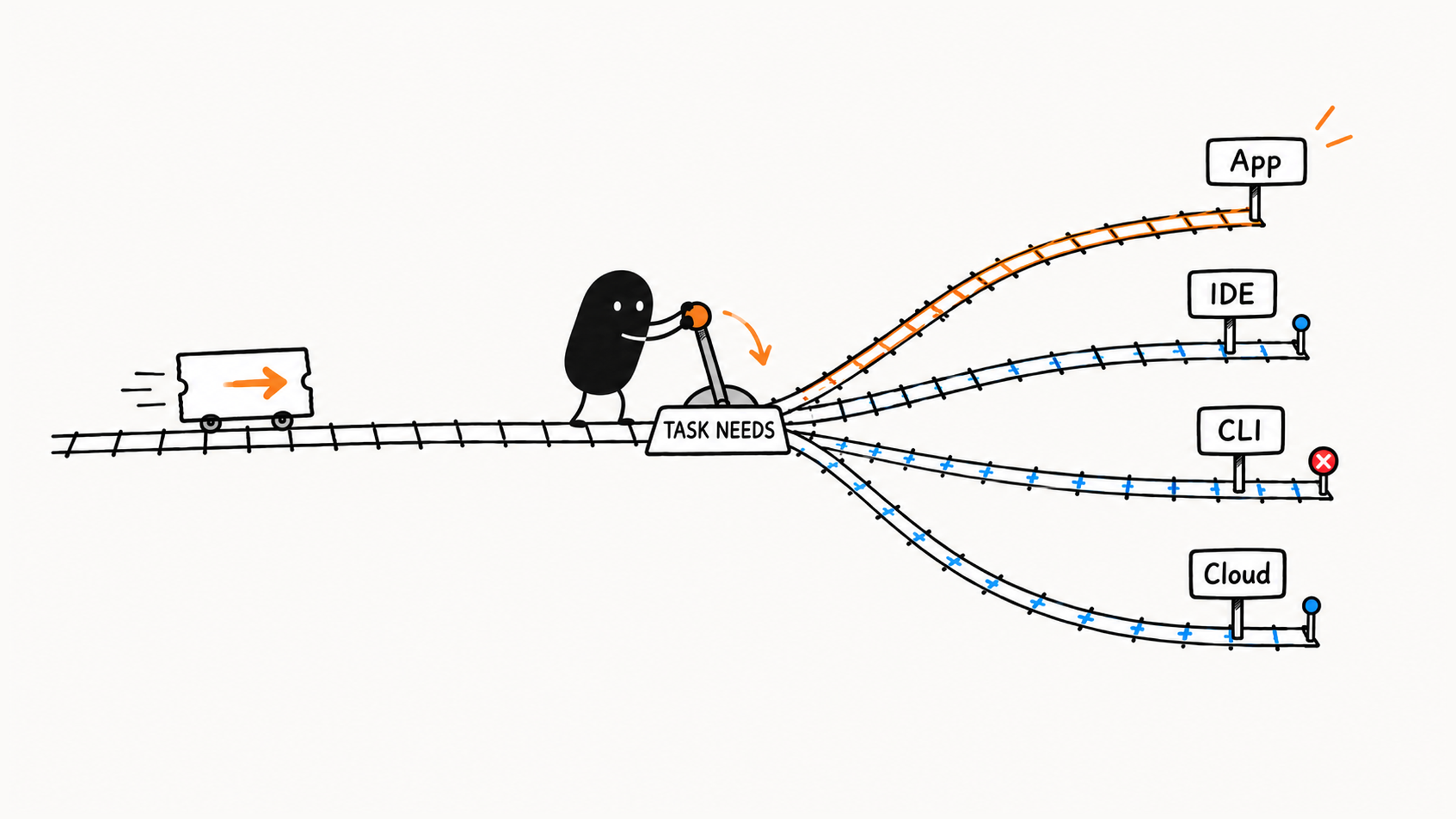
First confirm which project is open, where the task runs, and which actions are allowed. Then you can judge what it can see and do.
The official docs spell out the opening scenario: a cloud task uses only the files and services in its cloud environment. Your computer's local files, running processes, and browser sign-ins aren't carried over. A local IDE task can read your unstaged edits in the current workspace. When you need to review a PR that's already been pushed, asynchronously, a remote task is often more convenient. Check the state of your code and how you want results delivered, then choose.
02 What Each Entry Point Is Good For
1. App: a graphical interface
The App is the Codex entry point in the desktop app. In current desktop versions, Codex and ChatGPT live in the same app, and you pick Codex when you open it; exact names and menus depend on your installed version. Once you choose a project folder and grant access, it can read files, edit code, and run commands.
Use the App when you want to pick a project, watch progress, and review changes in a visual interface. For example, open a practice project, have Codex find the login button, then review the copy change it proposes. For a tour of what each part of the interface does, see the Codex App beginner guide.
If you only want to discuss a plan, stay in the App and say "analysis only." A simple-looking interface can still have write tools, so confirm permissions in the current project, tools, and settings.
To work against real code, open the project or provide the relevant files first. Keep plain web chat and a cloud task connected to a repository apart in your head too: both run in a browser window, yet what they read and where they run can differ.
2. IDE: working inside your editor
The IDE entry point fits when you're already writing code and want Codex to handle a small task in the current project. In the IDE extension, Codex can read files, run commands, and change the project, and you can check the code and diff in the same editor at any time.
It suits small component edits, explaining how files relate, adding tests, fixing local bugs, and reviewing changes you just made. It acts directly on your workspace, so state the allowed scope before the task and check the diff and results after.
If you already work in an editor, make your first small change from the IDE. Pick a small, clear task and open the files to check as you go.
3. CLI: working in the terminal
The CLI fits when you work in a terminal and want Codex to finish a well-defined engineering task around the current directory. Use it to search files, analyze failing tests, run tests and checks like lint and typecheck, make clear small edits, or handle tool and script work. These actions apply directly to the current directory.
With the CLI, check the current directory first: which project will the commands hit? Then look at what it plans to run and which files or environments that will change. Terminal actions can take effect immediately. When you don't understand a command, ask it to explain what the command does and affects before you allow it.
Beginners can use the CLI too, as long as they're willing to read commands and check output. Sort out the directory, permissions, and rollback before allowing commands.
4. Cloud: remote collaboration
Cloud suits remote repositories, async tasks, PRs, team collaboration, and long-running work. Connect a repository and prepare a remote environment, then start the task and follow its progress. Codex edits and verifies in a remote working copy and hands back a diff or a PR.
A PR (pull request) asks others to review and merge your changes. When Codex hands one back, the code hasn't been merged into the main branch or deployed yet.
It fits GitHub issues, PRs, and well-defined remote repository tasks, and makes it easy for a team to delegate asynchronously or run independent tasks in parallel. Remote tasks need a configured environment, the right repository, and a clear statement of what's allowed and who checks the result. Beginners do better learning small tasks and local review before moving to Cloud.
Think ahead about one more thing: the code is readable remotely, but are the services your tests need there too? If your tests depend on a service you start locally, the remote side needs an approved test service and config as well. When those aren't ready, keep what it has found, report that the checks were blocked, and supply credentials only within the scope you've approved.
Be clear about what comes back, too. A diff is for you to review changes; a PR is for the team. Whether to merge and whether to deploy each need their own approval. Moving a task to the cloud only changes where it runs. Someone still makes those calls.
03 The Four Entry Points Side by Side
Compared on five dimensions: reading the project, changing files, running commands, remote collaboration, and reviewing results:
| Dimension | Local task in the App | Local task in the IDE | Local task in the CLI | Cloud task |
|---|---|---|---|---|
| Reads | The selected project folder | The open workspace | The current or specified directory | A remote working copy of the connected repo |
| Changes files | As permissions allow | As permissions allow | As permissions allow | In the working copy, as the remote task allows |
| Runs commands | As permissions allow | As permissions allow | Fits a terminal workflow directly | In the configured remote environment |
| Remote collaboration | Deliver through the repo; may offer cloud delegation | Deliver through the repo; may delegate cloud tasks | Deliver through Git and similar tools | Built for async delegation and repo review |
| Reviewing results | Task diff and run log | Code, diff, and output | Command output and diff | Task output, diff, or PR |
The table reflects typical local and cloud tasks. Exact features depend on your version, account, and configuration.
Say you're fixing the layout of a local login button. You need to read the page and styles, change the relevant files, and check the result. If you know your IDE, review there; if you prefer the CLI, pair it with an editor for review. Choose by whether you can get the material you need and check the result easily.
You can also work backward from the task:
| Your task | Suggested entry point | Why |
|---|---|---|
| Asking about a concept, explaining an error, rewriting a prompt | Any convenient chat entry point, limited to analysis | Give it enough material; no project changes needed |
| Writing code locally and fixing one small problem | IDE | Context stays close to your work |
| Terminal commands, tests, scripts, batch jobs | CLI | Fits a command-line workflow |
| GitHub issues, PRs, remote repository tasks | Cloud | Built for async and remote collaboration |
| High-risk tasks with unclear impact | Read-only analysis in whichever entry point can see the needed material | Clarify first, and set permissions by the risk |
04 Your First Session: Widen Access in One Place
For your first session, stay in one entry point and widen the allowed actions one step at a time:
- Open the right project and get a read-only look at the relevant structure.
- Find where the login button text is defined or rendered, still without changing anything.
- Allow the edit to that one piece of text, then check the diff and the page.
Before any edit, ask Codex to read back a heading or component name you already know, then open the file and compare. If they don't match, check the directory, branch, file path, and any edits not yet synced. A match only confirms that one spot; still check the task's path and version to be sure it has the code you need. For how to phrase that read-only step and check its analysis, see how to debug an unclear bug with Codex, read-only first.
05 More Power Means a More Specific Request
Keep this rule in mind:
The more an entry point can do, the less vague your task description can be.
Match the description to the allowed actions. If it can write files, state the area it may change. If it can run commands, check their impact. For remote tasks, also name the repository, how results come back, and how they'll be reviewed. Use this table as a check:
| What the entry point can do | Your task description should include at least |
|---|---|
| Answer questions only | The question, background, and what you want to understand |
| Read the project | Files to focus on, target behavior, "don't modify" |
| Change files | Goal, allowed scope, what's off limits, completion criteria |
| Run commands | Which commands it may run, how to report failures |
| Run remotely | Repository context, permission limits, review process |
The same idea corrects the usual misjudgments. Whether the CLI or the App is "better" depends on your habits, code access, and how easily you can check results. An entry point that can edit can still start by reading, explaining, and planning, with edits approved once the limits are clear. And even with the right entry point, you still need a clear task and a check of the real result.
Weigh the risk of each action on its own: an answer can be wrong, a write can break something, and a command can delete files, install dependencies, reach the network, or overwrite work. For remote collaboration, also check team review and permissions.
A typical wrong choice and the fix:
Wrong choice: In the App, saying "fix the login form bug" with no project connected
Problem: Not enough context; it can't see the code, so it can only give generic advice
Better: Open the project in the IDE, have it locate the relevant files read-only first, then talk about changes
Start with an entry point that can reach the code you need and makes checking easy, and you won't end up with a careful analysis of files that aren't the ones on your screen.