
DeepDojo.AIPublished 2026-11-17中文
Debug an Unclear Bug With Codex, Read-Only First
On your login page, submitting with an empty email shows no message at all. You ask OpenAI's Codex to look at the code first, and it says: "LoginForm's submit handler calls validateEmail. It may return early, so no message appears."
That sounds like an answer, but the sentence has two halves. "The submit handler calls validateEmail" is something you can check in the file. "It may return early" is something it hasn't checked yet. Tell it to make a fix based on that guess right now, and an untested assumption goes straight into your code.
A bug with an unclear cause is hard because the gap could be in several places: the validation is missing, the submit handler blocks it, or the error is created but never shown. The safer move is to have Codex analyze read-only first, in three steps:
- Say what to read, what to return, and which actions to hold off on.
- Sort its answer into file evidence, reasonable inference, and unverified guesses.
- When two causes are both possible, find one check that tells them apart.
If its understanding is wrong, correcting a plan is much easier than undoing a string of bad edits.
01 When to Analyze Before Acting
For a simple, clear task like changing a button label, Codex can usually go straight to the edit. In these situations, have it understand the project first:
| Situation | Why understand first |
|---|---|
| You don't know the project structure | Learn the relevant files and call paths |
| The cause of the bug is unclear | Avoid patching only the symptom |
| Several files are involved | Confirm the data flow and dependencies |
| User flows could be affected | Identify risks and how to verify |
| The requirement is abstract | Map it to actual code locations |
| The impact of a change is unclear | Confirm where to change and how to check |
If you still can't tell where the change belongs, stay read-only. Focus on the reason for the change, the relationships involved, and how to check it. Where evidence is missing, ask for more.
In this round, Codex only reads and analyzes: the key files and the call flow. You check the paths, then decide whether to allow changes. If its understanding is off, fix the plan first so the wrong assumption never reaches the code.
02 Write a Read-Only Analysis Request
A read-only request says what to read, what to return, and which actions to hold off on. Have it read the project's existing docs and rules first, then the code related to the problem. If the repo already has an AGENTS.md, it should read and follow it from the very first task; per the official docs on AGENTS.md, Codex reads these files before doing any work.
Something like this:
Read the code related to the login form first. Don't modify any files yet.

Please give me:
1. The key files you think are relevant
2. The rough flow from user input to submit
3. Possible reasons no error appears when the email is empty
4. A minimal change plan
5. The scenarios that need verifying

Until I confirm, don't change code and don't run any commands that write.
This round is read-only. What comes back is file evidence, a flow, a plan, and scenarios to check. You review it, then decide whether to allow changes.
If your entry point has a plan mode, you can switch to it as well. Codex's best practices recommend planning before coding for complex or ambiguous tasks: plan mode gathers context, asks clarifying questions, and builds a plan before implementation. Toggle it with /plan or Shift+Tab. Whether or not you use it, still state "don't modify anything yet" in the request.
03 Sort Its Answer Into Three Kinds
When Codex returns its analysis and plan, sort the content into three kinds, then judge whether the evidence holds up:
| Kind | How to tell |
|---|---|
| File evidence | Points to an actual file, line of code, or config |
| Reasonable inference | Drawn from what it has read, with the reasoning stated |
| Unverified guess | No evidence yet; needs more reading or a test run |
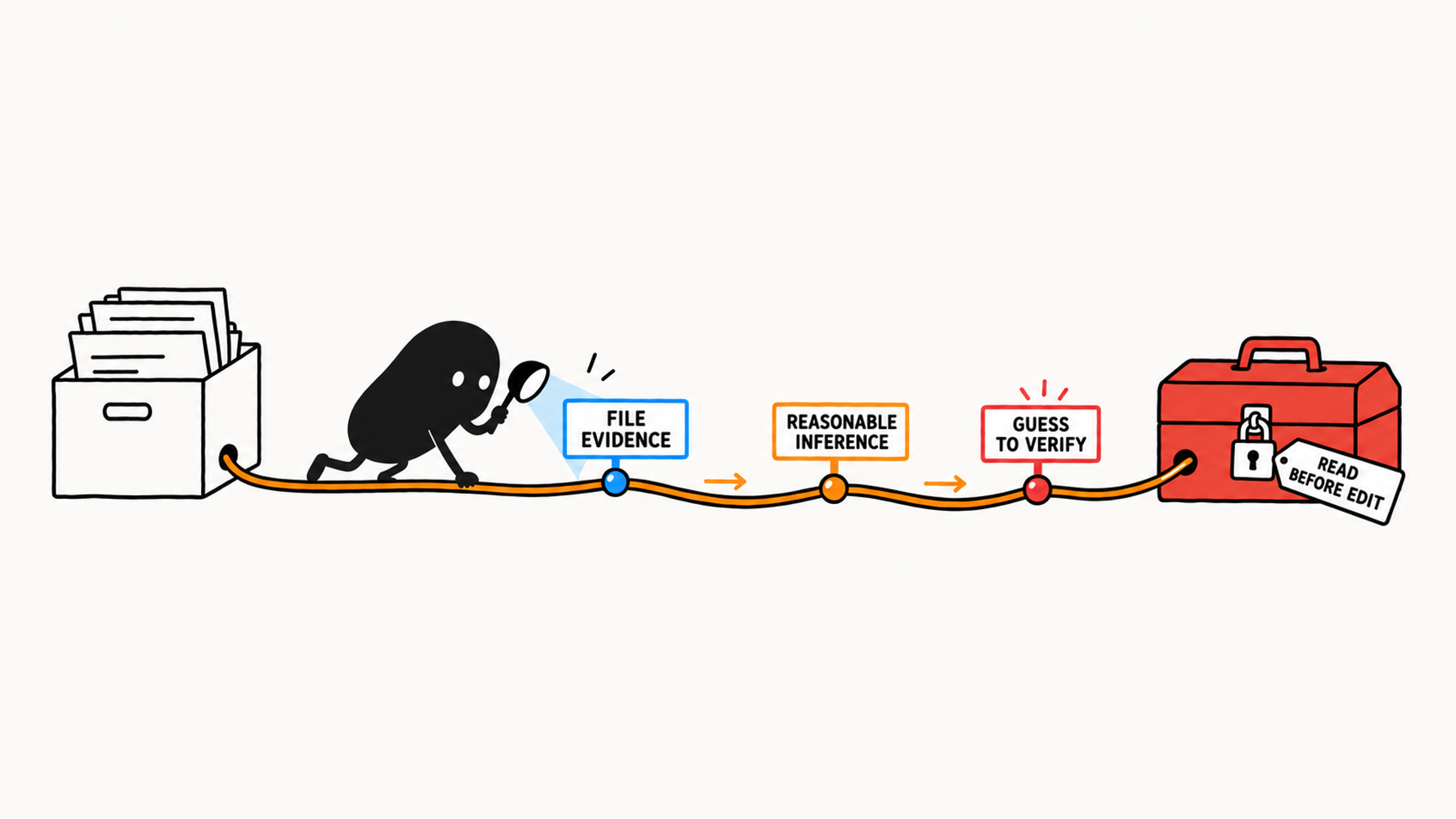
If Codex states an unconfirmed cause with confidence, ask for its evidence or have it label the claim as a guess. Then check four things:
| Check | What to confirm |
|---|---|
| Files | Related to this problem, with no important entry point missed |
| Flow | Data flow, component relationships, and user behavior match the project |
| Risk | Impact and areas to leave alone are spelled out |
| Minimal plan | Fixes only this gap, with no broader refactor |
If it got something wrong, stay at the analysis stage and correct it directly:
The file you mentioned isn't the path this page actually uses.
Look again at the login form components and tests.
Still don't modify files. Just update your analysis and plan.
04 Follow One Sentence Back to Its Evidence
Back to that opening sentence. The first half you can check in the file; the second half still needs checking. Ask next: which branch returns? Where is the error message set, before or after that return?
If the handler hits return before the message is set, the code after it never runs, which supports the early-return explanation. You still need to confirm the page actually binds this handler and nothing upstream intercepts the submit before you can connect the code to what users see.
Finding the definition of validateEmail alone doesn't show that the page calls it. Keep going: where the input comes from, what might intercept the submit, and where the message renders. Fill in the call chain this decision needs.
With that evidence, compare fixes. Plan A adds a whole new set of validation. Plan B says the error already exists and only needs to reach the page. Which one? Go back to the files. If the error really is created, B closes the actual gap and saves you from maintaining two sets of rules that could drift apart. Nothing has been executed yet, so a wrong call is still cheap to fix.
05 Run One Check That Separates the Causes
When two causes are both possible, find one check that tells them apart:
Does an empty input produce a validation error?
  ├─ Yes → check how the error is displayed
  └─ No  → check whether validation is called at all
Check that one point first. Changing both places at once feels faster, but afterward you can't tell which gap you actually closed.
06 Stop Investigating Once You Have Enough
Once the investigation is enough to decide on this fix, wrap it up. A long whole-project report helps this fix less than one fully traced call chain. You can limit it like this:
List only the 3-5 files directly related to this problem.
Keep the plan to 5 items or fewer.
Skip unrelated refactoring suggestions.
These limits exist to help you focus. If the call chain still doesn't connect by the fifth file, ask what's missing and let it read the necessary dependencies. The point is understanding this problem; adjust the file count to what the investigation needs. With a narrower scope, you can check its work more easily, and Codex stays on the current problem.
If an investigation request is already too broad, narrow it along four lines: related module, core flow, likely causes, and the smallest verification point:
Too broad:
Analyze the whole project, find every possible cause of login problems, and give me a complete optimization plan.

Narrowed:
Read only the login module (`src/login` and its direct dependencies).
Explain the core flow from user input to the submit request.
List 2-3 likely causes most related to "no message for an empty email."
Give me the smallest verification point: which test to run, or which manual step confirms it.
For how to write the request itself with a clear goal and completion criteria, see turn a vague request into a task Codex can finish. Once the analysis has enough evidence and the plan is checkable, you're ready for a small edit; for how to set limits the first time you authorize one, see your first small code change with Codex.
After one round like this, that "it may return early" either points to a real return in the file or gets replaced by another cause. Either way, the fix you approve next has files behind it.