
DeepDojo.AIPublished 2026-11-13Updated 2026-11-13中文
Honest Reports From Multi-Agent Claude Code Reviews
You type /prepare-pr and ask Claude Code to get a feature ready to merge. It hands the general review, the security check, and the test work to separate subagents, then merges everything into one report.
This time the results differ. The general review returns three business risks, one of which can only be confirmed in a real integration environment. The security review finds nothing.
The test agent gets stopped for lack of permission while adding tests. The main agent, taking the easy route, writes: "Review fully passed."
That one line flattens at least three things: a risk that hasn't been verified, a test that never ran, and an agent that failed. Whoever reads the report will think the change is ready to merge.
Multi-agent delegation never goes smoothly every time, and external services time out. The real test of a workflow is whether it reports honestly when a step fails partway through. Three practices make that happen:
- When merging results, sort them into three groups: confirmed by evidence, hypotheses still to verify, and steps skipped for lack of an environment or permission.
- When combining findings from several sources, decide duplicates by trigger condition, location, and failure cause; similar titles aren't enough.
- When external state can't be fetched, mark it "unknown," name the gap, keep going on the parts that can be done independently, and leave the final call to whoever has the authority.
01 What a merge-prep run goes through
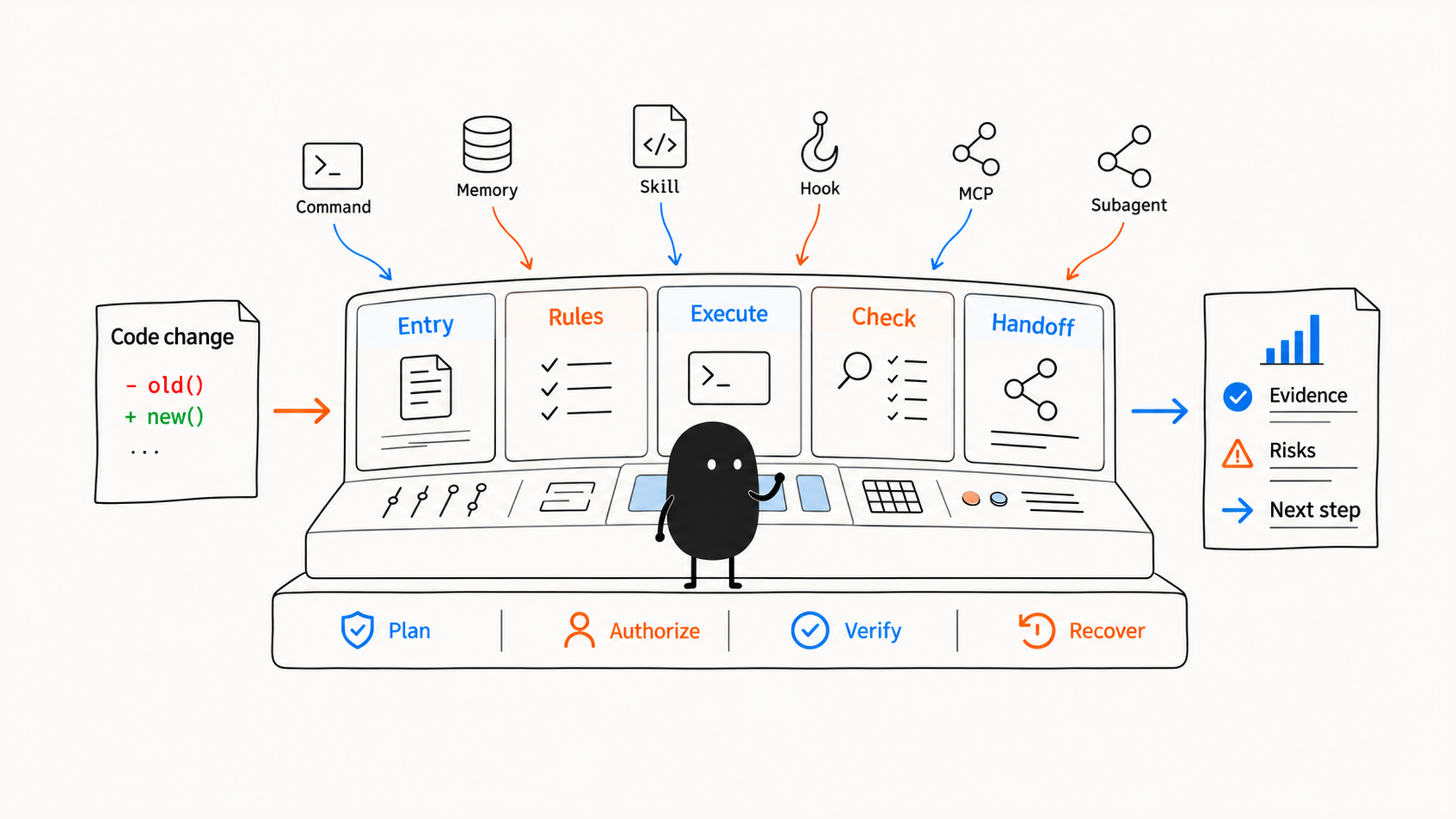
The steps below show how the components connect in a full setup; in practice, skip agents and MCP servers you don't need. Memory and hooks must be configured beforehand; listing a step doesn't switch it on:
- The slash command gathers git status, the diff, and recent commits.
- Memory supplies project rules, test commands, and commit conventions.
- Confirm the current restore point and which changes Rewind can't cover.
- code-reviewer checks for behavior regressions.
- security-reviewer runs a read-only security review.
- test-engineer looks for test gaps.
- documentation-writer decides whether docs need updating.
- Hooks format and scan written files.
- MCP queries the current PR or issue status.
- A skill turns the findings into a review report.
- The main agent outputs the final summary, risks, to-dos, and verification results.
The report should make clear what changed, what must be fixed, what's optional, and the state of tests, docs, external tasks, merge risk, and next steps.
02 Sort results into three groups: confirmed, to verify, not run
Back to those three agents. When the main agent writes "Review fully passed," it's making a judgment for the user that it has no evidence for. The main agent should separate clearly:
- What is confirmed by evidence.
- What is still a hypothesis to verify.
- Which tests couldn't run for lack of an environment or permission.
Put the unresolved problems on the table and let the engineer with final authority decide. However nicely a command is named, it reassures less than an honest evidence list that holds up under scrutiny.
When the Claude Code best practices guide separates "the model decides" from "the tooling enforces," it includes the question of who has the last word: on one side, Claude's summary of what it did; on the other, branch protection and the person who approves the merge. A merged report belongs to the first group. Its job is to lay out the evidence and the gaps clearly; whether to merge is decided by the second.
03 Before merging duplicate findings, compare trigger conditions
Put the reporting method into a shared skill, and commands and agents use the same format. A review report skill might look like this:
---
name: review-report
description: Produce a structured code review report. Use when reviewing a diff or PR, assessing risks and test gaps, or running pre-merge checks.
---

# Review Report Skill

## Workflow

1. Collect the scope of the changes.
2. Classify by behavior risk, security risk, test gaps, and performance risk.
3. Merge the conclusions from multiple subagents.
4. Remove duplicate issues.
5. Order by severity.
6. Output using the report template.

## Output

- Summary
- Critical findings
- High findings
- Medium findings
- Test gaps
- Recommended verification
Put several sources together and you hit the next judgment: which findings are true duplicates, and which only have similar titles? Two cases:
| Two findings | How to handle |
|---|---|
| Both titled "auth risk," one about unauthenticated access, the other about privilege escalation after login | Different failure causes; keep both |
| Same request, same location, same failure cause | Merge the duplicate descriptions |
When merging reports, it's easy to go by title. Two findings called "auth risk" read like duplicates but may involve two different kinds of requests. Compare trigger conditions, locations, and failure causes, and merge only once you've confirmed it's the same problem. Otherwise the report gets shorter and a risk quietly disappears.
04 A deploy check delivers check results
The user calls:
/deploy-check productionThe check follows this chain:
Get the target environment and branch
  → Hook checks whether production operations are allowed
  → MCP reads deployments, error rates, and key metrics
  → Test agent checks the real tests; security agent checks permission and credential changes
  → Main agent merges; a deployment specialist joins only if configured and needed
  → Deliver the check results
At the end of that chain, what's delivered is the environment, current and pending versions, test and metric status, risks, the rollback plan, and actions awaiting confirmation, and the user decides the next step from there. The command's name says "deploy," yet what it completed is a check. An actual release goes through a separately authorized execution flow, and the final decision and any irreversible action are confirmed by the user.
05 When the flow doesn't finish, know where it stopped
When the flow doesn't finish as planned, you should know where it stopped and what can continue:
| Failure | How to handle it | What can continue |
|---|---|---|
| MCP can't query live state | Mark the state unknown, record which layer failed, invent nothing | Local code review continues; the release decision waits for the missing state |
| A tool permission is denied | State the action and scope needed; don't work around the limit | Use existing read-only evidence, or wait for approval |
| Tests fail | Keep the real logs and judge how the failure relates to this change | Fix and retest; don't report it as passed |
| Two agents edit the same file | Stop the conflicting writes, compare each diff, merge one at a time | Independent work without conflicts continues |
| Metrics look wrong after release | Handle code and external state with the confirmed recovery plan | Verify the recovery and record an incident timeline |
Say the deployment-monitoring MCP times out, and neither the live version nor the error rate comes back. The report says "unknown" and notes the connection failure and the actual time:
Local tests and code review already obtained → keep the conclusions, continue independent work
Live version and error rate missing          → list the gap, recheck after reconnecting or manual confirmation
When the material a deploy decision needs is missing, say what's missing; an estimate can't fill that gap.
Recovery has layers too. Picture the first phase editing files and the second running a command that updates the database. When later tests fail, rolling back the files restores only the first part, and the database is still in its new state. Record what each phase did, how it was verified, and how to recover if it fails, so the report can say what's already restored and what still needs handling in its own system.
06 Have a new teammate walk through it to accept the workflow
Once the workflow is built, have a new team member walk through a real task, then check each layer's results:
| Layer | Acceptance evidence |
|---|---|
| Entry points and rules | Common tasks start, and project rules actually load |
| Changes and recovery | Big changes have a plan and approval; code, conversation, and external state can each be restored |
| Methods and checks | Skill methods are reusable, and automatic checks don't catch the wrong things |
| Tools and delegation | MCP data is live and permission-limited; agents have clear roles and tools |
| Automation and distribution | CLI output is parseable; with plugins, loading locally runs the representative flow |
After the walkthrough, check whether results can be traced back: did any sensitive config land in the project in plain text, where did each failure happen, can you find the responsible component? A complete config checklist only shows everything was put in place. A new teammate finishing a task with it and being able to trace the intermediate results shows the layers are actually connected.
Judge an AI collaboration system by whether its safety measures and recovery paths actually work when something unexpected happens. Clear entry points, contained permissions, and recoverable failures are all judged by real results; how many directories and config files you have depends on what you need. For building the system up from one minimal flow, see building a Claude Code workflow from one small loop. For checking a single result in a script, see three checks before using Claude Code JSON output.
Back to that merge: one risk to verify, one test not run, one agent denied. Write those three lines into the report as they are, and leave the merge decision to the person entitled to make it.