
DeepDojo.AIPublished 2026-11-13Updated 2026-11-13中文
Splitting a Long SKILL.md Into Smaller Files
A new skill is usually short: one SKILL.md with a few dozen lines of workflow does the job. The longer you use it, the more you add: a security checklist, a testing checklist, a performance checklist, a report template.
By the third revision, your team's code review skill has reached 260 lines. This time you only want to check one auth change, yet Claude reads all 260 lines every time the skill fires, when the workflow, security checklist, and report template, about 150 lines, are all it needs.
The more material piles up, the more it buries the main thread. The hard part of organizing a skill usually isn't the syntax. It's three decisions:
- Is this work worth a skill, or is a single command enough?
- What goes in
SKILL.md, and what goes in supporting files? - When should supporting files be read, and which criteria must be read up front?
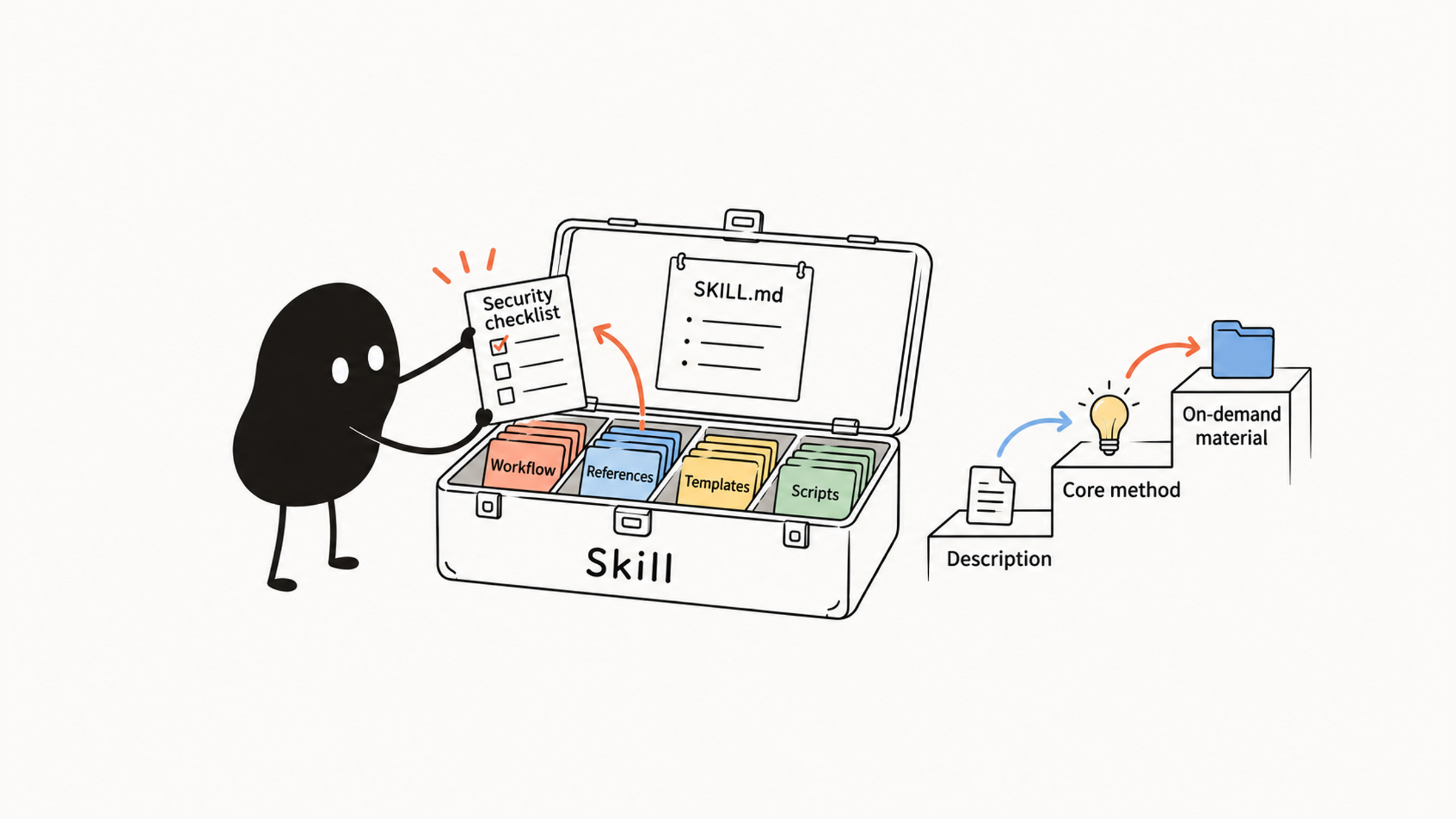
Claude Code already loads skills in layers: it sees the name and description first, reads SKILL.md only when the skill fires, and opens supporting files only when they're actually needed. Organize files along that mechanism, and the main file holds just the method and the routing, long material loads on condition, and the criteria you need stay in reach.
01 When a skill is worth writing
The two ideas get confused easily. A slash command answers "how do I start this task quickly." A skill answers "what steps and method should this specialized work follow." They can share the same foundation.
Short procedures you can finish in a minute, such as "summarize the current git diff" or "draft a commit message," only need one SKILL.md with the core prompt, and it works as a command. When the job requires checking a troubleshooting guide, verifying against internal standards, applying a specific report template, or calling local scripts, that's when to grow it into a full package.
When you have a pile of work you want to speed up, use this list to sort it:
| Question | Better fit |
|---|---|
| Is it just a fixed prompt or a short procedure? | Slash Command |
| Does it need a full method, templates, and references? | Skill |
| Does it need automatic checks before or after tool calls? | Hook |
| Should the task go to an isolated role? | Subagent |
| Do commands, skills, subagents, and hooks need to ship as a team package? | Plugin |
With those options in mind, look again at what you actually want to reuse. If it's just a short procedure, start with a single-file skill as the entry point; how to write a custom Claude Code slash command covers that. After a few reviews, if severity criteria, report templates, and references really do repeat, move them into the package.
Writing, brand rewrites, documentation, refactoring, and organizing project rules can all be judged the same way. Settle the method first, then decide which files it needs; every piece of material should serve a specific step.
02 Skills load in three layers
Skills use progressive disclosure. Claude Code loads content in layers as the task requires:
| Layer | What loads | Purpose |
|---|---|---|
| Layer 1 | The skill's name and description | Decide whether it fits the current task |
| Layer 2 | SKILL.md | Read the core workflow, boundaries, and instructions |
| Layer 3 | Supporting files in references/, templates/, scripts/, assets/ | Read or use only when actually needed |
The Claude Code skills documentation explains that in a regular session only skill descriptions enter the context, so Claude knows what's available; the full content loads when the skill is invoked. Name and description help decide whether it fits; SKILL.md holds the core method; long references and reusable artifacts go in supporting files.
Back to the 260 lines:
| Material | Lines |
|---|---|
| Core workflow | 40 |
| Security checklist | 80 |
| Testing checklist | 60 |
| Performance checklist | 50 |
| Report template | 30 |
All in the main file, that's 260 lines per load. This time you're only checking auth; do you need the performance checklist? If not, reading the workflow, security checklist, and template comes to 150 lines and keeps the material focused.
Make the call based on what this judgment needs. A checklist can wait, but required criteria like severity levels still have to arrive up front. Line counts only illustrate the difference; the real test is "without this file, can it still make this judgment?"
03 Where files live and what each folder holds
There are two common locations. Project skills live in .claude/skills/ inside the project, shared with the team. Personal skills live in ~/.claude/skills/, for your own preferences or methods you use across projects.
A minimal skill needs only a directory and a SKILL.md. A fuller one is often organized like this:
my-skill/
├── SKILL.md
├── references/
│   ├── review-checklist.md
│   └── style-guide.md
├── templates/
│   ├── report-template.md
│   └── outline-template.md
├── scripts/
│   ├── collect-context.sh
│   └── validate-output.js
└── assets/
    └── example-output.md
Each folder has its own purpose:
| Folder | Holds | Good for |
|---|---|---|
SKILL.md | Core instructions | Triggers, workflow, boundaries, output requirements |
references/ | Reference material | Style guides, standards, rules, checklists, concepts |
templates/ | Output templates | Report, outline, document, and commit message templates |
scripts/ | Helper scripts | Gathering context, running checks, formatting, generating intermediate files |
assets/ | Examples or materials | Sample output, screenshot notes, fixed assets |
At first, put the method in a minimal SKILL.md and test it on one real task. When the report template starts repeating or a checklist is only needed sometimes, move it into the right folder and say in the main workflow when to read it. After splitting files, make sure the material can be found and actually gets used.
04 Entry fields: name and description
SKILL.md has frontmatter and a body. The frontmatter gives Claude Code the name, purpose, and control settings; the body describes the workflow. A basic template:
---
name: code-review
description: A skill for reviewing code changes. Use when the user asks for a review, wants a diff checked, needs a risk assessment, is looking for test gaps, or is preparing a merge request.
---

# Code Review Skill

## When to use

- The user asks for a review of the current changes.
- The user asks about risks in a file or module.
- The user asks for pre-merge advice.

## Workflow

1. Read the scope of the current changes.
2. Identify behavior changes, compatibility risks, error handling, and test gaps.
3. Order the issues by severity.
4. Give actionable fixes.
5. List remaining risks and suggested verification.

## Output format

- Findings: issues ordered by severity.
- Open questions: assumptions that need confirmation.
- Verification: checks to run.
To make the name and trigger explicit, fill in these two fields. The docs say every field is optional, but description is recommended:
| Field | Required? | Purpose |
|---|---|---|
name | Recommended | Stable name; defaults to the directory name |
description | Recommended | When the skill should trigger |
Keep name stable, and make description state the use cases and boundaries. Pick other fields by purpose:
| What to control | Fields |
|---|---|
| Argument hints, pre-approved tools | argument-hint, allowed-tools |
| Model and user entry | disable-model-invocation, user-invocable |
| Isolated execution | context, agent |
| Model or event handling | model, hooks |
A vague description triggers too often; a narrow one misses real requests. How to test its range with a few sets of requests is covered in how to test a Claude Code skill before sharing it.
05 The main file routes; long material loads on condition
When a skill has many rules, split long content into supporting files and let SKILL.md say when to read each. For a code review skill:
code-review/
├── SKILL.md
├── references/
│   ├── risk-levels.md
│   ├── security-checklist.md
│   ├── testing-checklist.md
│   └── performance-checklist.md
└── templates/
    └── review-report.md
SKILL.md keeps only the routing:
## Workflow

1. Read the scope of the changes.
2. If they touch auth, permissions, input validation, or external requests, read `references/security-checklist.md`.
3. If they touch performance paths, caching, loops, or queries, read `references/performance-checklist.md`.
4. If a review report is needed, use `templates/review-report.md`.
After splitting, walk through one review. Decide what to check, open the matching security or performance checklist, then use the report template; each long file now has a specific moment to be read.
But if every finding must carry a severity, the risk-level definitions have to be read before any check. They aren't a detail only security work needs. Keep that prerequisite in the main workflow and add topic material based on the change. What you skip is irrelevant reading; the criteria stay right where they were.
06 A code review skill, and how to test it
A code review skill locks in the team's review standards, which makes it good for long-term sharing. SKILL.md might look like this:
---
name: code-review
description: Review code changes for bugs, behavior regressions, security issues, test gaps, and maintainability risks. Use when the user asks for a review, wants a diff checked, is preparing a merge, or is investigating recent changes.
allowed-tools: Read Grep Glob Bash(git diff *) Bash(git status *)
---

# Code Review

## Review focus

- Behavior regressions
- Edge cases
- Error handling
- Permissions and input validation
- Data consistency
- Test coverage
- Compatibility and migration risk

## Workflow

1. Confirm the scope of the change.
2. Read the related files and tests.
3. Look first for issues that cause wrong behavior.
4. Order findings by severity.
5. Every finding must include the file location, cause, impact, and suggested fix.
6. If there are no clear issues, state the remaining risks and suggested tests.

## Output format

### Findings

- Severity:
- Location:
- Problem:
- Impact:
- Recommendation:

### Open questions

### Verification
With a consistent report heading in place, test it against a single finding. Say the diff removed a permission check on an endpoint. A note that just says "watch out for security" can't be judged right or wrong. It should point to the file and location, explain which unauthorized request would now get through, and propose a regression test that proves it.
That's how you get from output back to real behavior. Check the tools separately too: allowed-tools here only lets reads and Git queries skip approval. To truly match a read-only role, restrict writes with disallowed-tools or permission rules. Whether the report has evidence and whether execution is controlled are two separate checks.
07 Structure notes for other kinds of skills
A blog drafting skill breaks writing into controllable stages: sources, outline, draft, versions, and feedback, with outline and draft templates in templates/. Settle the target reader, core conclusion, tone, and length before designing the outline. When editing an existing article, read the current draft first and go straight to revision, skipping the research and outline stages.
A brand voice skill suits marketing copy, customer communication, and product announcements. Split the rules into three references, voice-principles.md, forbidden-phrases.md, and examples.md, plus a rewrite report template. This kind of skill depends more on clear rules and good and bad examples than on complex scripts.
A refactoring skill needs more than spoken instructions. Pair it with a few lightweight scripts: one that collects call sites, one that runs tests, and one that compares behavior before and after. Put verification in the main workflow, because refactoring improves structure while existing behavior must stay correct.
A CLAUDE.md generation skill extracts collaboration notes from the project structure, scripts, config, test commands, and code style. That file shapes future sessions, so separate observations from requirements first:
| What you observe | What it supports |
|---|---|
package.json includes Vitest | The current test dependency is Vitest |
| The last 30 commits use conventional commits | That's the usual history; it doesn't prove every commit must |
scripts has pnpm db:migrate | A migration command exists; whether it's mandatory needs the team's word |
Confirmed facts can be saved. List mandatory rules and unverified guesses for confirmation first, so later sessions don't treat a guess as a rule.
08 Running in a subagent, and going from personal to team
Large reviews, research, security audits, and cross-module analysis can involve a lot of reading. In a subagent, the intermediate work stays in a separate context and the main session only receives evidence and conclusions. Setting context: fork in the frontmatter runs the skill in a subagent; the docs note that it doesn't inherit your earlier conversation, so the skill's instructions have to stand on their own.
Before handing off, think through:
Which project material and main-session decisions does it need?
  → Can they be handed over completely?
  → Read-only or allowed to edit?
  → Return a full report, a summary, or structured output?
A security audit reading many routes produces a lot of intermediate material, and a separate context keeps it out of the way. For a few lines of diff, writing up the background and interpreting the result may cost more than reading it yourself. Isolation suits long or specialized work; quick judgments stay in the main session just fine.
Grow a skill along this path:
- Write a personal skill and confirm the workflow works.
- Move it into the project directory for the team.
- Package mature capabilities as a plugin.
When a personal method goes to the team, you often find gaps in project conventions and dependencies; fix those in the project directory first. Move to a plugin when you need to ship commands, skills, subagents, hooks, and templates together; otherwise an experiment with one method turns into maintaining a whole package too early.
To judge whether a skill's files are well organized, look at one real call: was every file it read used in the judgment, and were the files it skipped ones it never needed?