
DeepDojo.AIPublished 2026-11-13Updated 2026-11-13中文
Validating Claude Code's JSON Output
Once Claude Code is wired into CI, many teams give it a handy job: when tests fail, read the log, write a JSON summary of the cause, and pass it to a downstream script. When the script sees is_error set to false, it treats the step as a success.
Then one day the log is full of "database connection timeout" errors, yet the summary says "all connection issues have been fixed." The script lets it through as usual, and an unsupported conclusion sails into the pipeline.
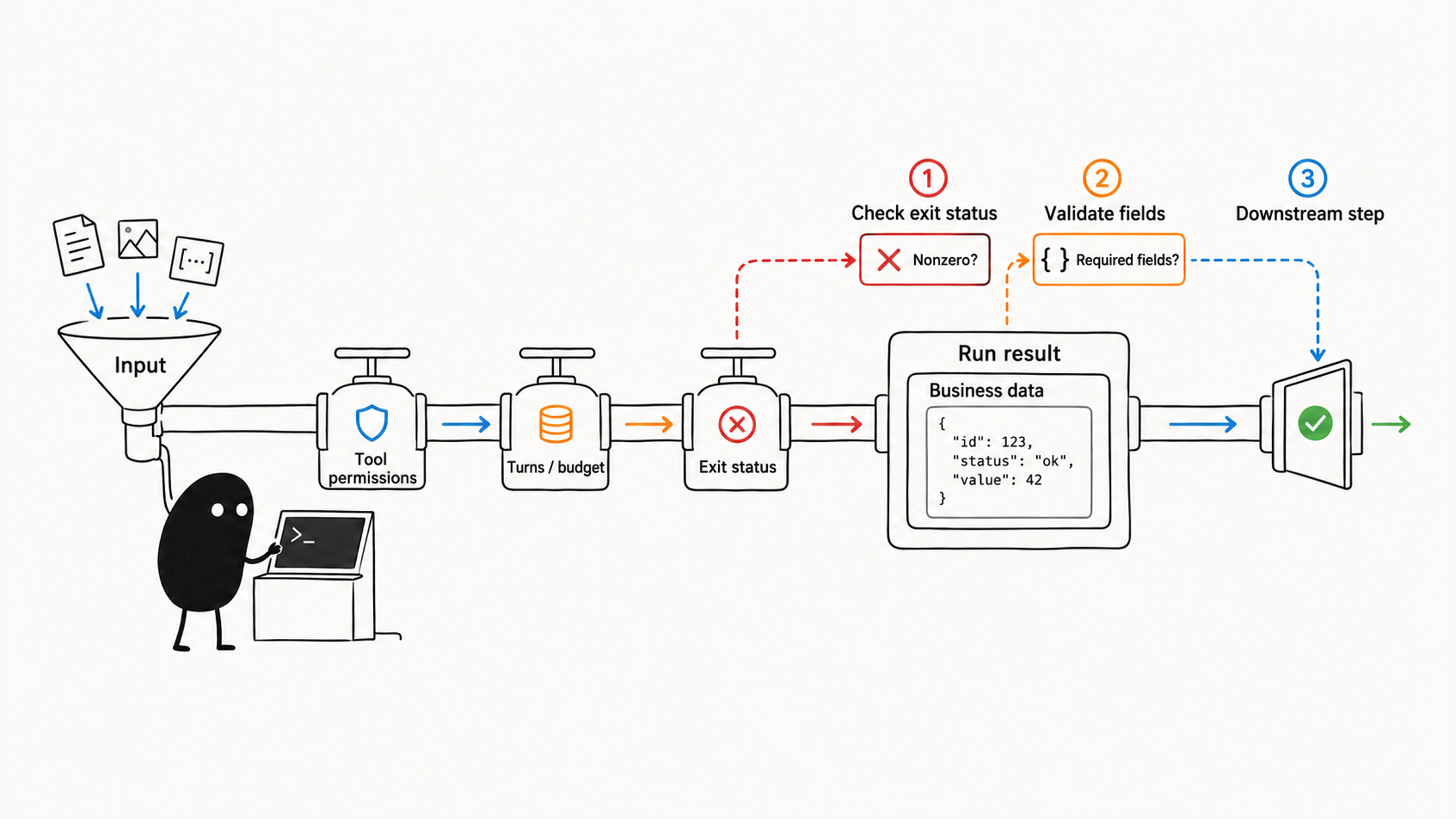
A person can find the conclusion in a few paragraphs of prose; a program needs to know where to read and what structure to expect. When you hand Claude Code's output to a script, three gaps are common:
- Reading the field at the wrong level, when the business data is wrapped inside the run result.
- Treating "the call didn't error" as "the conclusion is reliable."
- Treating "didn't finish" as "found nothing" in batch jobs.
The fix is a chain of checks. Look at the process exit status first, validate the field structure with a JSON Schema next, and finally confirm the conclusion is supported by the original input. Correct structure lets a program read the result; supporting evidence is what lets the conclusion move on.
01 Let programs decide by field
Start with a common fragile pattern:
claude -p "List the to-do items" | grep "URGENT"The grep here just shows output being picked up. If an alerting script only recognizes "URGENT," the same connection-pool failure phrased as "Critical: connection pool exhausted" can slip past it. Change the prompt once, and the position and wording of the explanation can change too.
The sturdier approach is to define the allowed values of fields like severity in --json-schema, then decide by field. The explanation can be worded any way; the format your program depends on stays fixed.
02 Pick the output format by how it's consumed
Decide how the downstream step will use the result, then choose a format:
| Flag | What it does |
|---|---|
--output-format text | Plain text, the default |
--output-format json | JSON, easy for scripts to parse |
--output-format stream-json | Streaming JSON for long tasks and real-time handling |
--include-partial-messages | Includes streaming events in stream-json |
--json-schema | Requires output that matches a given JSON Schema |
--max-budget-usd | Caps spend in print mode |
--max-turns | Caps agent turns in print mode |
--verbose | Detailed logs for debugging |
If only people read the result, use text. If a downstream step parses fields, use json. If a long task needs handling as it streams, use stream-json. Each format serves a different consumer; pick the one your workflow needs.
# Plain text
claude -p "Explain this code"

# JSON output
claude -p --output-format json "List every function in main.py"

# Streaming JSON
claude -p --output-format stream-json --verbose "Generate a long report"

# Structured output with a schema
claude -p --output-format json \
  --json-schema '{"type":"object","properties":{"bugs":{"type":"array","items":{"type":"string"}}},"required":["bugs"],"additionalProperties":false}' \
  "Check main.py and return evidence-backed issue descriptions; return an empty array if none are found"
After choosing JSON, define which fields downstream depends on and check the exit status. When stable fields match the contract, the script can read by field, and only then does the format choice connect to what happens next.
03 The run result and the business object are two layers
First, see which layer the result is in:
CLI run result (--output-format json)
  ├─ result: plain answer
  └─ structured_output: business object when a schema is given
       ├─ summary
       └─ risks
.summary and .bugs aren't at the top level, so follow the actual structure to find them. A trimmed example shows how the layers fit:
{
  "subtype": "success",
  "is_error": false,
  "result": "The log shows two recurring failures...",
  "structured_output": {
    "summary": "Two recurring failures: token refresh timeout and stale cache",
    "risks": ["Refresh timeout may block login", "Stale cache serves old prices"]
  }
}
Now read the summary from this example. Reading .summary at the top level gives you null, and the first problem is location: the business object lives in structured_output, wrapped in the CLI's run report. A plain-language answer sits in result.
Per the Claude Code headless documentation, if a run ends without valid structured output, for example because Claude declined the request, the response has no structured_output field at all. So check that the field exists before your script uses it.
Once you've found the field, there's a second question. is_error: false means the call didn't error; whether the summary has evidence behind it is a separate check. The order is run first, structure second, content last. JSON that parses is not a reason to let the next step proceed.
04 A complete script with checks
The example below analyzes only the log it's given and outputs a summary and a list of risks. Prepare error.log and install jq first; the script writes the run result to analysis-result.json in the current directory.
#!/usr/bin/env bash
set -euo pipefail

analysis_schema='{"type":"object","properties":{"summary":{"type":"string"},"risks":{"type":"array","items":{"type":"string"}}},"required":["summary","risks"],"additionalProperties":false}'

if ! claude -p --tools "" --disallowedTools "mcp__*" \
  --max-turns 3 --max-budget-usd 1 --no-session-persistence \
  --output-format json --json-schema "$analysis_schema" \
  "Analyze only the supplied log. Summarize evidence and list risks; do not invent missing facts." \
  < error.log > analysis-result.json; then
  echo "Analysis failed; stop downstream processing." >&2
  exit 1
fi

jq -e '
  if .is_error == false
    and (.structured_output.summary | type) == "string"
    and (.structured_output.risks | type) == "array"
    and (.structured_output.risks | all(.[]; type == "string"))
  then .structured_output
  else error("Missing or failed structured result")
  end
' analysis-result.json > analysis.json

jq -r '.summary' analysis.json
jq '.risks | length' analysis.json
The script has two gates. The first checks the exit status of claude: the docs say it exits with 0 on success and a non-zero code when the run fails, so the script decides whether to continue from that. The second uses the -e option of jq, which exits non-zero when the condition fails, so missing fields or wrong types stop here.
05 Three checks: exit code, structure, evidence
Before passing a JSON result downstream, check it layer by layer. It's tempting to see is_error: false, watch the JSON parse into an object, and call the job done. But does valid structure mean the content holds up?
Go back to the "connection timeout" log. The summary says "fixed," the structure is perfectly valid, and no field is missing. If the CI script decides on is_error alone, that false conclusion goes straight through.
So the checks chain together:
- First, the process exit code: did the command fail?
- Second, JSON Schema validation: are all required fields present with the right types?
- Third, and most important: can the conclusion be found in the original input?
Correct structure lets a program read the result; evidence is what lets a conclusion into a production pipeline.
The script also leaves its own files behind. Turning off session persistence doesn't delete analysis-result.json. When turns or budget run out, record the run as incomplete and hand it to a person. The limits in the example fit this example only and aren't recommendations for every task.
If you only need a plain answer, read .result. To filter, convert to CSV, or count array items, validate structured_output first and then read its business fields. What you'll do with the result decides which checks come next.
06 In CI, test results come from the tests themselves
CI can have Claude Code summarize test failures, with JSON output:
claude -p --tools "" --disallowedTools "mcp__*" --output-format json \
  "Summarize this test log; do not claim tests passed without evidence." < test-results.log
Let CI run the tests first and keep the real exit code and logs, then ask the model to explain. However polished the summary, it can't pass the tests for them; whether they passed comes from the test command's own exit code. Run the structured result through the same three checks.
Pipelines suit read-only analysis, for example:
cat access.log | claude -p "Find unusual traffic"
git log --oneline -20 | claude -p "Summarize recent development direction"
rg -n "TODO|FIXME" . | claude -p "Sort these to-dos by priority"
Project changes go through a separate workflow with explicit approval. For setting permissions before the call, see locking down Claude Code before running it unattended.
07 In batch jobs, "found nothing" and "didn't finish" are different results
In large batch jobs, the easiest misjudgment is treating "found no issues" and "timed out before finishing" as the same thing.
A realistic case: the script reaches a generated file tens of thousands of lines long, one call hits the budget cap or times out, and the review of that file quietly stops.
If the summary step only collects reports that returned normally, a glance shows nothing but empty results, and you might conclude the whole project is clean. Meanwhile the largest and most suspicious file was never checked.
So every batch item should record three things:
- The target file path.
- A clear success or failure status.
- The specific reason when it ran out of resources or errored.
Flag anything that didn't run to completion and let a person decide whether to split the input or run it again. For combining results from many items and many agents into a report you can trust, see reporting honestly when a Claude Code workflow fails.
Back to that log: the exit code says the command finished, the schema says the fields are all there, and only comparing the summary against the original log tells you whether "fixed" holds up.