
DeepDojo.AIPublished 2026-11-10Updated 2026-11-10中文
What Claude Code Checkpoints Can and Can't Undo
In a single session, Claude Code does two things. It edits Home.tsx with its file editing tool, then runs a script that overwrites report.json from top to bottom. You decide the whole thing is heading the wrong way and use /rewind to jump back to an earlier checkpoint. Home.tsx goes back to how it was. report.json still has the script's output in it.
A lot of beginners carry around a mental safety net: checkpoints can undo anything, tests will catch problems, and Claude Code already reviewed its own work. Each of those covers only part of the risk. Checkpoints track changes made by the file editing tools, so a file that only a script touched isn't covered. Database writes, sent messages, and deployments can't be rewound at all. A screenshot proves one state, and a self-review in the same session can't replace an independent one.
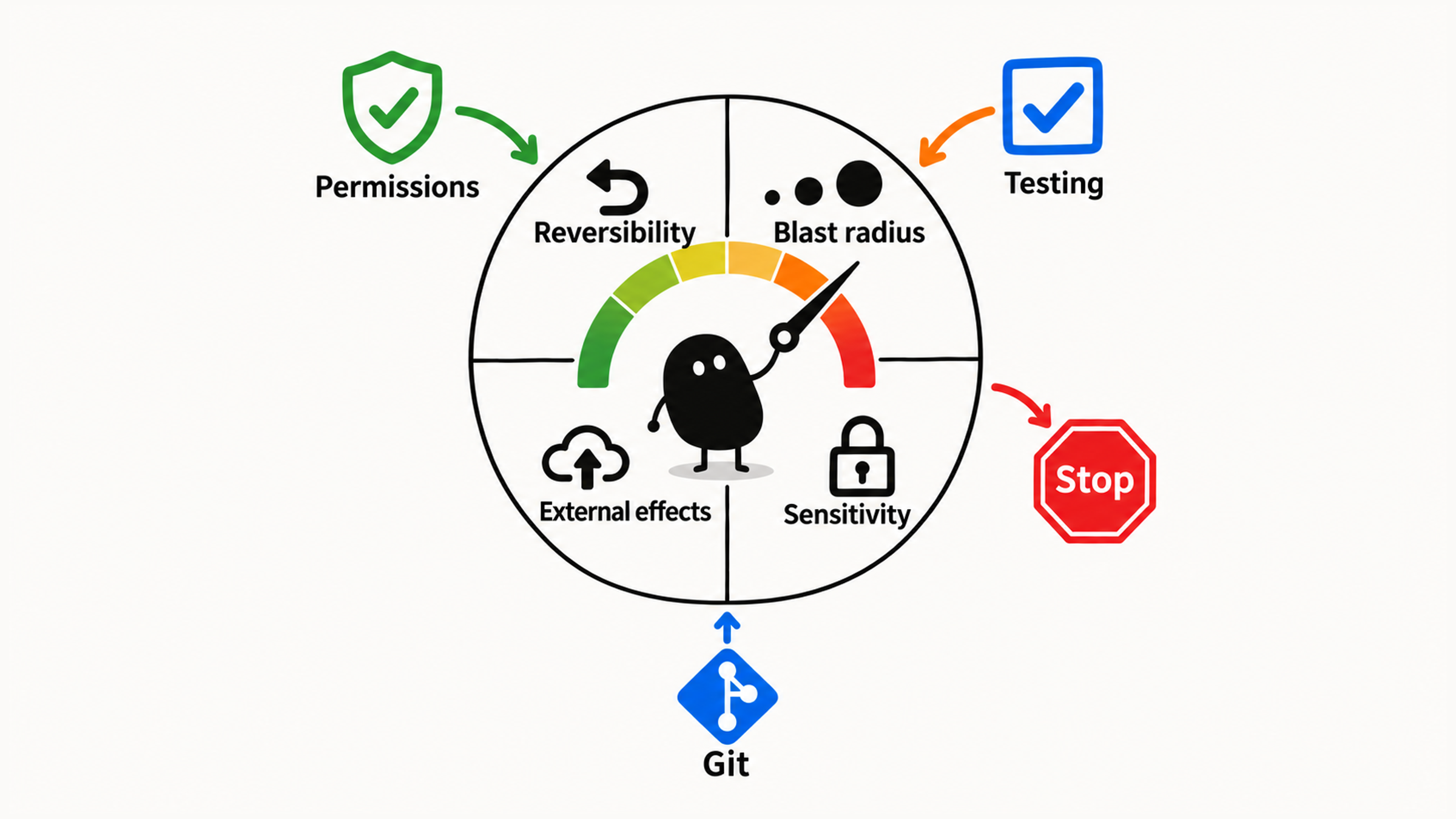
So managing risk starts with knowing what each safeguard covers and what it misses, then layering them to match the real risk:
- size up an action with four questions, and set permissions to match;
- keep your real history in Git, and treat checkpoints as a quick undo within a session;
- choose checks that fit the task, and record the ones that actually ran;
- review against the plan and the diff, and name whatever is still uncovered.
Write down the goal, the boundaries, and what counts as done before you start, then stack these layers on top. You're in control when you can name what's at stake, what could go wrong, which safeguards are in place, and where the gaps are.
01 Pin Down the Goal, the Limits, and What Counts as Done
Permissions, recovery, and verification have to work together around the real risk, and none of them can stand in for another. Look separately at which actions need limits, which changes you can recover from, and what tests and human review can each prove.
Before you start, write down three things:
| Item | Question to answer |
|---|---|
| Goal | What is this change supposed to fix? |
| Limits | What is it allowed to change? |
| Done | What evidence will show it's finished? |
Once those are settled, decide what permissions Claude Code gets based on the actual risk.
02 Which Permissions to Use While You're Learning
Pick a permission mode based on risk, and check both the mode shown on screen and any existing allow rules. default (labeled Manual) is still affected by those rules, so it won't necessarily ask every time, and exploration commands in plan mode still need a side-effect check. Looser modes cut down on manual approvals, so save them for later. For how the modes differ and how to switch between them, see whether to approve a Claude Code permission request.
While you're learning, practice your judgment with default and plan:
Impact still unclear                          → use plan and analyze first
Scope clear, mistakes easy to undo            → use default and review small changes
Databases, payments, or other high-risk areas → read-only analysis first
Treat permissions, deployment, and production as high risk too.
Writing "analysis only" in a prompt states what you've agreed on for the task, but the actual mode is a separate setting. Check the interface before you start, and even when no approval prompt appears, make sure each action stays within what you've allowed.
03 Four Questions for Sizing Up Risk
Before approving anything, size up the specific action on four points. The command name and whether a prompt appeared are only hints:
- If it goes wrong, can you easily recover?
- How many files or systems will it affect?
- Will it quietly write data to an outside system?
- Will it touch keys or other sensitive information?
If you're unsure about any of the four, stop and find out. Then use this table for a first read:
| Action | Risk | Advice |
|---|---|---|
| Reading ordinary source, searching code, explaining structure | Usually low | Rule out sensitive files first |
| Summarizing the project, tracing a flow | Low | Fine in plan or default |
| Changing copy, the README, a small test | Low to medium | default, and review the diff |
| Running tests, lint, or a build | Medium | Have it explain the command, then approve |
| Installing dependencies | Medium to high | Confirm they're needed and trustworthy |
| Deleting or moving files | Medium to high | See the full scope first |
| Changing auth, permissions, or payment logic | High | Beginners analyze only, no direct changes |
| Database migrations, production deploys | High | Not a beginner task |
Reading .env, secrets, or key files | High | Off limits by default |
| Running downloaded scripts of unknown origin, force-pushing, bulk deleting | Very high | Off limits while you're learning |
Treat those levels as a starting point. Change a command's arguments, target, or environment, and the real consequences can change too. Anything that touches data or outside systems deserves a closer look:
While you're learning, never auto-approve anything that affects data, permissions, deployment, keys, or production, or that deletes something you can't get back.
When you're not sure a command is safe, have Claude Code explain it first:
Before running this command, explain:
1. What will it do?
2. Will it modify files?
3. Will it access the network?
4. Will it delete, overwrite, or move anything?
5. Is there a read-only way to check instead?
These questions are worth the time. Once you have evidence about what it does, how far it reaches, and how to undo it, your decision to approve is an actual risk judgment.
04 Checkpoints and Git Each Cover Part of It
Checkpoints restore changes from the current session that the file editing tools tracked. Git keeps the project's real version history. The official checkpointing docs say Claude Code tracks every change its file editing tools make, and /rewind takes you back. A file that only Bash commands changed isn't tracked and stays as it is. The page on how Claude Code works adds that actions affecting remote systems, like databases, APIs, and deployments, can't be checkpointed. Rewinding the conversation leaves those outside effects exactly where they are.
Back to the opening example. After rewinding, check each file separately:
| Change | What to check after rewinding |
|---|---|
The file editing tool changed Home.tsx | Whether the tracked edit was reverted |
A Bash script overwrote report.json | Restore it from a Git commit or backup you made earlier, then check the file |
After the rewind, Home.tsx may be back to normal while report.json still holds the script's output, so check both. If you didn't save the old report.json beforehand, you may not be able to get it back. Whether you can recover depends on the change and on which mechanism recorded it.
An easy way to remember it:
Checkpoint = quick undo within this Claude Code session
Git = the project's real version history
Use the two together:
Before: run `git status`, save existing work, and confirm how you'd recover
During: use checkpoints and `/rewind` when you need them
After: review the diff, then decide whether to commit
Save existing work before you act. Before any high-risk change, commit to Git or make a reliable backup, so you can still recover after the session ends.
05 Match the Check to the Task
Choose how you'll verify before you start. It tells you whether the goal was met, and it gives you somewhere to start if something fails:
| Task | How to verify |
|---|---|
| Changing copy | Open the page or component and look |
| Changing a function | Run the unit tests |
| Fixing a bug | Reproduce it first, then confirm it's gone |
| Changing the README | Follow the README steps once |
| Changing styles | Compare screenshots or check by eye |
| Changing build config | Run the build |
| Changing type definitions | Run the type check |
You can ask Claude Code:
First, tell me the best way to verify this task.
If the project already has test commands, use those first.
If there are no automated tests, give me steps to check it by hand.
An empty-state screenshot shows the page with no data. Whether the list still works with data needs its own check. Check the other states the change could affect, and write down the steps you actually took and what happened. A manual check only counts once you've actually done it.
06 Five Things to Check in a Review
After Claude Code changes code, read its summary and the actual changes side by side. Check at least five things:
1. Does the change fix the original problem?
2. Did it stay within the plan, with no unrelated refactors or new dependencies?
3. Is the logic correct, and does it follow the project's conventions?
4. Did the checks actually run, and what does the result prove?
5. Did it touch high-risk areas or expose sensitive information?
You can have it summarize the diff:
Using `git status`, the unstaged and staged diffs, and any new files, summarize:
1. Which files changed
2. What changed in each file
3. Whether anything goes beyond the plan
4. Any potential risks
5. How you'd suggest verifying next
Treat its explanation as a lead, then read the actual diff yourself; how to check code changes made by Claude Code walks through how. The final call is yours, and even where it says "no problems," you still need evidence.
Before you call the task done, you can also have it review the work once more, as a reviewer:
Don't make any more changes. Just review the code:
1. Compare the current diff against the original plan
2. Find any out-of-scope changes
3. Find obvious bugs or missing checks
4. Report only issues that affect correctness, not style
Switching to a reviewer's voice in the same session still uses the same context, so it isn't an independent review. A self-review gives you leads. The final word still comes from the actual diff and the verification evidence.
07 Name What Your Safeguards Don't Cover
Every safeguard should map to a specific consequence. Take that small empty-state change: save existing work first and confirm which permissions it runs with. After the change, review the actual diff and check both the no-data and with-data states. If you roll back with a checkpoint, confirm which edits were tracked, and check other files and anything outside your machine separately.
When you decide whether something is safe, name what's at stake, what could go wrong, which safeguards are in place, and what's still uncovered. Changes that need an independent review should go to the right reviewer. A self-review in the same session can't carry that responsibility.