
DeepDojo.AIPublished 2026-11-10Updated 2026-11-10中文
How to Check Code Changes Made by Claude Code
The plan couldn't have been clearer: the home page empty-state message lives in EmptyState.tsx, and that's the only file to touch. Claude Code gets to work and reports back: "Message updated." But when it opened the file, it found the message actually lives in i18n/en.json. If it quietly edited that file instead, or fixed something else while it was in there, "updated" would never tell you.
The most common mistake after a change is treating the summary as the result. The summary is what Claude Code says it did. The diff is what actually changed in your files. A passing build means the code meets the build's rules, but it says nothing about whether the message shows up correctly on the page. Then a check fails, someone says "just fix it," and after a few rounds of side fixes nobody can tell whether the original problem is solved.
Wrap up every change the same way:
- keep execution inside the plan, and stop when the code doesn't match it;
- compare the full diff against the plan and the summary to catch anything out of scope;
- choose checks that fit the change, covering both the goal and the behavior that shouldn't change;
- when a check fails, find out why before deciding on the smallest next step.
Then decide whether to accept the change, keep fixing it, or roll it back, based on three things: the original plan, the actual diff, and the verification results.
01 How One Small Change Wraps Up
Once the plan is approved, make the small change within the approved scope. After that, you still need to look at the actual diff, collect evidence that it works, and dig into any failures before deciding to accept, keep fixing, or roll back:
Confirm the plan
  ↓
Approve a small change
  ↓
Review the diff
  ↓
Run verification
  ↓
Handle failures
  ↓
Record the result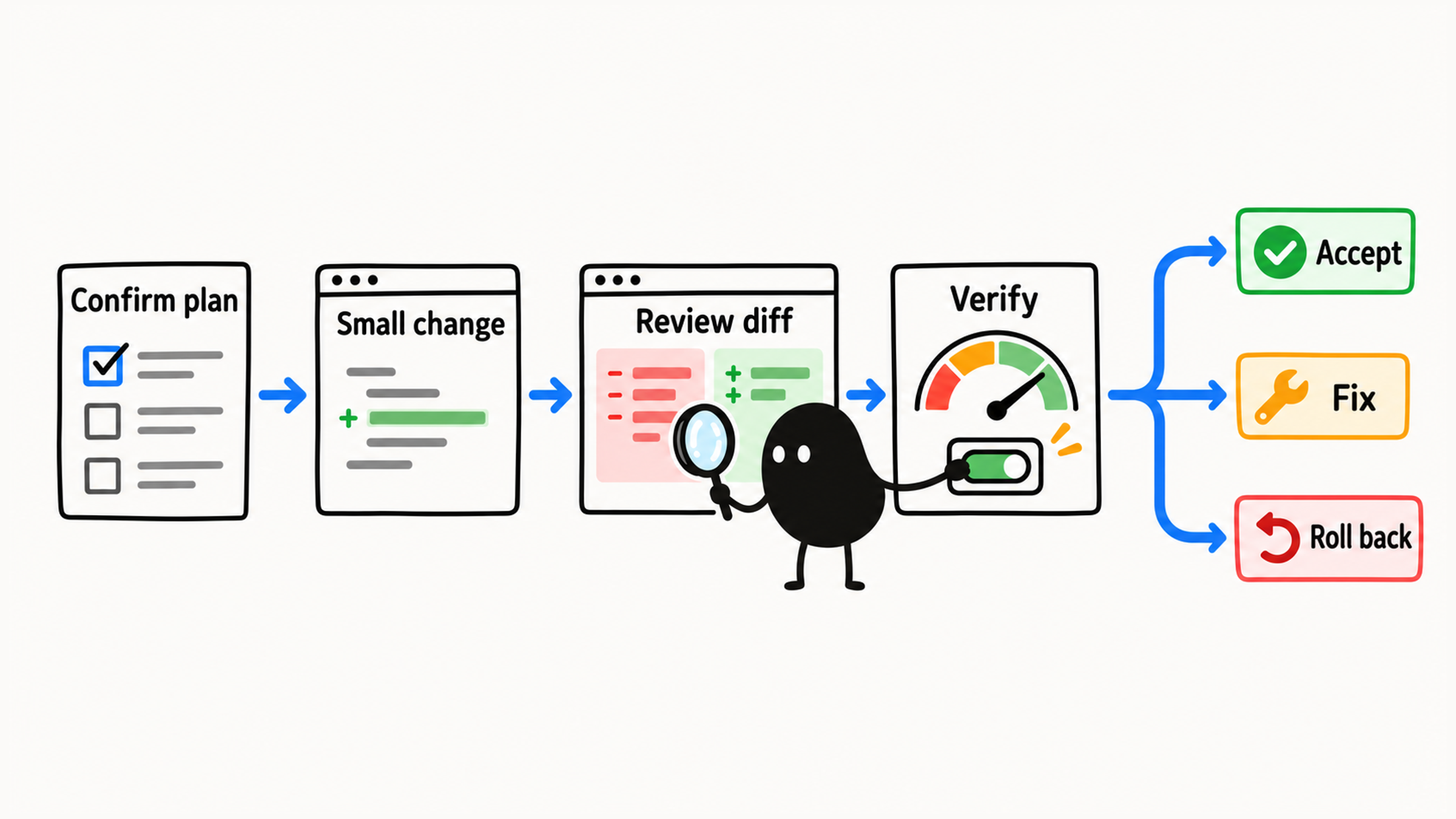
A good first change might be one piece of copy, a short README section, a simple test, a small bug you can reproduce reliably, a low-risk style, or an edge case in an existing function. Whole-module refactors, databases, auth, permissions, payments, deployment, bulk deletes, and changes that span systems can wait until your approval and verification habits are more solid.
For your first try, pick a task where you can follow every step. Keeping the scope small makes it easier to see what each step changed and what effect it had.
02 Keep Execution Inside the Plan
What gets changed should match the plan. An empty-state copy task covers the copy, and refactoring the component would be a separate decision. Adding a test means adding a test, and restructuring the function isn't part of it. The diff and the checks for this change all point at one goal. To review the plan itself first, see 7 questions for reviewing a Claude Code plan.
Before it starts, you can say:
Let's move on to making the change.

Follow the plan we just approved exactly.
Requirements:
1. Only modify the files listed in the plan
2. No extra refactoring
3. No new dependencies
4. Don't touch databases, auth, deployment, environment variables, or other high-risk areas
5. After each change, tell me what you changed
6. When you're done, summarize the diff and how to verify it
That spells out which files it may change, which areas are off limits, and what you expect at the end. While it works, approve only actions that are in the plan. Any new file or command needs its own explanation and your sign-off.
03 Stop When the Code Doesn't Match the Plan
Add one condition when you approve the change: if the code doesn't match the plan, stop. Have Claude Code tell you what it found and why the plan needs to change, and only continue once you've approved any new file or command.
In the example from the top, it might find:
The plan says the message is in `EmptyState.tsx`,
but it's actually in `i18n/en.json`.
Have it report the facts and the new file scope first:
The plan needs an adjustment. The message is actually in `i18n/en.json`.
May I modify this file?
Plans change when an investigation turns up something new, and that's fine. When it reports the difference and waits for your approval before touching the new file, you know why the task changed and by how much.
04 Check the Diff Against the Summary
When Claude Code is about to edit a file, look at what it's planning to change before you approve.
In an IDE extension, you can usually preview the proposed edit. In the terminal, read the pending edit too. Once the files have actually changed, use Git diff or your editor to see the differences. Git diff only shows changes that have been written to disk, so a plan that hasn't run yet won't show up there.
The summary tells you the intent, and the diff shows what changed in the files. Read them side by side, and treat "Message updated" as a lead to follow up on.
Here's a hypothetical copy change:
--- a/src/pages/Home.tsx
+++ b/src/pages/Home.tsx
@@ -24 +24 @@
-  <p>No data</p>
+  <p>No items yet. Add your first item to get started.</p>
Lines starting with - were removed, lines starting with + were added, and the path at the top tells you which file changed. Once you've read it, keep checking:
| What to confirm | Where to look |
|---|---|
| Is this the target page's empty state? | Compare with the plan and read the display condition around it |
| Did anything else sneak in? | Read the full diff |
| Does the page actually show it correctly? | Run the page and put it in that state |
All this diff proves is that the text here changed. Every other conclusion needs its own evidence.
When you go through the full diff, check at least four things:
1. Did it change the files in the plan?
2. Did it touch unrelated code along the way?
3. Did it add new dependencies or complex logic?
4. Did it touch any high-risk area?
If a copy change comes with edits to auth logic, the database, or build config, stop right there. It's gone beyond the plan, so reject it or ask why. You can say:
This diff goes beyond the plan.
First tell me which unrelated changes you made in this task, then propose how to revert them.
Keep existing changes and other people's work. Don't reset whole files.
Or:
Explain why this file needs to change. If it doesn't have to, leave it alone.When you compare the changes with the plan and the summary, make sure you see every kind of change:
`git status`        → which files changed
`git diff`          → unstaged changes in tracked files
`git diff --cached` → staged changes
New untracked files → open and check each one
As the Git documentation explains, git diff with no arguments compares your working tree to the staging area, and --cached shows what's staged. Running git diff on its own misses staged changes and new untracked files, so read it alongside the status output and the matching diffs.
05 Verify the Goal and Everything That Should Stay the Same
Once the code has changed, verify it. Check that the goal is met and that existing behavior still works. Mix three kinds of checks to fit the change:
| Type | What it checks |
|---|---|
| Automated checks | Whether the related tests, lint, build, or type checks pass |
| Manual checks | Whether the page, button, or error message matches the goal; whether the bug still reproduces; whether the README steps work |
| Code review | Whether the diff's scope, dependencies, deletions, naming, and style match the plan and the project's conventions |
You can ask Claude Code to verify against the plan:
Run the checks described in the plan.
If you need to run a command, explain what it does first.
When you're done, tell me:
1. Which commands you ran
2. Whether they passed
3. If anything failed, why
4. Whether more changes are needed
If you don't understand a verification command, have it explain the purpose, the arguments, and any side effects before you decide to run it.
For empty-state copy, put the page into its no-data state and look at what actually shows up. A build or type check tells you the code meets those rules. Whether the copy, layout, and display condition are right takes a look at the page itself.
Claude Code’s official best practices recommend giving it a check that returns pass or fail, so it can revise its work using the actual result.
06 When a Check Fails, Find Out Why First
When a check fails, save the error message and the step where it happened before deciding whether to change anything. "Just fix it" gives no evidence about what went wrong and can send the investigation off in the wrong direction. Ask for an analysis first:
The check failed. Don't make any more changes yet.

Here's the output:
[paste the error]

First, work out:
1. Which step failed
2. Whether it's likely related to the change you just made
3. Whether the original plan needs to change
4. The smallest fix
5. How to verify again after the fix
Start by figuring out where the failure comes from: this change, the environment, a problem that was already there, or the check itself?
If it says "test script not found," look at the config first. If it says "can't connect to the test database," look at the test environment first. Once you know the cause, decide whether the application code needs to change at all. If you suspect the problem predates your change, look for a record from before the change or something else you can compare against.
When you hand the failure back, set the scope too:
Only fix problems directly caused by this change.
No side refactors.
Don't modify files that haven't been approved.
Hold that line. When one error kicks off a chain of side fixes, it gets harder and harder to tell whether the original problem is solved.
07 Accept, Keep Fixing, or Roll Back
At the end, check which files changed, which checks actually ran, and what risks remain. Report passed, failed, not run, and blocked separately, then decide whether to accept the result. You can ask:
Summarize this change:

1. Which files changed
2. What changed in each file
3. Why you made the change this way
4. Which checks you ran
5. What the results were
6. Any remaining risks
Claude Code can help you summarize the change and draft a commit message or PR description. While you're learning, confirm before anything gets committed, and check at least three things:
The diff looks right
Verification passed
The change stays within the original plan
The final call rests on the original plan, the actual diff, and the verification results together. If the change meets the goal, accept it. If problems remain, make the smallest possible fix, and roll the change back if you have to. Before rolling back, separate this change from what was already there, and keep your own and other people's existing work. For what can be undone and how, see what Claude Code checkpoints can and can't undo. And accepting the change still doesn't commit it. That's a separate step, and it needs your go-ahead.