
DeepDojo.AIPublished 2026-11-10Updated 2026-11-10中文
7 Questions for Reviewing a Claude Code Plan
You ask Claude Code for a plan before it touches any code, and it comes back with: "I'll update the frontend code and make sure everything works." Nothing wrong with that, and it lines up with your goal. But which files will it change? What will it leave alone? How will you know it worked? It doesn't say. Approve that, and you've left the scope for Claude Code to guess.
Most people know the advice: plan first, then code. The hard part is knowing what to look for once the plan shows up. Approve a vague plan and the change tends to grow: a quick refactor of a component here, a new dependency there, maybe even a proposal to change the database schema. By the time you notice it in the diff, the files have already changed.
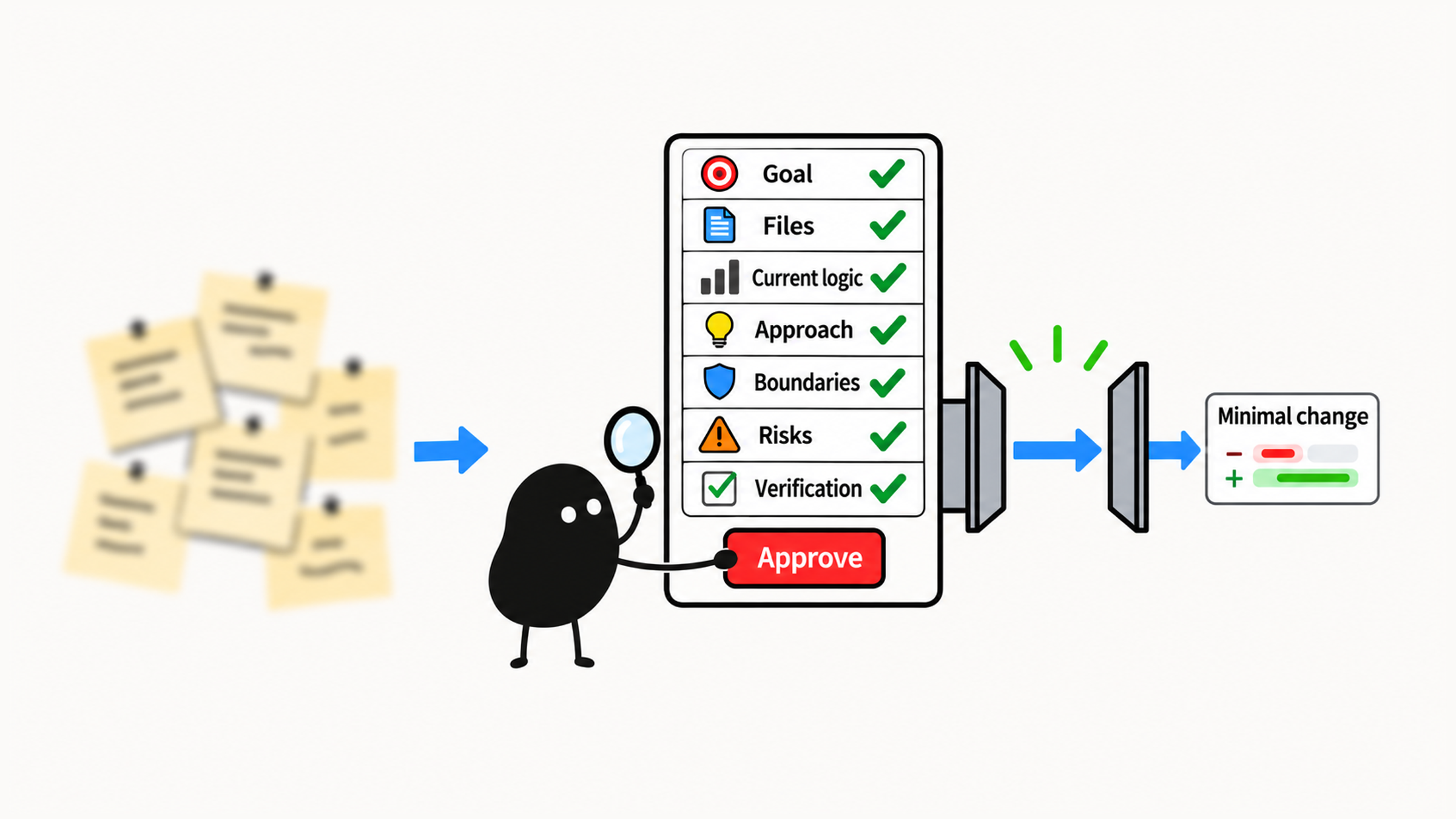
Reviewing a plan comes down to seven questions:
- What specific problem does it solve?
- Which files does it need to read or change?
- How does the current code work?
- How exactly will it make the change?
- Which areas will it definitely not touch?
- What could go wrong?
- How will you verify the result?
When all seven have clear answers, you have grounds to approve. When something's missing, ask for it. When the scope is too big or reaches into risky territory, put the task on hold and pick a smaller one. Running one small task, "make the home page empty-state message clearer," through these questions shows the difference between a vague plan and one you can actually act on.
01 Read the Plan Before Any Code Changes
Reading the plan first lets you catch a misunderstood goal, scope creep, or a missing check before a single file changes. If the direction is off, fix the plan and settle the scope before any editing starts.
For any code change, use this order:
Have it understand the problem
  ↓
Have it propose a plan
  ↓
You review the plan
  ↓
Approve it, then let it change code
"Add search," "fix login," and "improve the page" don't say what should actually happen. Search might involve the page, the API, and the database. Improving a page could mean making it faster or rearranging the layout. Describe what you're seeing now, then use the plan to pin down the scope and what "done" looks like. Otherwise Claude Code has to guess, and the change keeps growing.
02 Seven Questions Every Plan Should Answer
You read a plan to decide what happens next. When the goal, the files in scope, and the way to verify are all written down, you can check each one before anything changes. The seven questions above are what a solid change plan has to answer.
Say the task is to improve an error message, and a weak plan just says:
I'll update the relevant logic to make the error message friendlier."Friendlier" sounds like the goal, but it leaves out how. Which file? What wording? How will you check it? Until those are pinned down, there's nothing to approve.
Even changing login copy can accidentally reveal whether an account exists. If a plan adds new error types or changes how authentication behaves, pause it, and keep a single message for "wrong email or password." For your first try, pick something like the empty-state copy, where the scope and the check are easier to see.
03 Analyze in Plan Mode, Then Pick a Small Task
Plan mode shows you its thinking up front: which files it will read, how the current code works, how it would change things, and how it would check them. All that analysis and exploring happens before any source file changes, so you can correct course if the direction is wrong. The official common workflows have a section on planning before you edit that recommends exactly this.
At this stage, stop at investigation and planning. Check the relevant files, the current logic, the smallest change that would work, and how to verify it, without making the change. Also make sure the interface actually shows plan mode. Typing "plan first" in your message doesn't switch the mode, and exploration commands still need a side-effect check.
Ideally, pick the task from your project notes, and make sure it meets all four of these:
Small scope
Low risk
Clear result
Verifiable
Page copy, the README, small style tweaks, or edge-case tests for an existing function all fit. The example below uses the home page's empty-state message. If you don't have project notes yet, first use Claude Code to learn the codebase and pick from there. Leave auth, databases, payments, and deployment for later.
04 Write the Plan Request
Check that the interface shows plan mode, then swap the placeholder for your own small task. While it investigates, it should stay read-only: no installing dependencies, and no project scripts that change anything.
Switch to plan mode. Don't modify any files yet.

My task: [describe the small task clearly]

First, work through this analysis:
1. Find the files most relevant to this task
2. Explain how the related code currently works
3. Propose the smallest change that would solve it
4. List which files will change and which won't
5. Explain what could go wrong with this approach
6. Explain how to verify the change
7. If you think this task is too much for a beginner, say why and suggest a smaller one

Wait for my approval before changing any code.
This keeps investigation and execution apart, makes it justify the plan with real files, and leaves room for you to review. Once the plan is clear and you've confirmed the mode and the scope, it can move on to the change.
05 Three Common Replies and How to Push Back
When the plan arrives, check the goal first: is it solving the problem you actually picked? If so, look at the file evidence, the current logic, and whether the change is as small as it can be. Then check what it leaves alone, the risks, and the verification. Point out every gap and every place it goes beyond the goal.
Review the plan before the change, and the diff after it. "Update the relevant modules" still doesn't say which files, and "a quick refactor" can drag in unrelated changes. Ask it to fill in the evidence or tighten the plan. Strip out any dependency that has nothing to do with the goal, too. Each one adds work to install, maintain, and verify.
For a reply like the one at the top:
I'll update the frontend code and make sure everything works.Push back:
This plan is too vague. Please add:
1. Exactly which files will you change?
2. Why are those files related to the task?
3. Which files will definitely not change?
4. How will you verify the change?
If it says:
I'll refactor the related components to make the code cleaner.A refactor isn't part of this task, so ask it to drop it. It means more files, behavior changes, and more to verify, and "cleaner" doesn't justify any of that:
Don't refactor. Give me the smallest change that solves only this task, and don't touch unrelated code.If it says:
I need to change the database schema.A database schema is the structure of your tables, fields, and their constraints. Changing it can mean a migration or altering existing data, so put it on hold and ask:
Is there a way to do this without changing the database structure?
If the database really has to change, explain why this task isn't a good fit for a beginner.
Every review ends one of three ways: approve, ask for more, or put it on hold. If key files, impact, or verification are still unclear, ask for more. If the risk goes beyond a beginner task, shrink the task or swap it for another. Once it's approved, see how to check code changes made by Claude Code for checking the work against the plan.
06 What an Actionable Plan Looks Like
Say your task is:
Make the home page empty-state message clearer.A vague plan might say:
I'll look at the home page code, change the message, and test the page.It mentions changing and testing, but says nothing about which files, how the message is displayed now, or what exactly gets checked. An actionable plan ties that evidence to the smallest possible change instead of just listing actions.
Here's the same hypothetical project with a better plan. Anything marked "likely" still needs checking, so before approving, have Claude Code read the actual files and confirm where the message lives and where the component is used:
Goal:
Make the home page message for the no-data state clearer.

Related files:
- `src/pages/Home.tsx`: likely handles the home page structure
- `src/components/EmptyState.tsx`: likely renders the empty state
- `src/components/__tests__/EmptyState.test.tsx`: if it exists, a test can be added here

Current logic:
When the data list is empty, the home page renders the `EmptyState` component. The current message is generic.

Smallest change:
1. Prefer changing only the message in the `EmptyState` component
2. If the message comes from a constants file, change only that file
3. Don't change data fetching
4. Don't change the page layout
5. Don't change API calls

Verification:
1. Start the page locally and confirm the empty-state message displays correctly
2. If there are component tests, run the related ones
3. Check the diff and confirm only the message changed
After reading a plan, be explicit about what happens next:
File evidence, scope, and verification all clear → approve
Key information missing                          → ask for more
Scope too big or touches risky areas             → put on hold; shrink or swap the task
When you explain your decision, say which file the evidence comes from, what the change affects, and how you'll verify it. The way you verify is sometimes called a verifier. The official best practices recommend giving Claude something it can run that comes back pass or fail, and the verification section of a plan sets that check up ahead of time.
Now go one step further. Say the investigation finds that both the home page and the search page use EmptyState, and you only want to change the home page. First check whether a page can pass in its own message:
| What the component supports | How the plan should handle it |
|---|---|
| A page can pass in its own message | Consider passing the new message from Home.tsx and keeping the shared default as is |
| Not yet | Expand the plan first: say whether the component and the pages using it need changes, then decide whether to widen the scope |
Once you know who calls what, the verification scope is clear too: put the home page in its no-data state and check the new message, then open the search page and confirm the old message is still there. Changing a single shared file can affect several pages. Judge whether a plan is small enough by those real effects. The file count is only a rough guide.