
DeepDojo.AIPublished 2026-11-10Updated 2026-11-10中文
Use Claude Code to Learn an Unfamiliar Codebase
Say you've inherited a small to-do app, and you ask Claude Code how "add task" works. It finds three files and traces the flow: click the button, read the input, update an array in memory, render the list. Almost as an afterthought, you ask, "Will the tasks still be there after a refresh?" It says yes.
None of those three files writes anything to disk or to a database. That last step, surviving a refresh, has no evidence behind it.
Gaps like this are most dangerous when you take over an old project, a new team's code, or an unfamiliar module. Jump straight into adding features or fixing bugs, and you might edit the wrong file, or fix one thing while breaking a convention somewhere else. The usual cause is mistaking "I know a few file names" for "I understand the project."
A safer approach is to have Claude Code explore read-only and sketch the project as a four-layer map, with file evidence at every layer:
- Overview: what the project does, who it's for, and what kind of project it is;
- Structure: what each folder and key file is responsible for;
- Core flow: which modules a feature passes through from trigger to result;
- Action: where you can safely start changing things, and what to leave alone.
Claude Code does the digging, and you check its evidence. When every arrow in a flow points to real code, and every gap is marked for follow-up, you won't fall into a hole when it's time to pick where to make a change.
01 Understand the Project Before You Change It
By the end of the investigation, you should be able to say what the project does, what it's built with, how its files are organized, and how its main features work. You should also have evidence for how to run and test it, where the risky areas are, and which small tasks are worth trying. Get this right, and choosing where to make a change becomes much easier.
With unfamiliar code, start by confirming its purpose, its entry points, how its modules connect, and how to check your work. In the official common workflows, the first set of recipes is about understanding a new codebase: get the big picture first, then ask about specific parts. Let Claude Code do that read-only digging while you check what it turns up.
If you haven't done a first session yet, start with a read-only first session. Confirming the folder, the permission mode, and the evidence behind its answers comes before any map.
Claude Code’s explanation of its agentic loop separates gathering context, taking action, and verifying results; a question about the codebase may need only context gathering.
02 The Four Layers of a Project Map
Break your understanding into four layers, each answering a different question:
Overview:   what the project does, who it's for, what kind it is
Structure:  what each folder and key file is responsible for
Core flow:  which modules a feature passes through, trigger to result
Action:     where I can start changing things, and what to leave alone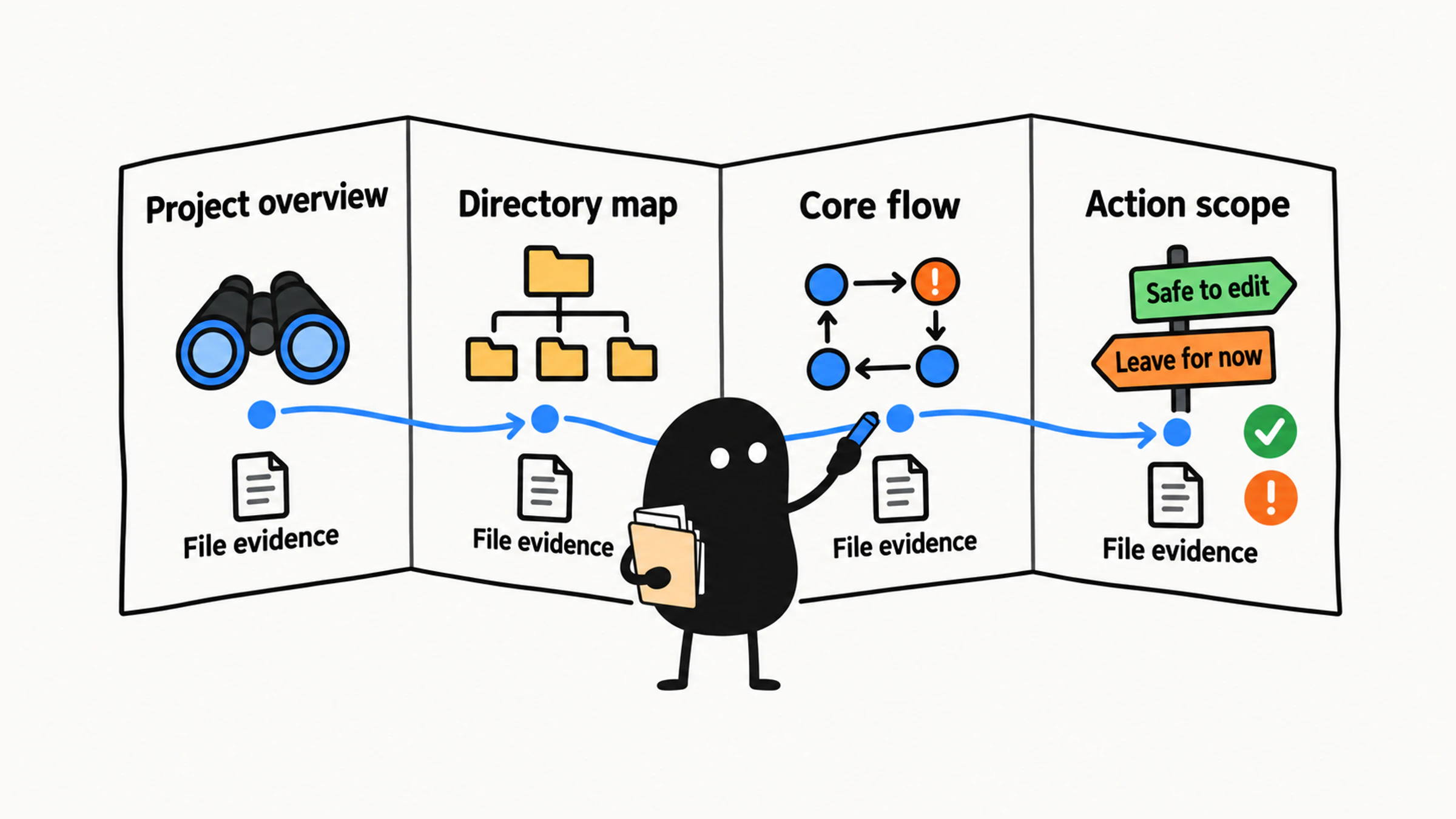
The last layer turns the first three into decisions: which file you might change, what that affects, and how you'll check it. An overview and a list of folder names won't support a plan on their own.
Try holding "it's a web app" up against those four layers. It gives you a rough category and leaves you far from knowing what to change. Ask for the evidence, the main entry point, and the source folders. Then trace a core flow and find the tests and the risky areas. That's when the map starts to fill in.
03 Open With a Tour Request
Frame the task as a guided tour, so Claude Code knows it only needs to explain things and shouldn't change anything.
You might open with:
Read-only investigation: don't modify files, install dependencies, start services,
or run project scripts, and don't read keys or private files.

Your job right now is to help me understand this project. Don't write any code yet.
Act like a patient tour guide: build a map of the project first, then answer my questions.
For each conclusion, tell me which files or folders it's based on.
"Tour guide" sets the role, but you still need to spell out the requirements: read-only, build a map, cite files. That's what lets you separate facts about the project from guesses.
Then ask for the overview:
Start with an overview of the project:
1. What does this project mainly do?
2. What kind of project is it?
3. Who is likely to use it, and for what?
4. Which files did you base this on?
That last question ties every claim to a file, so you can check them one by one.
04 Structure: How the Project Is Organized
The overview tells you what the project is. The folder map tells you how it's organized. Keep going:
Build a folder map of this project.

Requirements:
1. Explain only the main folders, not every file
2. Say what each folder is responsible for
3. Mark the folders a beginner should look at first
4. Mark the folders a beginner shouldn't touch yet
5. If you're not sure about something, say "not sure"
Map the main branches first, then go deeper only where the task needs it. Listing every file buries what each module is actually for. Docs and build output that have nothing to do with your question can wait.
These are the places to find:
| Location | What you need to know |
|---|---|
| Source folder | Where the actual business logic lives |
| Entry file | Where the project starts running |
| Config files | Framework, build, dependency, and environment settings |
| Test folder | Where the project's behavior gets checked |
| Docs | README, development notes, API notes |
| Scripts folder | Scripts for starting, building, deploying, and maintenance |
The folder map shows you where a task begins. To change page copy, find the component. To understand login, follow the route, the form, the API call, and the auth logic. To add a test, look at the existing test folder and how its tests are written.
05 Trace One Flow From Start to Finish
Even with a folder map, you still can't see how the files work together. Pick one concrete flow, such as creating a to-do or submitting a form, and follow it all the way through: what triggers it, what handles it, how the state changes, and what comes out the other end.
You can ask:
Trace one core flow in this project: [name the flow].

Tell me:
1. Where does a user or program trigger this flow?
2. Which files and functions does it go through?
3. What does each step roughly do?
4. How does data get passed between steps?
5. If I wanted to change this flow, which files would most likely be involved?
6. Which parts are high-risk and shouldn't be changed directly by a beginner?
Tracing a flow means checking events, function calls, and how data is handed off. A list of file names isn't enough. When every link has code behind it, you can tell whether a change will ripple into what comes after.
Back to that hypothetical to-do app. You've found three files, and now you need to see what the code in them actually shows:
| File | What the code actually does | Which link it supports |
|---|---|---|
main.js | The click handler calls addTask(input.value), then passes the returned array to renderTasks | The click hands the input to task handling, then the result to the display |
tasks.js | addTask pushes the input onto an in-memory array and returns it | A new task changes the list in memory |
task-list.js | renderTasks redraws the page list from the array it receives | The updated list appears on the page |
With that code in hand, you can draw the flow:
Click button → read input → update in-memory array → render listNothing here writes to disk or a database, so "tasks survive a refresh" needs a separate check. And if main.js only imported addTask without calling it, there would be a gap between the click and the task being added, too. Every arrow needs code to back it up. Wherever one doesn't have it, mark that spot for follow-up.
06 Find Out How to Run and Test It
Before changing anything, find out how the project is run and tested, so your plan has a clear way to check the work. This round, only locate the config and scripts. Don't run anything. If you can't find something, or can't tell what it does, note it as unconfirmed.
You can ask:
Based on the project files, figure out which commands this project probably uses to run, test, build, and check code.

Answer in this format:
1. Command to start the dev environment
2. Command to run tests
3. Command to build the project
4. Formatting or lint command
5. Which files each command comes from
6. Which commands you're unsure about and shouldn't run directly
Once you find a command, read which scripts it actually runs. This round is for looking only. Even a command called test might connect to outside services, so whether it's safe depends on what it really does.
In a JavaScript project, start with package.json. In a Python project, check pyproject.toml, requirements.txt, and pytest.ini. Some projects use a Makefile. Go by the actual files, write down each command with its source, and mark it "not run yet." When you're later cleared to run it, judge it by the real output.
07 Pick Your First Tasks From the Map
The whole point of the map is to help you act. Filter your first tasks with four conditions:
Small scope
Low risk
Visible result
Easy to verify
You can ask Claude Code to suggest some, based on what it's learned:
Based on what you now know about this project, suggest 5 tasks that would suit a beginner.

Requirements:
1. Each task has a small scope, ideally 1 to 3 files
2. No database migrations, payments, permissions, deployment, keys, or other high-risk areas
3. For each task, say which files would likely change
4. For each task, say how to verify it
5. Order them from "best for a beginner" to "a bit more challenging"
Good beginner tasks include changing page copy, updating the README, adding a simple test, tweaking a low-risk style, handling an edge case in an existing function, and fixing a small bug you can reproduce reliably.
Save these for later: refactoring the auth module, changing the database schema, touching payment logic, editing production deploy scripts, deleting large chunks of old code, and changes that cut across several subsystems.
The number of files is only a hint, and risk needs its own judgment: even a handful of files can involve auth or payments. Pick tasks whose impact you can see, verify, and roll back. Once you have one, the next step is to review the plan Claude Code writes for it.
08 Turn Your Findings Into Project Notes
Write up what you found as short project notes that tie together the file evidence, the flows, the checks, and the candidate tasks, so you can come back to them when you plan:
| Section | What to write down |
|---|---|
| Overview | What the project is for and who uses it |
| Folders | What each one does, the entry points, and what not to change |
| Flow | What triggers it, how it's handled, how data moves, what comes out |
| Commands | Where each one comes from and whether it's actually been run |
| Candidate tasks | Scope and how to verify |
When you're done, make sure every conclusion has file evidence and every flow holds together. Then check that each command's source and run status are clear, and that every candidate task can be verified. Mark anything without evidence as unconfirmed, like that "survives a refresh" arrow: leave it blank until you find the code that fills it in.