
DeepDojo.AIPublished 2026-11-10Updated 2026-11-10中文
Start Your First Claude Code Session Read-Only
You start Claude Code in a project for the first time and ask what the project does. The answer comes right back: "This is a web app for managing user data, backed by PostgreSQL." Sounds authoritative. But which files did it actually read? Did "PostgreSQL" come from a config file, or did it spot a folder called data/ and guess?
First sessions tend to go wrong at moments exactly like this one, when everything seems to be going smoothly. You don't know yet which folder it's in or which files it found, and you're already asking it to start services, fix bugs, or treat an unsupported summary as fact. Everything that comes after, from choosing files to writing a plan, inherits that error.
So give the first session a single job: from the right folder, have it explore without changing anything, and make it back up every conclusion with a file. That takes four steps:
- find the project root, start in plan mode, and check which mode the interface actually shows;
- write a clearly scoped read-only request that keeps secrets and private files out;
- work from purpose and tech stack down to entry points, checks, and possible tasks;
- finish with a session record where every item cites its evidence.
Nothing gets edited or installed this round. What you get is a project map you can trust, and picking tasks, planning changes, and verifying results all build on it.
01 Use the First Session to Look Around
Start read-only. Confirm the project folder, the permission mode you're actually in, and the evidence behind each answer before you think about changes. At this point you have no idea which files Claude Code has found, so starting services or fixing everything is premature.
Follow this path:
Start Claude Code in the real project folder
  ↓
Make sure it's in the right project
  ↓
Ask about purpose, structure, and evidence
  ↓
Write down what it concludes
  ↓
Leave the files alone for now
If your first session ends with a project map backed by evidence, it's already done its job.
02 Start From the Project Root
Where you start Claude Code determines where it starts looking. From a subfolder, it can miss config files that matter. From a parent folder holding several projects, it can wander into unrelated code. Confirm the project root and the scope of the task before it reads anything.
The starting folder only sets a starting point. Access limits come from other settings, so what the tools can reach depends on your actual permissions and environment.
First, check where your terminal is:
| Where you are | What can go wrong |
|---|---|
| A subfolder inside the project | It can't see config or code higher up |
| A parent folder with several projects | Files from other projects get mixed in |
| A system folder or Downloads | Hard to tell where the investigation should stop |
A simple way to picture it:
The starting folder is the job site Claude Code walks into.So which folder should you start from? Usually the project root. Look for files like these:
package.json
README.md
pyproject.toml
requirements.txt
src/
app/
test/
.git/
The telltale files vary by project type. Look at config files, the source entry point, and version control together, and the root is usually obvious.
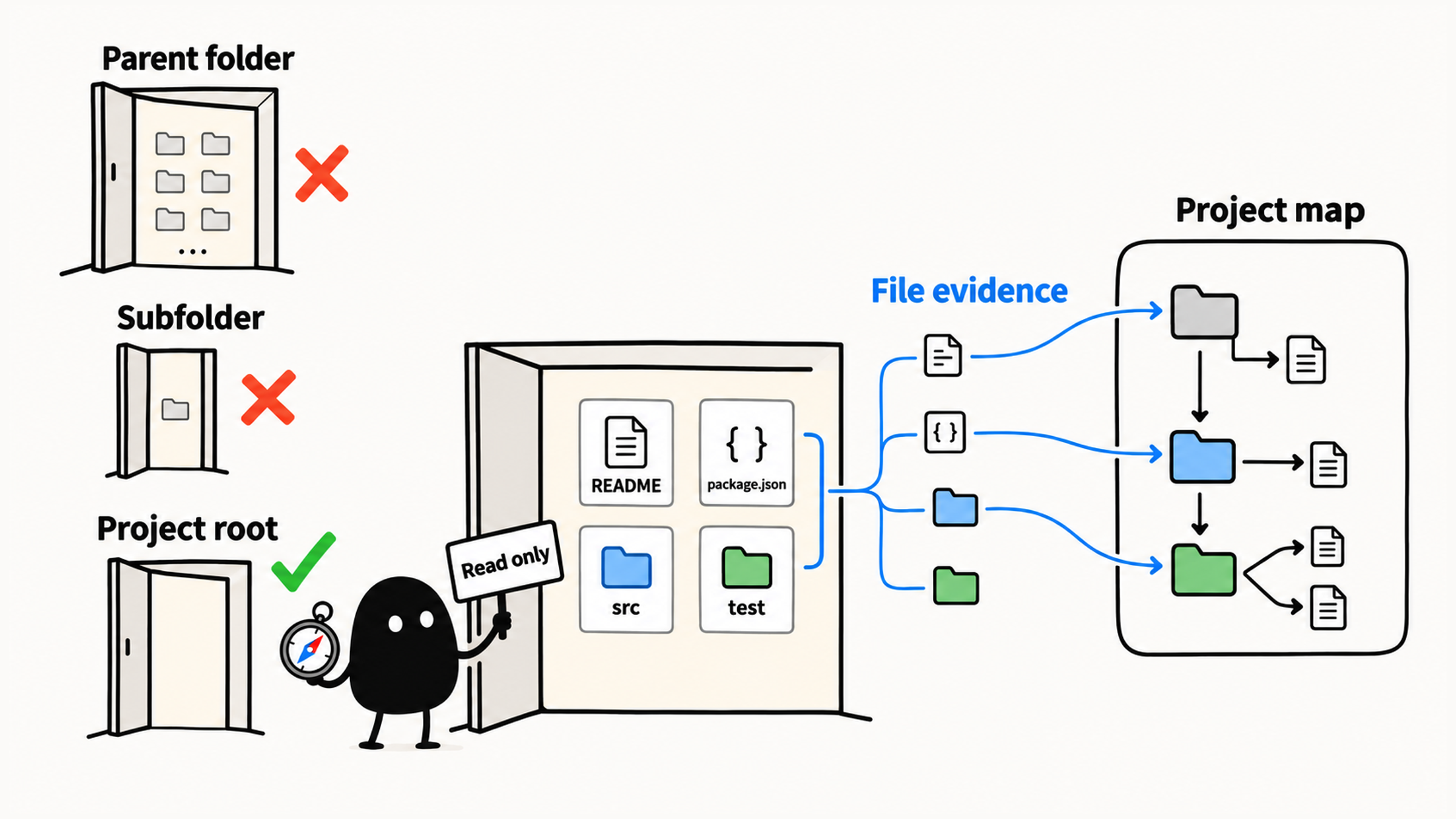
Move into the project folder in your terminal, using your own path:
| Terminal | Show where you are | Change folder |
|---|---|---|
| macOS, Linux, PowerShell | pwd | cd "project-path" |
| CMD | cd | cd /d "project-path" |
For a look-only session, start like this:
claude --permission-mode planThe first time, Claude Code may walk you through signing in. Once the session starts, check the working folder, run /help to see the basic commands, and answer three questions:
Is the working folder my project folder?
Did Claude Code start an interactive session?
Do I know how to get help and how to exit?
/help lists the commands in your version, and /exit ends the session. Even if you started with the plan flag, check which mode the interface actually shows. The official permission modes page says plan mode runs shell commands to explore and writes a plan, but doesn't edit your source. You still need to check whether those exploration commands have side effects and which files it's allowed to read.
03 Write a Read-Only Request With Clear Limits
Make the scope explicit in your first request. "Tell me about the project" says nothing about whether it may install packages or run scripts, so state the read-only limit and what you want explained in the same message.
For example:
Don't modify any files, install dependencies, or run risky commands yet.
Read this project and explain, in plain language for a beginner:
What does this project mainly do?
This gets it reading and makes clear what's allowed this round. Keep .env files, keys, and private documents out of bounds. If you need to understand the environment setup, start with an example file that has no real secrets in it. Every follow-up question keeps the same limits.
Once you know the purpose, dig into the tech stack, the entry points, and how the modules connect. A login page, for example, doesn't tell you where authentication happens: it could be in the frontend, the backend, or a third-party service. If you haven't pinned that down, you can end up changing the wrong layer even when the code runs. The next round of questions fills in that evidence, still without touching anything.
04 Narrow Down Step by Step
Check the evidence after each round, then narrow from the big picture to specific places:
| Step | What to find out | Where the evidence is |
|---|---|---|
| Purpose | What problem it solves and who uses it | README, pages, main features |
| Tech stack | Languages, frameworks, and tools | Dependencies, config, source |
| Entry points and folders | Where it starts and how the modules split the work | Entry files and actual calls |
| Running and checking | How it might start, test, or build | Project scripts and config, not run yet |
| Possible small tasks | Which change is small, low-risk, and easy to check | Related files, impact, how to verify |
Every question keeps the read-only and sensitive-file limits from your first request. Key conclusions should point to specific file contents, and anything with thin evidence gets marked "unconfirmed." Finding a command tells you it exists. Whether it actually works, you won't know until it runs.
For a first session, reading the files tied to your questions is enough. To turn this into a full project map, including tracing a feature end to end and picking tasks, see how to use Claude Code to learn an unfamiliar codebase.
05 Back Every Conclusion With a File
Hold three lines in the first session: no file changes, no commands you don't understand, and no treating an unsupported summary as more than a lead.
If it suggests running a command, ask what it's for and whether it edits, installs, deletes, or affects anything outside your machine. Stay in read-only mode for this round. As for that opening line, "a web app for managing user data," ask which files it's based on and what in them supports it.
| What it saw | What you can conclude |
|---|---|
package.json lists React, and the dev script runs vite | The project uses React and Vite and has a dev server command |
| A start script it hasn't run | You know how it's supposed to start; whether it actually does is unverified |
Just a data/ folder | The database is still unknown; claiming PostgreSQL needs a matching dependency, config, or code |
A file path only tells you where to look. What counts is whether the file's contents back up the conclusion. For deciding which files it may read and which commands to approve, see whether to approve a Claude Code permission request.
06 Write Down What You Found
Before you wrap up, record what you confirmed. You'll need this evidence when you pick a task and plan a change. A vague project description would just send you back to investigate again.
After the first session, note down:
- the project's name and type;
- the tech stack;
- the entry points and key folders;
- likely commands for running and checking it;
- low-risk tasks you could try.
Attach the evidence to each item, and mark anything missing or unconfirmed as such.
Then check two things: every conclusion is backed by a file, config, or command, and the session stayed read-only, with no edits, installs, or risky commands. If both hold, this record is ready to carry you into the project map and your first change plan.