
DeepDojo.AIPublished 2026-11-07Updated 2026-11-09中文
Do You Need to Label AI Images? A Pre-Publish Check
Before you publish, look at the image the way an ordinary viewer would. Could they take it for a news photo, evidence from the scene, a real person's experience, or an actual product shot?
Then add the explanation that closes the gap. Once the image is done, a few things still need confirming: did the people in it agree, how will viewers read it, how does the platform require it to be labeled, and who is responsible if something goes wrong.
Laws, platform terms, and model licenses get updated, and they vary by region. A sequence of checks follows. For high-risk projects, rely on the official documents in force at publication time and on professional advice.
The check can follow a five-layer chain, where the earlier a problem is found, the cheaper it is: whether the image shows a real person or a minor, whether viewers might misread it, how to label it as AI-generated, who reviews it at what risk level, and who is responsible if something goes wrong.
Write down the division of responsibility before the project starts. At publication, keep an evidence package with the source of materials, licenses, and review records, so you have them when you need to trace something back.
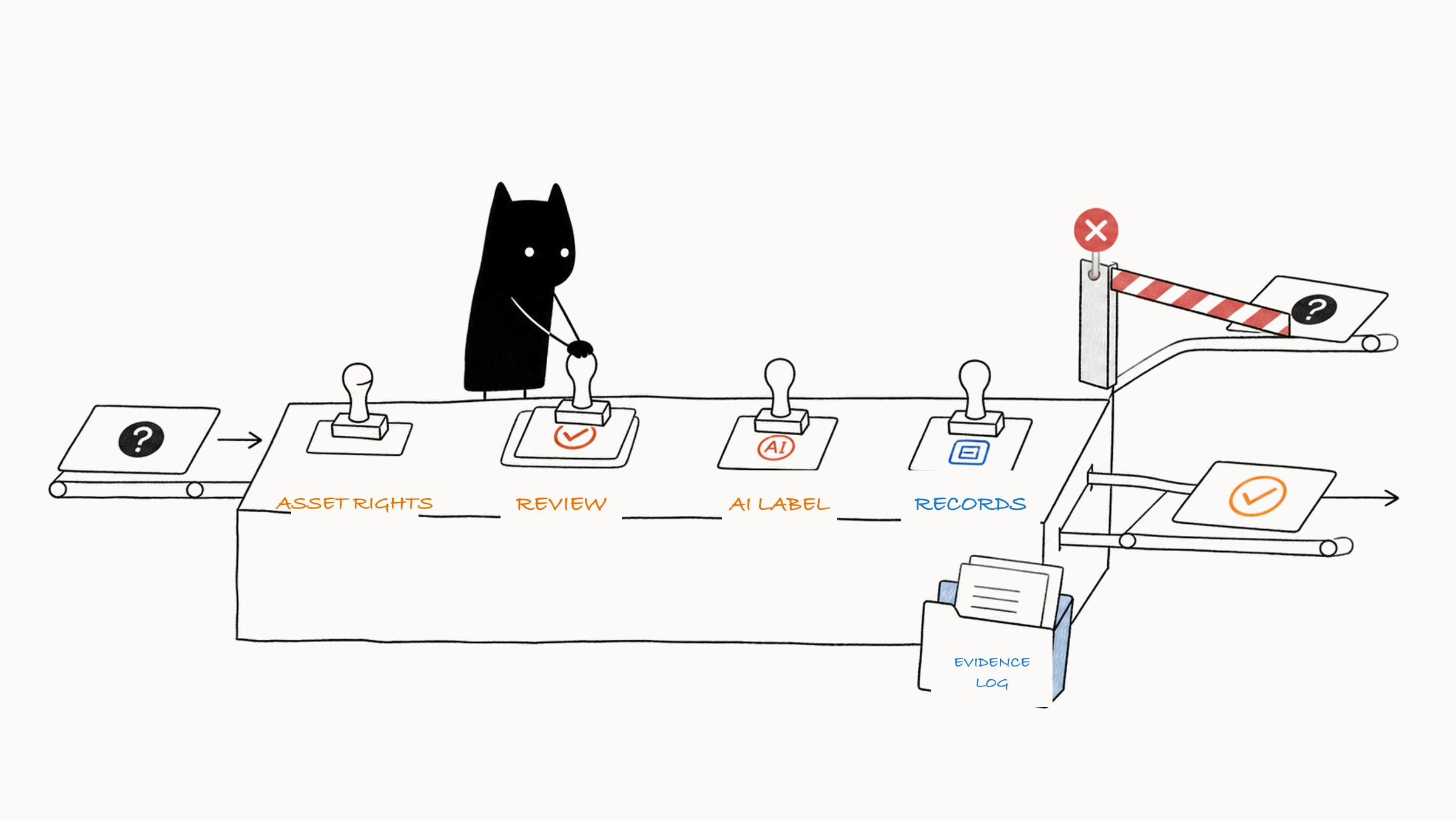
01 Five layers, and the earlier you catch a problem the cheaper it is
Risk checks run through input, generation, output, and publication, and the license side of material and tools is covered in can AI-generated images be used commercially. Before publishing, confirm along five layers:
- Input: sources and licenses are recorded, and client, personal, and brand permissions cover the current use.
- Tool and model: account terms, licenses, and data handling requirements have been checked.
- Process: the prompt and references stay within bounds, and impersonation and high-risk uses are avoided.
- Output: similarity, trademarks, likeness, products, and safety have been checked, and official information comes from reliable files.
- Publication: regional and platform labels are applied, necessary reviews have passed, and the final files and the process can be traced.
The earlier a problem is found, the lower the cost of adjusting.
02 Using images of real people and minors
Before you use a photo of a real person for an avatar, outfit change, face swap, digital double, or ad, get that person's clear consent for this use. Record what is allowed, which platforms, for how long, in which regions, and how consent can be withdrawn. When the client supplies the photo, also confirm that the client has the right permissions.
Public figures and celebrity likenesses more easily cause confusion about endorsement, news, and identity. Advertising, politics, news, finance, medicine, and similar settings carry more risk, so use authorized real material and review strictly.
When minors are involved, apply a stricter standard to whether the likeness, clothing, pose, scene, and use are age-appropriate, and rule out sexualization, horror, violence, and privacy exposure. When you use real children's material, also get the guardian's consent and limit who can view it and how it's stored.
After you generate a fictional person, check whether it might be taken for a real one. If it looks like a celebrity, or like someone the client hasn't authorized, regenerate it or change the features that invite confusion.
03 Let viewers see whether an image is generated
These settings carry higher risk: disasters, accidents, war, public events, medical outcomes, financial returns, before-and-after product comparisons, a real person's statements, and identity documents. A generated image in these settings can shift public judgment, so use real, verifiable information and add a clear note.
For concept renderings, imagined buildings, and product concept images, say outright that they are concepts or imagined. Let viewers tell what has been built, photographed, or released. Claims about effects and results in an ad need a factual basis before AI visuals express them.
Face swaps without the person's consent, impersonation, fraud, fake news, forged proof, and similar uses should stop. When a project's intent, material source, or publishing context looks suspect, pass it to the person in charge and to professionals for review.
04 Apply AI content labeling under current rules
When you publish generated or synthetic content online in China, check the current Measures for Labeling AI-Generated Synthetic Content and the labeling features your platform provides. The measures took effect on September 1, 2025. They distinguish explicit labels that users can perceive from implicit labels in file data, and they require users to declare generated or synthetic content when publishing and to use the labeling features the service provider supplies.
When you actually publish, check four steps:
- Decide whether the image counts as generated or synthetic content.
- See whether the generation tool already added explicit or implicit labels.
- Use the AI-content declaration and labeling features that the publishing platform provides.
- Keep the original file and generation records, and don't delete, tamper with, or forge the required labels.
Other regions and platforms may have their own disclosure rules. Ads, political content, news contexts, and highly realistic people usually face stricter requirements. Before publishing, check the current official rules, and record the date of checking and how you complied.
Technical specifications from C2PA, including Content Credentials, can record source, edit history, and signatures to help trace where an image came from. Whether the facts shown are true and whether the copyright and content comply still need checking separately.
05 Match review to the risk level
You can arrange review by this table:
| Risk | Common projects | What is required |
|---|---|---|
| Low | Practice with your own material, abstract backgrounds, fictional concept images with no brands | Follow platform content rules and basic labeling requirements |
| Medium | Public illustrations, ordinary commercial posters, client proposals, ads with fictional people | Record sources, check terms, clear brands, and finish publication labeling |
| High | Real people, real products, medical and financial content, education involving minors, news and politics, highly realistic before-and-after effects | Review by the person in charge, the client, and the relevant specialists, with legal advice where needed |
| Extreme or prohibited use | Impersonation, fraud, non-consensual intimate content, sexualization of children, forged evidence, malicious fake news, clearly illegal content | Stop immediately |
Choose tools, material, reviewers, and records to keep according to risk. The more an image could affect others' rights, public judgment, or purchase decisions, the more you should use real material, limit free generation, and add specialist review.
06 State responsibilities before the project starts
Before the project starts, write the division of work into a contract or confirmation document: whether AI is used and at which steps, who provides material, who confirms licenses, where the finished image will be published, and who reviews and releases it after delivery. Agree on the scope of delivery beforehand too: which versions of the final images and source files you provide, whether you attach generation records, license confirmations, AI notes, and labeling methods, and which limits the client still needs to recheck.
Confirmation has to reach the person who knows the facts. The client checks products, prices, claims, and copy. The design side checks image processing and files. High-risk legal judgments go to legal or compliance staff. "Everyone looked at it" doesn't say who confirmed what. Sort that out in advance, and at each step you know whom to ask.
07 Case: an opening poster for a real coffee shop
Say you're making an opening poster for a real coffee shop. The client provides photos of the shop, the logo, the menu, and a group photo of the staff, and AI is to extend the space and adjust the light.
Start with the files the client hands over. Confirm that you have rights to the shop, logo, menu, and staff portraits, and whether the staff consent covers ad publication. Then the tool: whether the current account and editing features permit commercial use, and whether this client material may be uploaded.
Only after those conditions are met do you set the generation scope. The background and light can be extended, with faces, the logo, and menu text locked. The prompt says "keep the staff's identities, the shop's structure, and the brand assets," and the background signs and passers-by stay out of the generation area. After editing, check item by item the staff, the shop, the menu prices, and the logo, and look for background trademarks and similarity risk. Official text and event details are laid out in design software. At publication, use the platform's AI declaration feature and add the label under the applicable rules, and save the client's confirmation, sources, originals, edited versions, and screenshots of the post.
If the client asks you to add a celebrity who wasn't there to the group photo, or to disguise an ordinary event photo as a news report, stop that direction and explain the likeness, endorsement, and misleading risks. How the whole process runs through a project is in an AI poster from request to delivery.
08 Keep a traceable evidence package
When you need to look back later, what you usually look for first is where the material came from, how each version was changed, and who confirmed it. Put those files together in four groups and you have a traceable evidence package:
- Sources: original shots, sketches, client material, material licenses, purchase proof, and likeness consent.
- Rules: tool policies, model licenses, and the matching check records.
- Production: the Brief, prompts, references and settings, reasons for choosing images, local edits, and layered files.
- Review and publication: similarity, brand, product, and safety checks, confirmations from each side, AI labels, final files, and screenshots of the post.
Store files by project and date, and set access limits for sensitive portraits, unreleased products, and contract material. When delivering externally, provide only what the contract specifies, and keep the necessary tracing material internally. When you organize these records, think first about whether you can find the basis later. A tidy folder is nice, and being able to answer these questions is more useful. When rights are disputed, judge by the specific facts and the applicable rules.
After one check, if the use changes later, check again. When rights are unclear, a license is disputed, a brand looks similar, or the project involves medical or financial promotion or cross-region publication, pause and hand it to the relevant specialists. Leave time for confirmation in the delivery schedule, and record the conclusion, the person responsible, and the scope that applies. If these conditions change afterward, assess again.
If you find a missing label, a material dispute, or a factual error after publishing, stop distribution, save records, and notify the person in charge. Correct it through the proper process, and write the result back into the file.