
DeepDojo.AIPublished 2026-11-12中文
Which Claude Code Settings File Takes Effect?
Your user settings say "model": "sonnet" and your project settings say "opus". The project also has a rule denying reads of .env, so you add an empty deny array to your local settings to clear it. In the next session, the model is opus and .env is still blocked.
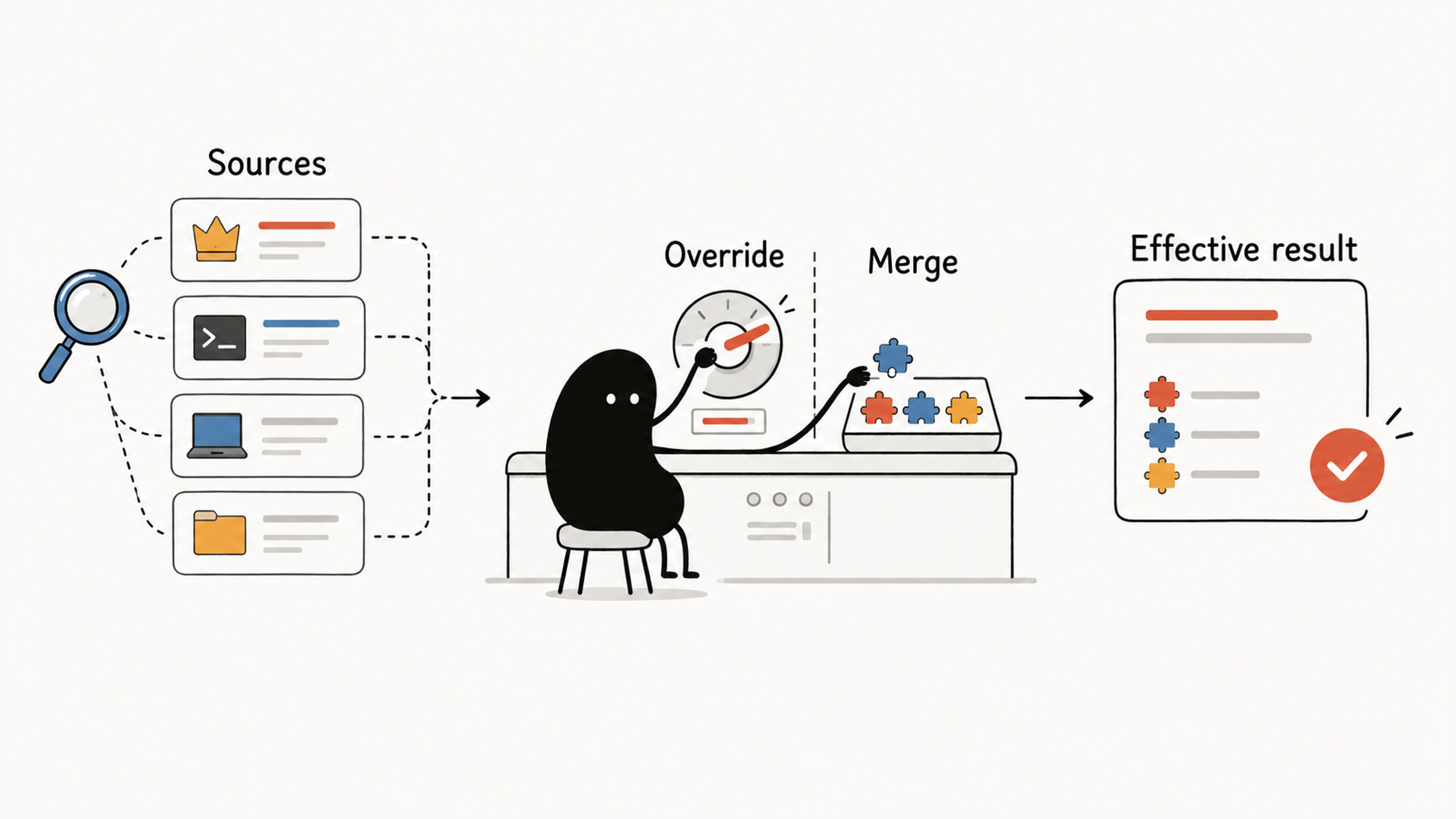
Claude Code settings can come from several files at once: your user settings, the project settings your team commits, your local settings for this machine, and sometimes managed settings your organization deploys. Open any single JSON file and you still can't explain what the whole session ends up using.
What really trips people up is that different fields combine in different ways:
- a field that holds one value, like the model name, is replaced by the higher-priority source;
- objects such as environment variables are merged key by key;
- lists such as permission rules are combined, so no file can remove another file's entries.
That third point is why the empty array couldn't clear the deny rule. The fix takes three steps: find every source this session loaded, work out the result field by field according to its type, and compare against the real state with /status, /permissions, and related commands.
01 Pick the File by Sharing Scope
Decide who a setting should affect before you choose a file. Personal preferences, team standards, and machine-specific differences need different sharing scopes:
| Scope | File Location | Affects | Common Uses |
|---|---|---|---|
| User | ~/.claude/settings.json | Your sessions in all projects | Theme, default model, personal plugins, general preferences |
| Project | .claude/settings.json | All collaborators in this repository | Team permissions, Hooks, shared plugins, consistent tool behavior |
| Local | .claude/settings.local.json | You in this repository | Machine differences, personal experiments, settings that shouldn't be shared |
An administrator can also deploy Managed Settings to enforce security and compliance requirements across an organization. They take the highest priority, and personal or project settings can't override them. As a regular user, start by checking what your organization already enforces; the Setting sources line in /status names the managed source that applies to you.
For example, a team checking Hook goes in project settings and gets committed, a machine-specific port goes in local settings, and organization policy belongs in Managed Settings. If you create local settings by hand, check .gitignore so machine configuration stays out of commits.
02 Which Source Wins for the Same Field
Even with the right files, the same field can appear in more than one. Start with fields that hold a single value, called scalars, such as model. For these, sources are chosen in this order:
Managed Settings
  ↓
Command line (settings passed with --settings at launch)
  ↓
.claude/settings.local.json
  ↓
.claude/settings.json
  ↓
~/.claude/settings.json
From highest to lowest: for the same scalar, the project overrides the user, and local settings can override the project. The Claude Code settings documentation gives the same stack: managed settings, command line, project local, shared project, user, with a key at a higher level overriding the same key anywhere below.
The command-line level affects only the current session, which makes it handy for temporary changes. Single-value flags like --model can also override the default model for a session, though the docs note that such flags are handled per key and aren't part of the stack itself. Managed Settings are organization policy: neither your own files nor --settings can override a managed key.
One more source is easy to miss: environment variables. The docs point out that they aren't a level in this stack, and which one wins is decided pair by pair. For example, ANTHROPIC_MODEL exported in your shell applies over the model key from any file.
03 Three Field Types, Three Ways to Combine
Settings resolve field by field. A higher-priority file doesn't replace the others wholesale, and each field type combines differently:
| Field Type | How the Result Is Produced |
|---|---|
| Scalar (such as a model name) | The higher-priority value replaces the lower one |
| Object (such as an environment variable map) | Each layer is merged key by key |
| Rule array (such as permission lists) | Entries from every source are combined and deduplicated |
The docs are explicit about lists: when the same list key appears in more than one file, Claude Code combines the lists instead of picking one, so each file can add entries without removing another file's. A few keys that hold model lists follow their own rules, but everyday permission lists are combined.
Find every loaded source first, then work field by field. After permission arrays merge, check how they match: adding an allow rule can't undo a deny rule that already matched.
04 Work Through the Opening Example
Suppose these three files exist. Find the sources first, then calculate each field:
~/.claude/settings.json
  model: "sonnet"
  permissions.allow: ["Bash(pnpm lint)"]

.claude/settings.json
  model: "opus"
  permissions.allow: ["Bash(pnpm test *)"]
  permissions.deny:  ["Read(./.env)"]

.claude/settings.local.json
  permissions.deny:  []
Field by field:
| Field | Final Result | Why |
|---|---|---|
model | opus | Local settings don't set it, so the project value beats the user's sonnet |
permissions.allow | Both lint and test rules | Rules from both sources accumulate |
permissions.deny | The .env read denial stays | An empty local array can't clear an existing entry |
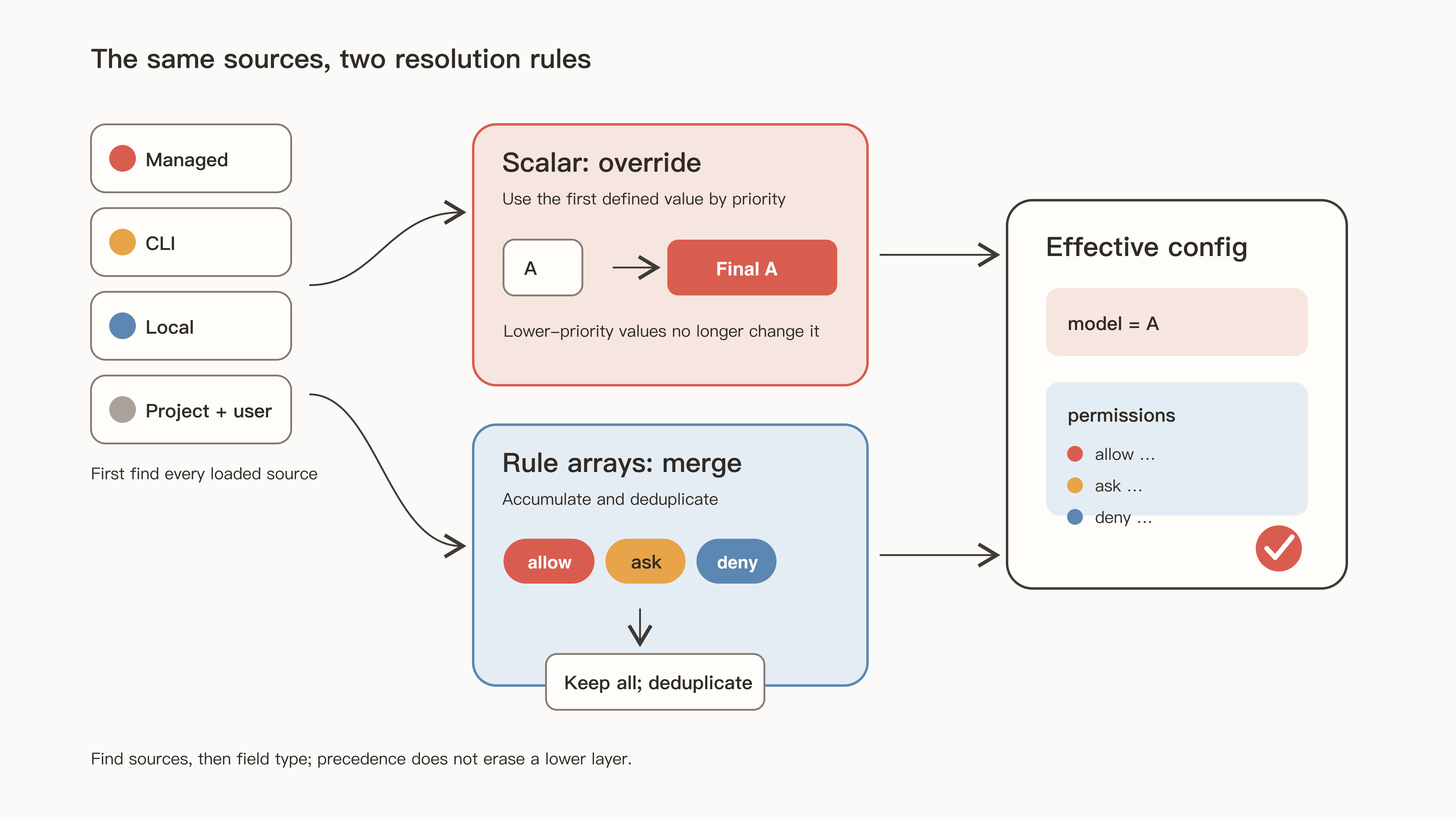
Once you've worked it out, open /permissions and compare with the actual merged result. If they don't match, go back and look for a source you missed. Understanding one JSON file doesn't explain the whole session.
After permission lists merge, each call still has to match against deny, ask, and allow in order. That step is covered in why Claude Code denies a command you allowed.
05 Check the Real State with Commands
Editing JSON by hand works well for team review and version control. Built-in commands confirm the final state.
| Command | Main Use |
|---|---|
/config | Open the settings interface; also accepts key=value to change one setting |
/model | Switch the session model; the choice is saved as the default for new sessions |
/status | See which Settings sources are loaded |
/permissions | See the final merged permission rules and where each came from |
/hooks | See the active Hooks |
/context | See what is taking up context |
/doctor | Check installation and configuration problems and propose fixes after confirmation |
claude doctor | Print read-only diagnostics without starting an interactive session |
The official configuration debugging guide uses the same commands to narrow down problems: /permissions shows the allow and deny rules currently in effect, and /status shows the active settings sources, including whether managed settings apply.
After changing a file, check how the setting takes effect. The docs explain that Claude Code watches settings files and applies most edits to a running session without a restart, including permissions, hooks, and credential helpers like apiKeyHelper. Saving the file is only half of it; confirm the actual result.
06 When a Setting Doesn't Take Effect
When a setting doesn't work, start from the sources that actually loaded, and avoid changing several parameters at once. Check loading, validation, precedence, and resolved results in this order:
- Use
/statusto confirm which user, project, local, or Managed Settings actually loaded. - Use
/doctororclaude doctorto check JSON syntax, field types, and invalid entries. - Search higher-priority scopes for the same field.
- Check whether command-line flags or environment variables override the file value.
- Use the matching command to see the resolved result for permissions, Hooks, and MCP.
Errors and warnings have different reach:
| Result | Example and Next Step |
|---|---|
| Settings Error | A trailing comma breaks JSON parsing, so the whole file may not load; fix the syntax before checking other settings |
| Settings Warning | An invalid entry such as Bashh(pnpm lint) is skipped; fix it and confirm with /permissions, while the file's other valid settings keep working |
The settings documentation describes the two this way. A Settings Error means a file has invalid JSON or a value the schema rejects; at the start of an interactive session, a dialog lets you fix it, exit, or continue without the broken file. A Settings Warning means only individual entries failed; Claude Code skips them and keeps the rest of the file in effect.
After fixing a typo and clearing the warning, still look for the entry in /permissions or the matching command, then retest the behavior that depends on it. /status only proves a source loaded. The docs also note that it doesn't show which file supplied each key, so it can't prove a specific setting took effect on its own.
Find every source, work field by field, then confirm with commands. Note each setting's purpose and source, and the next time a change "doesn't work," you'll know where to start. For picking and writing the fields themselves, read what each common Claude Code setting does.