
DeepDojo.AIPublished 2026-11-12中文
Block Claude Code From Editing .env With a Hook
To keep Claude Code away from .env and secrets/, the project adds a PreToolUse Hook, and it works fine on the normal paths you test. Then one day an event arrives missing a field, the script throws a Python exception and exits with code 1. Claude Code shows a warning, and the write goes through anyway.
This is the trap protection Hooks fall into most often: they let things through when they fail. Ordinary scripts use exit code 1 to signal failure, but on most Hook events, exit code 1 is only a non-blocking error. A few other gaps are easy to miss:
- comparing only the raw path string lets something like
src/../../secrets/key.pemslip past; - intercepting only Edit and Write leaves writes inside Bash unchecked;
- when an HTTP service does the checking and returns a 500 or can't be reached, that doesn't block by default either.
A protection Hook that actually holds has to block on failure: a missing field, unparseable input, or a path outside the project all go down an explicit blocking branch that returns exit code 2. Static sensitive paths go to permission rules first, and the Hook only adds finer checks; process-level access still belongs to the sandbox. Here's the complete script, followed by exit codes, handler choice, and script review.
01 Give Static Paths to Permission Rules First
Protect static sensitive paths with permissions.deny first. When the project needs finer path checks and feedback, add a PreToolUse script on top. Deny rules live in configuration and are enforced by Claude Code directly, which is simpler and more reliable than a script; see 5 common gaps in Claude Code permission rules.
To block an operation, you must use PreToolUse, which runs before execution; by PostToolUse, the file has already changed.
02 A Protection Script That Blocks on Failure
Create .claude/hooks/protect-files.py:
#!/usr/bin/env python3
import json
import os
import sys
from pathlib import Path


def is_protected(path: Path) -> bool:
    return any(
        part in {".git", "secrets", ".env"} or part.startswith(".env.")
        for part in path.parts
    )


def main() -> int:
    try:
        payload = json.load(sys.stdin)
        if not isinstance(payload, dict):
            raise ValueError("event must be an object")
        tool_input = payload.get("tool_input")
        if not isinstance(tool_input, dict):
            raise ValueError("tool_input must be an object")
        root_value = os.environ.get("CLAUDE_PROJECT_DIR")
        cwd_value = payload.get("cwd")
        raw_path = tool_input.get("file_path")
        if not all(isinstance(value, str) and value.strip()
                   for value in (root_value, cwd_value, raw_path)):
            raise ValueError("project directory, cwd and file_path are required")
        if not Path(root_value).is_absolute() or not Path(cwd_value).is_absolute():
            raise ValueError("project directory and cwd must be absolute")
        project_root = Path(root_value).resolve()
        candidate = Path(raw_path)
        if not candidate.is_absolute():
            candidate = Path(cwd_value) / candidate
        resolved_path = candidate.resolve(strict=False)
        relative_path = resolved_path.relative_to(project_root)
        if is_protected(Path(raw_path)) or is_protected(relative_path):
            raise ValueError("protected path")
    except (ValueError, TypeError, OSError, RuntimeError):
        print("Blocked: invalid input, protected path, or path outside the project",
              file=sys.stderr)
        return 2
    return 0


if __name__ == "__main__":
    raise SystemExit(main())
Then register it in project Settings:
{
  "hooks": {
    "PreToolUse": [
      {
        "matcher": "Edit|Write",
        "hooks": [
          {
            "type": "command",
            "command": "python3",
            "args": [
              "${CLAUDE_PROJECT_DIR}/.claude/hooks/protect-files.py"
            ],
            "timeout": 10,
            "statusMessage": "Checking protected paths"
          }
        ]
      }
    ]
  }
}
The example runs with python3, so it needs neither jq nor an executable bit on the script. The target machine must have Python; you can switch to Node.js if that fits the project's existing dependencies.
03 How the Script Handles One Path
As you read the script, follow how it handles a single path. The event JSON arrives on stdin, cwd decides how relative paths resolve, and CLAUDE_PROJECT_DIR marks the project boundary. Check both the raw form and the resolved result.
The relative_to(project_root) step matters: if the resolved path leaves the project directory, it raises ValueError and lands in the blocking branch. Compare src/../../secrets/key.pem after Path.resolve(), never by its raw string.
A missing field or unparseable input should also go down an explicit blocking branch that returns 2. If the script just throws a Python exception, the usual exit code 1 may not block at all. The pass-through in the opening happened because the exception wasn't caught and the script exited with 1.
Once protected paths are being blocked, look back at what isn't covered. This only hooks Edit and Write, so writes inside Bash still get through, and the path can change between the check passing and the actual write. Process access boundaries still need the sandbox: per the sandboxing documentation, the operating system enforces the sandbox on Bash commands and their child processes, so it holds regardless of what the model chose to run. And returning 0 only means this script didn't block; the permission checks that follow still apply.
04 The Exit Code and Output Protocol
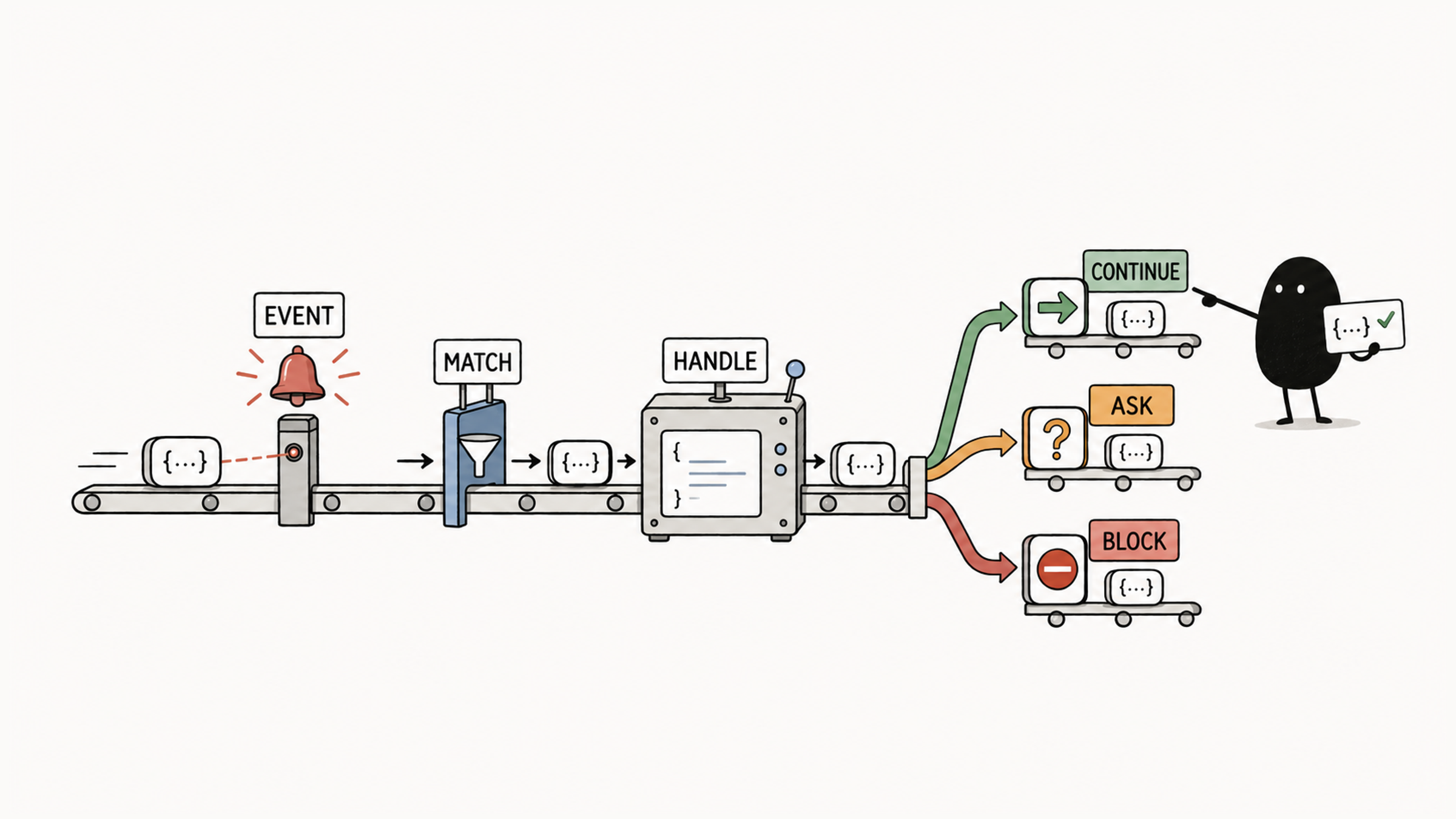
Hooks pass results through exit codes and output. The exit 1 that ordinary scripts use is only a non-blocking error on most Hook events. Confirm whether the event can block, then return according to the protocol:
| Exit Code | Default Meaning |
|---|---|
0 | Success; Claude Code tries to parse stdout as structured JSON |
2 | Blocking signal; stdout is ignored, stderr becomes feedback, and the exact effect depends on the event |
| Any other value | On most events, a non-blocking error that shows a warning and continues |
The Claude Code hooks reference calls this out explicitly: exit code 1 without valid JSON output is a non-blocking error, even though 1 is the conventional Unix failure code; if your hook is meant to enforce a policy, use exit 2. For PreToolUse, exit code 2 blocks the tool call.
You can also exit 0 and print a single valid structured decision on stdout, for example:
{
  "hookSpecificOutput": {
    "hookEventName": "PreToolUse",
    "permissionDecision": "deny",
    "permissionDecisionReason": "Production configs require approval"
  }
}
For PreToolUse, the decision goes in hookSpecificOutput.permissionDecision, with allow, deny, or ask meaning allow, deny, or prompt. The docs note that the top-level decision field is deprecated for this event, and the old values approve and block map to allow and deny; other events' decision formats can't be copied over either. updatedInput modifies the tool input; check the field location and permissions that event requires before using it.
There's one more safeguard. Per the hooks reference, from v2.1.295 you can add "onFailure": "block" to a command or http handler, so that a wrong script path, a crash, or a timeout blocks the action instead of letting it proceed. In the docs' words, on most events Claude Code still carries out the action when a hook fails or times out, so a policy hook with a wrong path or a crashing script lets everything through. Protection Hooks are a natural fit for it.
05 Choose a Handler and Keep It Synchronous
Hooks currently support five handler types:
| Type | How It Works | Good For |
|---|---|---|
command | Runs a local command and passes results through input, exit code, and output | Formatting, script checks, notifications, logs |
http | POSTs the event JSON to a service | Central auditing, team workflows, remote policy checks |
mcp_tool | Calls a connected MCP tool | Letting an existing external tool handle the event |
prompt | Calls a model once and returns ok/reason | Meaning-based judgments that need only the event input |
agent | Lets an agent read files and search before judging | Checks that need to investigate project state |
Path conditions can be checked with deterministic code, so command is enough. For clear-cut rules like this, a model's judgment adds time, cost, and uncertainty.
An HTTP 4xx or 5xx, a connection failure, or a timeout are all non-blocking errors by default. To really block an operation, the service should return 2xx with a blocking decision in that event's JSON format, or the handler should set onFailure: "block".
Control Hooks that decide whether the current operation may continue must run synchronously. Command handlers that don't affect the current decision, like notifications and logs, can run async, and an async result can't stop an operation that has already continued.
Matching handlers for the same event run in parallel, and array order doesn't guarantee completion order. When formatting and testing depend on each other, put both steps in one script and run them in sequence, so tests don't read files that haven't finished formatting.
When a synchronous check waits a long time, check timeout. It's in seconds, so leave room for normal run time, and don't copy a millisecond value from another config: 5000 means five thousand seconds.
06 Review the Script, Then Test Three Inputs
A command Hook runs as the current system user and can reach that user's files and environment variables. The hooks reference's security note is direct: command hooks execute shell commands with your full user permissions and can modify, delete, or access any files your user account can access. Review the script on its own merits; Claude Code's tool permissions don't tell you whether it's safe.
When writing a Hook or adopting someone else's, check:
- Input: validate stdin JSON, paths, arguments, and remote responses before using them.
- Shell: quote variables, and validate paths and commands before combining them.
- Paths: resolve first, then check for
.., symlinks, and the project boundary. - Location: use
${CLAUDE_PROJECT_DIR}to locate project scripts so a changed working directory doesn't run the wrong file. - Credentials: keep secrets out of Settings; insert into HTTP headers only the variables
allowedEnvVarsexplicitly permits. - Sharing: have someone else review it before committing, and test it in an environment with no secrets.
A Hook can tighten actions further, but it must still refuse anything permissions.deny blocks; it can't be used to get around a deny rule.
Finally, test the script on its own:
printf '%s' '{"cwd":"/tmp/demo","tool_input":{"file_path":"/tmp/demo/.env"}}' \
  | CLAUDE_PROJECT_DIR=/tmp/demo python3 .claude/hooks/protect-files.py
printf '%s\n' "$?"
The expected exit code is 2. Change the path to /tmp/demo/src/app.ts and expect 0; remove file_path or send invalid JSON and expect 2 again. These tests only judge paths and never write files. If nothing happens once it's wired into Claude Code, work through the layers in Claude Code Hook not firing? Check four layers.
Back to that pass-through in the opening. With exceptions routed into the blocking branch and onFailure: "block" added, a missing field, a crash, and a timeout all land on the "block" side. A Hook that holds when it fails is one that actually protects your files.