
DeepDojo.AIPublished 2026-11-12中文
Claude Code Hook Not Firing? Check Four Layers
You write a check script, put it in .claude/hooks/, and run it by hand in the terminal. The output looks fine. Then Claude Code edits a dozen files and the script never runs once. You change the script, add logging, and still nothing happens.
"The Hook doesn't do anything" is a vague description, and the cause can sit in any of four layers:
- Registration: the script is in
.claude/hooks/, but it was never registered in Settings. - Triggering: the wrong event was chosen, or the Matcher didn't match this tool.
- Input: the script reads the wrong field from the event JSON, or breaks on edge cases.
- Result: the exit code and output don't follow the protocol, so Claude Code logs an error and carries on.
The opening example is stuck at the first layer: .claude/hooks/ is just where scripts are stored, and running one by hand successfully doesn't mean it's registered. Editing the script can't fix a registration problem. So find the layer before you touch anything: check registration with /hooks, check matching in the logs, test the script alone with a minimal JSON event, and finally look at the exit code and both output streams. Let's lay out how a Hook works end to end, then go through the four layers.
01 The Hook Chain: Event, Matcher, Handler, Result
A Hook runs a handler when a lifecycle event occurs, which suits formatting after edits, checks before execution, and notifications while waiting for approval. Triggering doesn't depend on the model remembering an instruction, but whether it can block an operation still depends on the event's timing and the handler's result.
A Hook listens for events while Claude Code runs and passes the event JSON to a handler. The handler is the part that does the work: it runs a command, calls an HTTP service, or asks a model to judge. The chain is "event → Matcher → handler → result."
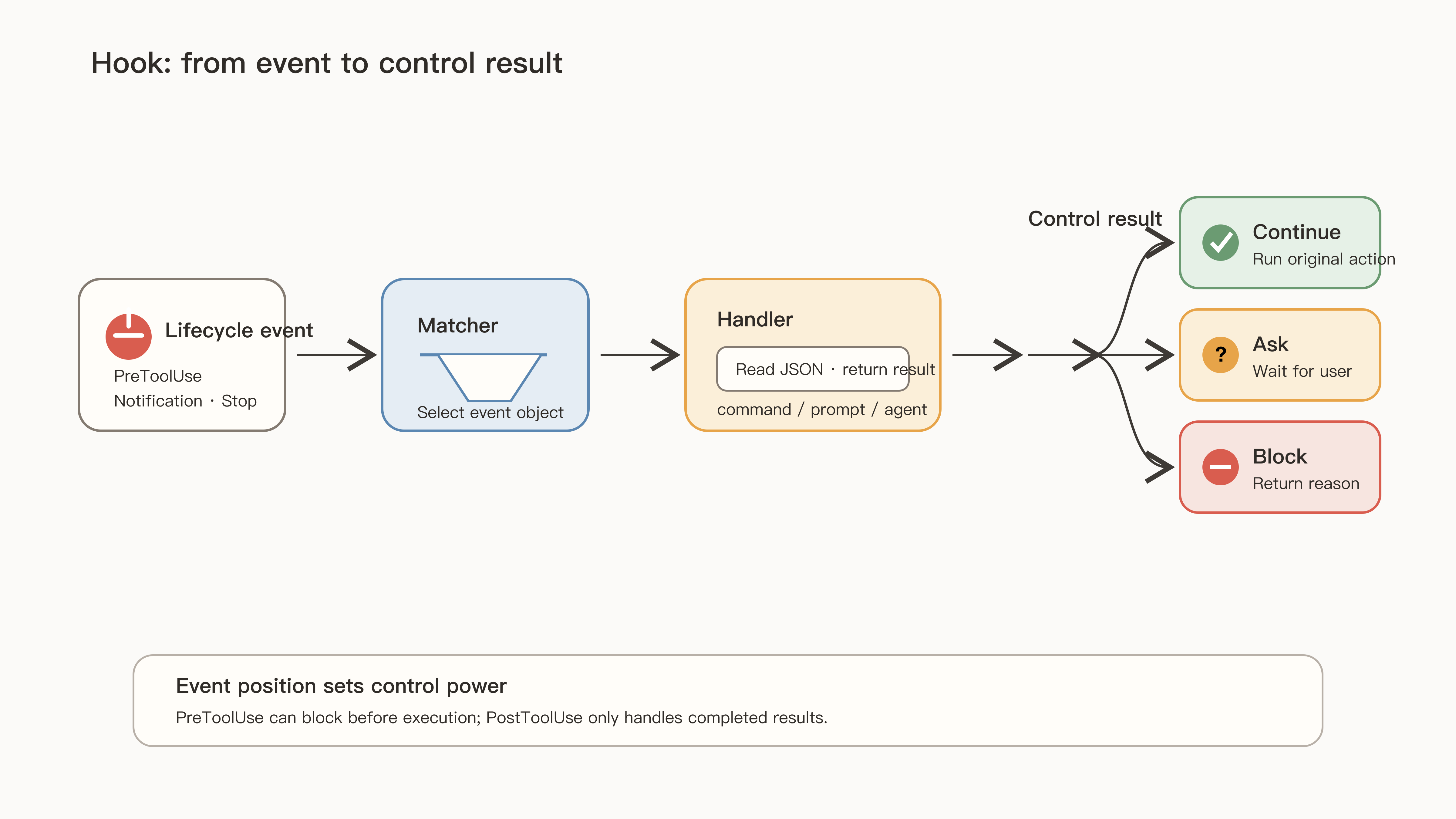
The Claude Code hooks reference defines Hooks as user-defined shell commands, HTTP endpoints, MCP tool calls, LLM prompts, or subagents that execute automatically at specific points in Claude Code's lifecycle.
02 Choose the Event by Timing
First decide whether you need to intercept before an operation or handle the result after, then pick the event:
| Stage | Common Events | Typical Uses |
|---|---|---|
| Session start and end | SessionStart, SessionEnd | Set up the environment, clean up temporary resources, log the session |
| User submits input | UserPromptSubmit | Inject dynamic context, reject noncompliant input |
| Before a tool runs | PreToolUse, PermissionRequest | Check commands, block operations, handle permission requests |
| After a tool runs | PostToolUse, PostToolUseFailure, PostToolBatch | Format, log results, summarize a batch of tool calls |
| End of a reply | Stop, StopFailure | Check whether Claude can finish, log API failures |
| Waiting for the user | Notification | Desktop notifications for permission prompts and idle waits |
| Subagents | SubagentStart, SubagentStop | Set up agent resources, audit agent results |
| Configuration and environment | ConfigChange, InstructionsLoaded, CwdChanged, FileChanged | Audit configuration, observe instruction loading, refresh the environment |
| Context compaction | PreCompact, PostCompact | Check before compaction, log the summary after |
To block a command, use PreToolUse, which runs before execution; by PostToolUse, the operation has already happened. Stop only means one reply ended, not that the whole task is done. When you use it to keep Claude from finishing, guard against repeated triggering, as covered in when to stop Claude from retrying a failing fix.
03 Layer One: Confirm It's Registered
Project Hooks are registered under the hooks field in .claude/settings.json, in three levels:
hooks
  └─ event, such as PreToolUse
      └─ Matcher group, such as Edit|Write
          └─ hooks: the handlers that actually run
Hooks can live in different scopes:
| Location | Scope |
|---|---|
~/.claude/settings.json | All your projects, such as personal desktop notifications |
.claude/settings.json | Team-shared automation for the current project |
.claude/settings.local.json | Personal experiments or machine differences in this project |
| Managed Settings | Organization policy that individuals can't override |
| Skill frontmatter | Registered when invoked, lasting until the session ends |
| Agent frontmatter | Active only while that subagent runs |
.claude/hooks/ only stores scripts; running one by hand doesn't register it. Ordinary Hooks are registered in Settings, and plugins use hooks/hooks.json. Open /hooks, confirm it's registered, check the event, source, and handler, and only then trigger the event.
04 Layer Two: Did the Matcher Match?
The Matcher picks which events to handle. What it looks at depends on the event type: a tool name, a notification type, an agent name, or a startup mode.
Tool names can be joined with | or commas as exact values:
Edit|Write
Read, Grep, Glob
To handle "only Edit," it's tempting to write Edit.*. But once a Matcher contains regex characters, it's evaluated as a JavaScript regular expression, which by default doesn't require a full-name match, so NotebookEdit can slip in. The hooks reference uses exactly this example: Edit.* matches both Edit and NotebookEdit; wrap the pattern in ^ and $, as in ^Edit$, when you need a whole-string match.
Tool events can also use if on a specific handler to filter tool arguments with permission-rule syntax:
{
  "matcher": "Bash",
  "hooks": [
    {
      "type": "command",
      "if": "Bash(git *)",
      "command": "python3",
      "args": ["${CLAUDE_PROJECT_DIR}/.claude/hooks/check-git.py"]
    }
  ]
}
Here the Matcher picks out Bash calls first, and if checks whether each one is a Git command, which cuts unnecessary script launches. If the goal is to forbid a command, you still need permissions.deny. Filtering handlers doesn't replace permission decisions.
Some events ignore Matchers entirely. The docs list Stop, UserPromptSubmit, PostToolBatch, and others, which fire on every occurrence. Check which fields an event accepts before writing filters, and check the Matcher's case too, such as writing edit instead of Edit. The official configuration debugging guide also lists two common reasons a Hook never fires: the Matcher is a JSON array instead of a string, or it uses a comma as a separator on a version before v2.1.191, which treats the comma as a literal character, so "Edit,Write" matches nothing.
05 Layers Three and Four: Input and Result
Feed the script a minimal event JSON and check field locations and edge-case inputs. For example, test a path-protection script on its own:
printf '%s' '{"cwd":"/tmp/demo","tool_input":{"file_path":"/tmp/demo/.env"}}' \
  | CLAUDE_PROJECT_DIR=/tmp/demo python3 .claude/hooks/protect-files.py
printf '%s\n' "$?"
This skips Claude Code and writes no files, and it shows exactly how the script reacts to each input.
At the result layer, look at the exit code, stdout, and stderr together, check that the commands it depends on exist on the system, and decide whether it actually blocked or just reported an error and continued. Exit code 1 is a non-blocking error on most events, which is the easiest thing to misread; the full exit-code and output protocol is covered in block Claude Code from editing .env with a Hook.
06 Use Logs Instead of Guesses
To see how Claude Code actually runs it, start with claude --debug-file /tmp/claude-hooks.log. The CLI reference says --debug-file writes debug logs to the given path and implicitly enables debug mode. The log shows matches, the commands run, exit codes, and both output streams.
For configuration problems, run /doctor first. If /hooks still hasn't updated a few seconds after a file change, restart to rule out a missed file-watch event. statusMessage can flash by too quickly to notice, so not seeing it doesn't prove the handler didn't run. Go by the matches, calls, and results in the log.
Putting the four layers together:
- Registration: open
/hooks, confirm it's registered, and check the event, source, and handler. - Triggering: find which event actually fired, and check the Matcher's syntax and case.
- Input: feed the script a minimal event JSON and check field locations and edge cases.
- Result: look at the exit code, stdout, stderr, and dependent commands, and decide whether it blocked or just errored.
A shared Hook should document its dependencies, supported systems, and whether failure blocks, then be tested with harmless samples for both allow and deny. One look at /hooks would have explained the script from the opening that never ran: it was sitting in the folder, never registered. Find the layer first, then change the script, and troubleshooting stops going in circles.