
DeepDojo.AIPublished 2026-11-13Updated 2026-11-13中文
When to Package Your Claude Code Setup as a Plugin
The commands, hooks, and subagents you built on your own machine run smoothly there. The moment you try to roll that workflow out to the whole team, manual syncing problems pile up:
- Alice copied the slash command but missed the template file it uses.
- Bob's local blocking hook still runs last month's logic.
- Carol's environment variable names don't match what the scripts expect.
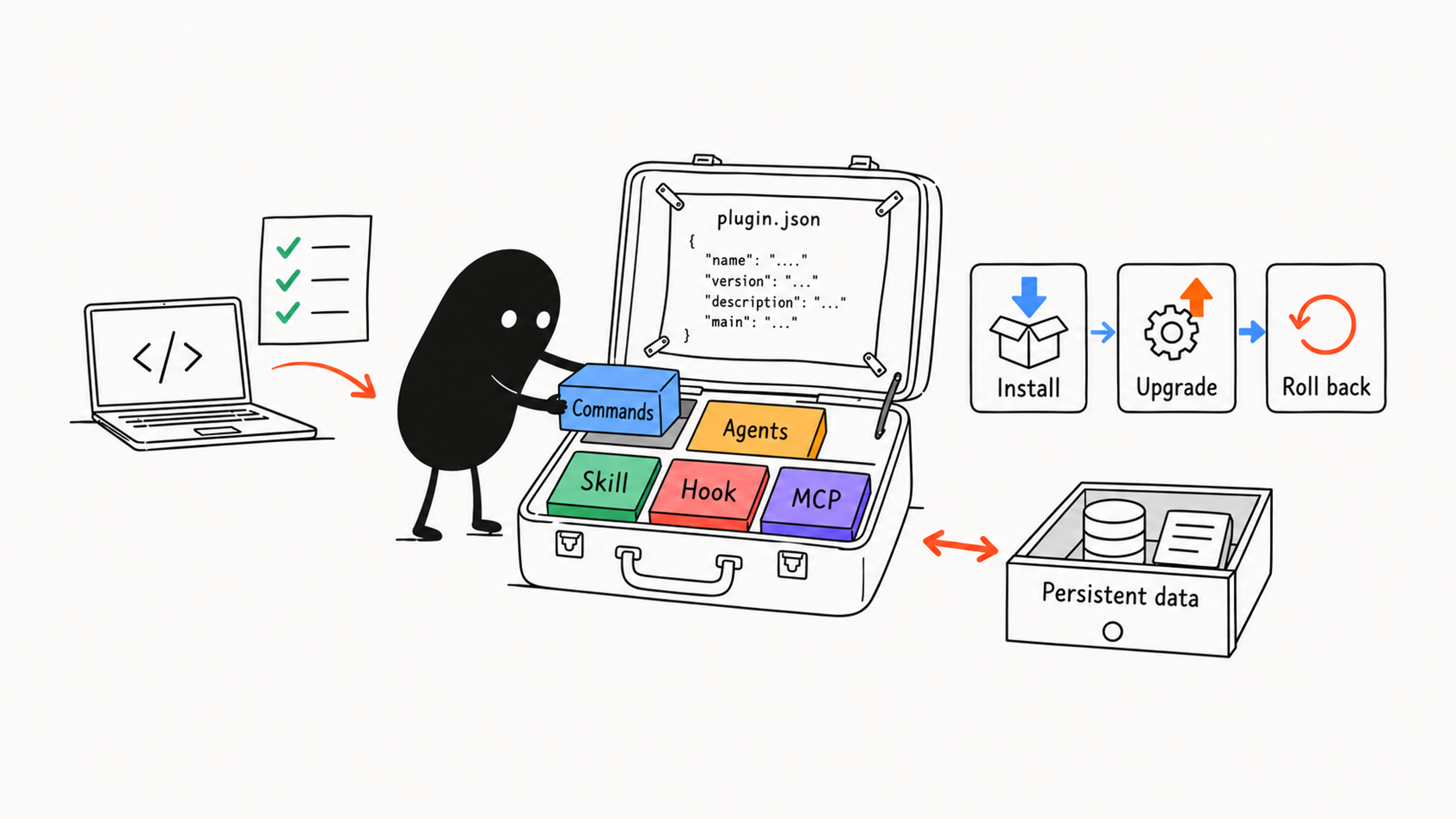
The method itself is solid, but distribution is scattered, everyone's tools end up in a different state, and debugging gets painful. Plugins exist to end that word-of-mouth, copy-by-hand situation: they bundle the commands, agents, hooks, templates, and MCP connections a scenario needs into one distributable unit. Teammates install it with one command, and upgrades, disabling, and rollback all go through the same mechanism.
The opposite mistake is just as common. Package a method before real work has tested it, and every one-line change means a new release and a reminder for everyone to update, which saddles you with distribution overhead too early.
So answer "when should I package?" first. While the configuration is still changing, keep it in the project's .claude/ directory and commit it with the repo. Once the method is stable and another repository needs it, turn it into a plugin. When you do, give each plugin one scenario, and base its directory layout, event bindings, namespace, and version numbers on how people will call it.
01 Settle it in the project first, then package
Start with this table to decide whether a plugin is warranted:
| Need | Better fit |
|---|---|
| A fixed prompt | Slash Command |
| One specialized capability | Skill |
| One specialist role | Subagent |
| Automatic checks at event boundaries | Hook |
| External tools or data | MCP |
| Several capabilities shipped as a team package | Plugin |
Before packaging, prove the workflow on real tasks. Imagine this: someone installs your plugin, runs it twice, and reports that arguments don't come through, the severity ratings seem off, and the template is missing a few fields. You change one line, then have to tag and publish a new version and remind everyone in the team chat to update. Your core method hasn't been tested on real work yet, and you're already carrying a layer of release overhead.
The practical path is to let it mature locally first. Keep the commands, agents, and templates in the current project's .claude/ directory, commit them with the Git repo, and let everyone use, critique, and improve them in daily PRs and debugging. For a small team working in one project, sharing through the repo is enough.
Once the core structure has been stable for a while and stopped changing often, and another project genuinely needs to reuse it, package it as a standalone plugin. The Claude Code features overview gives a concrete signal too: when a second repository needs the same setup, package it as a plugin.
A plugin should revolve around one clear scenario. Splitting by workflow keeps permissions, versions, and entry points clear, for example pr-review, devops-automation, documentation, security-audit, data-reporting.
02 Directories and components: right place, and say who calls them
A plugin is the unit for installing and distributing a set of capabilities. The layout below shows where optional components go; no plugin needs every directory. A minimal project can start with the manifest and one command, confirm it loads, then add components.
my-plugin/
├── .claude-plugin/
│   └── plugin.json
├── skills/
│   └── report-writer/
│       └── SKILL.md
├── commands/
│   └── review.md
├── agents/
│   ├── security-reviewer.md
│   └── test-checker.md
├── hooks/
│   ├── hooks.json
│   └── pre-check.js
├── .mcp.json
├── .lsp.json
├── settings.json
├── templates/
├── scripts/
└── docs/
What each part does:
| Directory or file | Purpose |
|---|---|
.claude-plugin/plugin.json | Plugin manifest: name, version, description, configurable options |
skills/ | Skills the plugin provides, also callable as commands |
commands/ | Command files in the older format; existing ones can stay |
agents/ | Subagents the plugin provides |
hooks/ | Hook handlers and event configuration |
.mcp.json, .lsp.json | MCP and language server configuration bundled with the plugin |
settings.json | Default settings the plugin supports; not a place to copy arbitrary project settings |
templates/, scripts/, docs/ | Templates, helper scripts, usage notes, and changelog |
According to the Claude Code plugin components guide, new commands should be written as skills under skills/, with commands/ kept for files you already have.
A plugin's settings.json has its own field limits. Check whether the default you want is supported; copying a whole project's settings in won't let it override user permissions at will.
With the layout in mind, trace one call through it. The manifest sits in .claude-plugin/, components sit at the plugin root. Commands or skills reference templates and scripts, and hooks bind to events through hooks/hooks.json. Putting files in the right directory isn't enough; you also have to state who calls them.
A script that runs by hand only proves the script works. If a hook never fires after install, define the event, matching tool, and command in hooks/hooks.json, for example:
{
  "hooks": {
    "PreToolUse": [{
      "matcher": "Bash",
      "hooks": [{
        "type": "command",
        "command": "node \"${CLAUDE_PLUGIN_ROOT}/hooks/pre-check.js\""
      }]
    }]
  }
}
Then use /hooks to see whether the binding loaded, and make a harmless call to confirm the script actually runs. If the binding is visible but nothing happens, trace the matching condition and execution path; separating loading from execution tells you where it's stuck. A folder named hooks doesn't make the scripts in it run on their own.
03 Commands need a namespace
Plugin commands are called through the plugin's namespace once installed, which keeps two plugins from colliding on the same name:
/pr-review:review
/pr-review:check-security
/pr-review:check-tests
A PR review command might look like this:
---
argument-hint: "[PR number or branch]"
allowed-tools: Read Grep Bash
---

# Review PR

Review the specified PR or the changes on the current branch.

## Workflow

1. Collect the scope of the changes.
2. Call security-reviewer to check security risks.
3. Call test-checker to check test gaps.
4. Call performance-analyzer to check performance risks.
5. Merge the results, ordered by severity.

## Output

- High-risk issues
- Medium and low-risk issues
- Test gaps
- Suggested changes
- Suggested verification commands
Follow the command down: the user names the target, the command schedules each check, then merges the results. The entry point needs to make the order clear; how to review security or judge test gaps can live in agents, skills, or scripts. When you later adjust one review standard, you'll know where it's actually stored.
pr-review and legacy-tools might both provide a review command with different severity standards. Calling /pr-review:review or /legacy-tools:review makes it explicit which method you're using. With only one review entry today, the short form may be fine; install another plugin later, and the same name could point to a different method. Keep the full namespace in team docs so everyone following them gets the same standard.
When bundling subagents in a plugin, keep tool permissions as tight as possible. Observer roles like security audits, code review, and architecture analysis get read and search tools only; only roles that actually write code or run deployment pipelines get write access or external system calls.
04 Manifest and version numbers: based on whether callers must change
The plugin manifest lives in .claude-plugin/plugin.json:
{
  "name": "pr-review",
  "description": "Team PR review workflow with a review command, a security agent, test checks, and a results template.",
  "version": "1.0.0",
  "author": {
    "name": "Team"
  }
}
At a minimum, the manifest should answer what users want to know: what the plugin is called, what problem it solves, the current version, what capabilities it includes, what external dependencies it needs, and whether it needs user configuration.
Use semantic versioning for plugin versions:
| Version change | Meaning |
|---|---|
| patch | Bug, wording, or minor template fixes |
| minor | New backward-compatible capabilities |
| major | Breaking changes |
Decide by whether callers need to adjust:
| Example change | Version |
|---|---|
| 1.2.0 → 1.2.1: a template typo fixed, calls unchanged | patch |
| 1.2.1 → 1.3.0: adds /pr-review:check-perf, old entries still work | minor |
| 1.3.0 → 2.0.0: review's argument changes from PR number to branch, scripts must change | major |
All three could loosely be called "an update," but their impact on callers differs. Fix a template typo and existing scripts keep running; change the argument from a PR number to a branch and the calling scripts must change too. When a command name, arguments, permissions, or output change, walk through a real call before choosing the version, rather than going by whether the release notes say "fix" or "add."
05 Add components only when they're needed
A plugin combines a complete workflow through a division of labor:
- Skills hold specialized methods.
- Hooks run automatic checks at event boundaries.
- MCP provides external tools and live data.
- Commands are the user's entry point.
- Agents are specialist roles.
A PR review plugin, for example, might contain:
pr-review/
├── .claude-plugin/
│   └── plugin.json
├── commands/
│   ├── review-pr.md
│   ├── check-security.md
│   └── check-tests.md
├── agents/
│   ├── security-reviewer.md
│   ├── test-checker.md
│   └── performance-analyzer.md
├── hooks/
│   └── pre-review.js
└── templates/
    └── review-report.md
The full workflow:
- The user calls
/pr-review:review-pr. - The command explicitly calls
pre-review.jsto check that it's inside a valid project. - security-reviewer analyzes security risks.
- test-checker checks test coverage.
- performance-analyzer checks performance risks.
- The command merges the results using the review-report template.
- It outputs suggested changes and verification commands.
pre-review.js here is just a script file; to have an event trigger it automatically, add hooks/hooks.json. This plugin only handles PR review. Deployment and incident response have different permissions and lifecycles, so they belong in separate plugins.
A documentation plugin works the same way: commands handle generating, syncing, and validating; three agents, api-documenter, code-commentator, and example-generator, handle API docs, comment suggestions, and usage examples; a technical-writing skill holds the writing method; templates standardize ADRs, endpoints, and function docs. Once a template lists its fields, generate docs from a piece of current code and compare parameters, responses, and examples one by one. All the fields can be present while the content is still outdated; what keeps docs usable is checking against the current code every time.
A plugin can also include LSP configuration, giving Claude Code better diagnostics, navigation, and symbol information; the required fields are the launch command and an extensionToLanguage map from file extension to language ID. First check whether the plugin's tasks use diagnostics, go-to-definition, or symbols at all. If it only assembles a report from a template, a language server won't improve the report. Add one when it's truly needed, and ordinary workflows avoid an extra install and startup dependency.
Plugins that touch deployment environments, such as a DevOps plugin's deploy, rollback, and incident commands, need human approval points: confirm the environment before deploying, the version before rolling back, and the impact before any production action. If a deployment needs approval, present a plan someone can check first, for example:
- Target: staging, taken from this run's arguments.
- Version: currently v2.3.1, planning to deploy v2.3.2.
- Scope: 3 services restart, no database changes.
- Expected impact: about 40 seconds of API downtime.
The version, the 3 services, and the 40 seconds are only examples; a real plan is filled in from this run's checks. Don't carry "no database changes" from the sample into every deployment; once the target, version, and impact are clear, confirm and continue through the process.
06 Distribution channels and managed settings
Plugins commonly come from the official directory, community directories, internal organization marketplaces, local paths, and package managers. Before distributing, decide where the team will get the workflow from. An organization marketplace or a controlled local channel lets everyone install from the same trusted source, and with explicit versions it's easy to confirm everyone has the same content.
A marketplace definition can live in .claude-plugin/marketplace.json:
{
  "name": "my-team-plugins",
  "owner": {"name": "DevTools Team"},
  "plugins": [
    {
      "name": "code-standards",
      "source": "./plugins/code-standards",
      "description": "Team code standards check plugin",
      "version": "1.2.0"
    }
  ]
}
Look at the two manifests from the installer's side. The marketplace entry says where to get the plugin, and the plugin.json in its directory describes the plugin itself. A marketplace file can parse fine while the plugin is unreachable; this example uses a relative source, so the matching directory has to exist in the marketplace repo. Component definitions follow the plugin manifest, so they aren't maintained in two places.
Common management commands, each showing one action, to run individually as needed:
claude plugin marketplace add ./team-marketplace
claude plugin install code-standards@my-team-plugins
claude plugin list
claude plugin disable code-standards@my-team-plugins
claude plugin validate ./my-plugin
During local development, load a plugin directory directly with claude --plugin-dir ./my-plugin, and after changes run /reload-plugins to reread it in the current session.
Teams and organizations can control plugin use through managed settings: enabledPlugins turns specific plugins on or off by plugin-name@marketplace-name, strictKnownMarketplaces restricts which marketplace sources can be added and installed from, and blockedMarketplaces blocks specific marketplace sources. If the policy is "only reviewed plugins," enabling a few standard plugins doesn't say whether others can be installed. Enabled state and marketplace sources control different stages; write down what the organization wants to restrict, combine the matching settings, and check that the result actually covers the policy.
Once a plugin is out the door, sensitive configuration, runtime data, and upgrade rollback still need managing; see upgrading Claude Code plugins without losing data. For how a skill grows from personal to project to plugin, see how to structure a Claude Code skill folder.
Packaging can wait. When the configuration has settled in the project and a second repository asks for it, turn it into a plugin, and what the team installs is the same content that has already been proven.