
DeepDojo.AIPublished 2026-11-09Updated 2026-11-09中文
Claude Code Says It's Fixed, but the Bug Remains
You ask Claude Code to fix a bug: refreshing the login page loses the session. It reads a dozen files, edits two, and reports "Fixed." You refresh. The bug is still there.
The tempting move is to reword the request or switch models, and the likely result is another round of reading files, editing code, and announcing "Fixed."
The trouble is that "Fixed" is only a report. Claude Code works in a loop of gathering context, taking action, and verifying the result, and each step should leave evidence behind. Wherever the evidence is missing, the repair hangs in the air right there.
Maybe it never read the file that matters, maybe it searched in the wrong place, maybe it never checked the original problem. Until you know which, every follow-up message is a guess.
A better way in is to work backward from its record. Lay a repair record out as evidence, judgment, and smallest next check, and the gap becomes visible. Go through context, tools, and verification one at a time and you can see which link was never solid.
The last step is turning a vague "help me fix the login problem" into a task statement Claude Code can follow and you can accept.
01 "Fixed" is only a report
Reading and editing files proves that work happened. It doesn't prove the work helped. An engineering agent gathers information toward a goal, calls tools to act, and adjusts its next step based on what comes back. In Claude Code, the model interprets information, reasons, and picks actions. Tools read files, search code, run commands, and edit code, and their results feed the next decision. Anthropic's documentation calls this the agentic loop.
The user defines the task and completion criteria
  ↓
Gather context: obtain relevant code, configuration, and errors
  ↓
Take action: read, edit, or run a command based on the current judgment
  ↓
Verify results: compare the observed result with the completion criteria
  ├─ A gap remains → revise the judgment using new evidence; read or edit further
  └─ Criteria met → report the result and anything still unverified
The three phases overlap. Running a failing test is an action, and it also collects error evidence. A test result can undercut the current plan and send the agent back to the code.
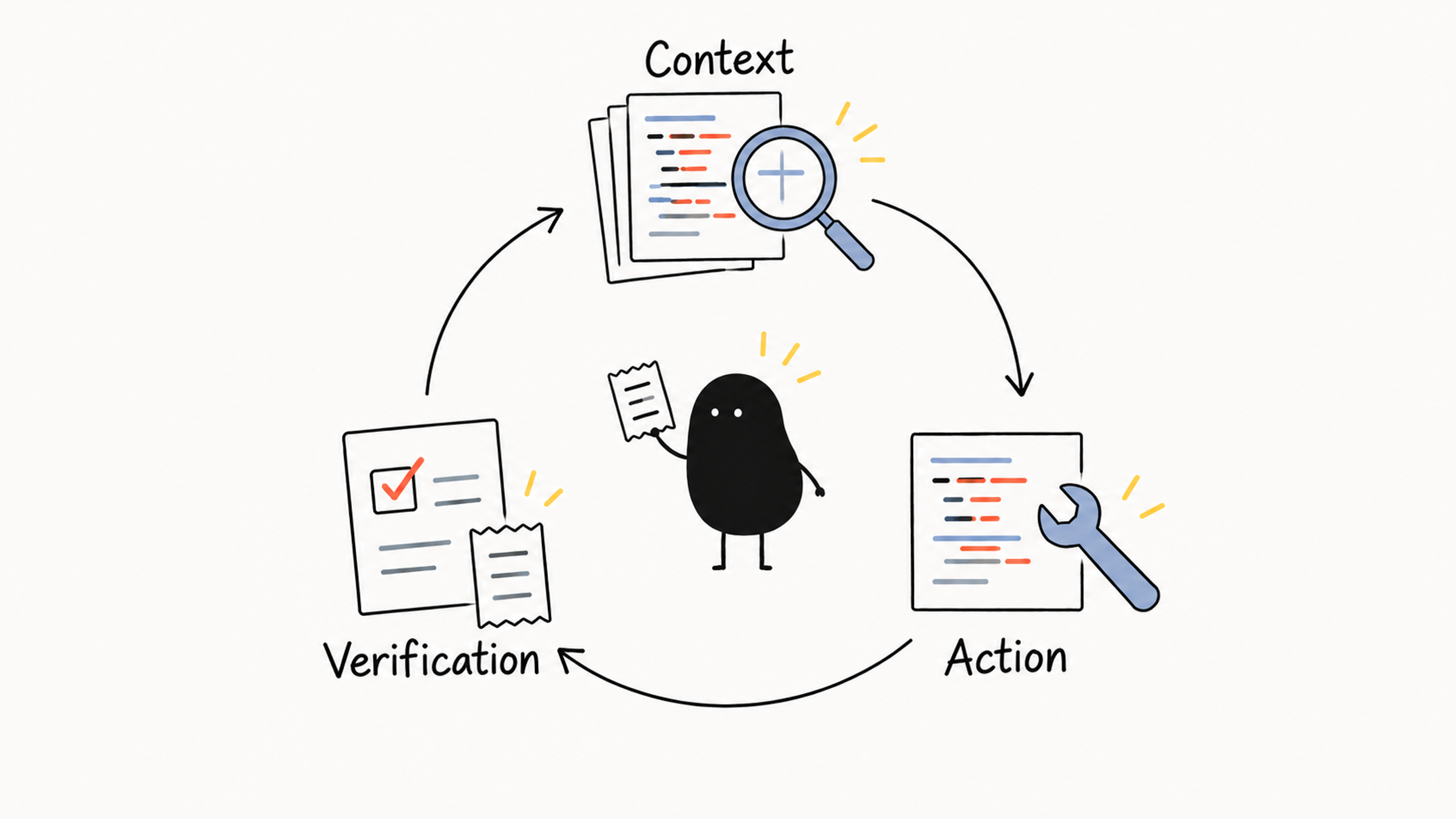
Reading the relevant code gives Claude Code a basis for choosing where to edit. Checking the original symptom gives it evidence that the edit worked. A bare "Fixed" has neither. Anthropic's best-practices page makes the same point: tell Claude what it can't see, and give it a check to run.
02 Find the gap in a repair record
The record below is constructed. Its paths and test names are there only to demonstrate the reasoning.
User report:
  Refreshing the login page loses the session.

Failing test:
  refresh-session.test.ts
  Expected: retain the original session after a refresh
  Actual: create a new session after a refresh
  Test calls: src/auth/restore-session.ts

Tool record for this attempt:
  Read src/legacy/login.ts
  Modified src/legacy/login.ts
  Ran legacy-login.test.ts; passed

Final reply:
  The login problem is fixed.
First, compare what the user asked for with what was actually checked. The user needs the session to survive a refresh, yet the record shows only that the old login test passed. One test passed. The refresh problem is still unverified. You can see that gap right in the record.
Next, look at where the investigation went. The failing test calls restore-session.ts, but the tool record shows reads and writes in legacy/login.ts. The edit may sit outside the failing call path, and that is worth checking.
Different paths don't settle the question, because session restoration could still call the old module. The next step is to read the failing test and the restoration entry point, then trace how they connect to the edited file.
Say that trace shows restoration never touches the old module, and the refresh test still fails. Now there is evidence that the edit missed the target behavior, and the next move is to keep digging in the restoration code. The root cause is still unknown, but the repair has already gone off course. Those are two separate conclusions, so keep them apart. Here is the analysis as three rows:
| Available evidence | Current judgment | Minimal next check |
|---|---|---|
| Only the old login test ran | Session restoration after refresh is unverified | Run a test covering the original symptom |
| The inspected path differs from the failing entry point | The investigation may have left the failing path | Trace the calls between the failing test, the restoration entry point, and the edited file |
| The edit is confirmed to be outside the failing path, and the original test still fails | This change missed the target behavior | Locate the cause through the restoration entry point, then change and retest |
A good minimal check shrinks the uncertainty you actually have, however short or long the command is. If the question is how two files relate, a pile of unrelated logs won't answer it.
03 How project code becomes evidence
The record raises another question. The restoration entry point is right there in the project, so why did it never shape the decision?
The context window holds the information the model can refer to while writing its current answer. That can include the task statement, conversation history, files already read, command output, and the loaded project rules and tool descriptions. A file informs the decision once it has been read. A file that only sits on disk has taken no part yet. If the search starts in the wrong place or a key file goes unread, the next decision rests on incomplete information.
Suppose the entry point has moved, but the loaded CLAUDE.md still says "login logic is in the legacy directory." That stale line can steer the investigation toward the old module. Or constraints from an earlier conversation about the old login flow may have followed the task along. Both are explanations to check against the actual record. When a session grows long, clearing, compacting, or handing off is how you sweep out leftovers like these.
A useful correction supplies facts that can change the next decision:
This failure occurs during session restoration after a refresh.
The failing test calls `restore-session.ts`, but you changed `legacy/login.ts`.
Please trace the call relationship between them before deciding
whether the current change affects this failure.
It names the symptom, the mismatch in the record, and the relationship to investigate, and it leaves room for the investigation to reach its own answer. Telling Claude Code to "be more careful" gives it exactly the project information it already had.
04 Examine the work from six perspectives
The agentic loop shows what happened and how each result shaped the next action. To investigate a failure, you also need to ask which part of the process lacked support. Six perspectives help: model, context, tools, controls, isolation, and verification.
| Perspective | What to examine | Observable evidence |
|---|---|---|
| Model | Whether the reasoning follows from the available information | All the relevant information was supplied, yet the explanation contradicts the code or the results |
| Context | Whether the decision used relevant, current information | A key file was unread, a version was outdated, rules conflicted, or old task constraints carried over |
| Tools | Whether the operation, parameters, and response served the immediate need | A wrong path or argument, a failed read, or missing result content |
| Controls | Whether permissions constrained actions as the task required | Permission-denial records, or an out-of-scope write being allowed |
| Isolation | Whether work interfered through shared information or files | Unrelated exploration entered the main conversation, or tasks overwrote each other's changes |
| Verification | Whether checks covered the behavior the user requested | No retest, an unrelated test, or a missing input or condition |
One failure can show up under several perspectives. In the login example, missing the restoration entry point is a context gap, and running only the old module's test is a verification gap. If a search parameter also pointed at the wrong directory, tool use deserves a look too. These gaps can feed each other, so check each against the record before you settle on a single cause.
Isolation has two targets. Separate contexts reduce the mixing of task information. Separate working directories reduce conflicting file changes. Two tasks with separate contexts can still write to the same file.
Task boundaries give every perspective a yardstick. "Optimize login" could mean speed, appearance, or behavior after a refresh. Clarify the intended change first. Once the goal is clear, you can start asking whether the work is complete.
Then follow the evidence to the part it points at. For a missing file, read it. For a permission denial, inspect the denied operation. If the context lacks a key fact, supply that fact. This beats switching models or adding a vague demand, and it keeps you from changing several layers of configuration at once.
05 Same failing test, different evidence
Back to the login repair. Each record below could be summed up as "the test failed," yet each supports a different conclusion.
| Observed record | What it establishes | Next step |
|---|---|---|
| Relevant tests were not run after the edit | The repair is unverified | Run a check covering the original symptom |
| Permissions denied the test command before it ran | Verification is blocked; there is no test result | Inspect the command, the denial reason, and the authorized task scope |
| The original failing test ran normally and its assertion still failed | The tested problem remains | Investigate the assertion, the call path, and the actual change |
| Login tests passed but omitted the refresh sequence | The tested behavior passed; the reported behavior is unverified | Add a check for session restoration after refresh |
A passing test covers only what its assertions cover. A test that logs in with credentials covers logging in. Whether the session survives a refresh takes its own check.
A permission denial means the command never ran, so there is no test result. Look at the operation, the denial reason, and the authorized scope. If the command still can't run, report the blocker and what remains unverified, and leave permissions at their original scope.
Pick checks that fit the task. To explain a function, compare the explanation with the branch logic. To repair session restoration, you need execution evidence for that behavior. The completion criteria decide what evidence you need. And when new evidence arrives, update your judgment. If you suspected a permission block, and then the command runs and the assertion fails, move on to the tested behavior and drop the explanation that lost its support.
06 Turn a vague request into a task you can accept
The user sets boundaries at the start, corrects direction with new facts along the way, and accepts the result at the end. Go back to the original request:
Help me fix the login problem.Three things are missing: what action triggers the problem, what actually happens, and what should happen. Fill them in from observations, and leave the code-level cause for the investigation to find.
The developer has confirmed that the anonymous session is created normally at first, and a refresh creates a new one. They don't yet know where the restoration code lives. The task covers restoration only, and explicit logout must keep working. Build the request item by item:
| Information | Basis | Wording for this example |
|---|---|---|
| Goal | Difference between observed and expected behavior | Retain the original anonymous session after refresh |
| Scope | Known problem boundaries and investigation clues | Focus on session restoration; locate its entry point during investigation |
| Constraints | Behavior to preserve and limits on changes | Explicit logout must still clear the session; leave the login-page redesign out of scope |
| Verification | An observation that separates success from failure | Compare the session before and after refresh, and check explicit logout |
A complete request could read:
The anonymous session is created normally at first, but refreshing the
login page creates a new session. Fix session restoration so a refresh
retains the original session.

I have not identified the relevant files. Start with reproduction steps,
the failing test, and the session-restoration call chain to locate the entry point.
Keep this task focused on that problem; do not redesign the login page.
Explicit logout must continue to clear the session.

After the fix, check that the session is unchanged across a refresh
and that explicit logout still works. Report the checks you actually ran.
If an environment requirement is missing or a behavior cannot be covered,
state the blocker and what remains unverified.
The request sets the behavior and the investigation scope first. File paths can come later, once the call chain has been traced. Constraints should come from real needs, such as a behavior that has to survive the fix. For everyday habits like asking questions first and planning before building, see Claude Code quick start.
For complex work, ask for read-only investigation and a plan before any edits, and revise the plan as new evidence arrives. Natural language sets the working agreement. Operations that must be enforced also need real permission controls.
To follow a task's progress, write down three things you can look back on: the evidence observed, the conclusion it currently supports, and the next step that will reduce uncertainty. With that record, you can set boundaries, correct direction, and accept results, and Claude Code can keep working toward the same goal.