
DeepDojo.AIPublished 2026-11-10Updated 2026-11-10中文
Your Claude Code Learning Path After the Basics
A few weeks into using Claude Code, you hear yourself complain: "It keeps forgetting to run the tests." So you go looking for advanced guides, and there they all are: CLAUDE.md, auto memory, hooks, MCP, subagents. Each one looks like the fix, so you set them all up at once.
Look back through your own sessions, though, and that one complaint can mean three different things. Claude Code might have to hunt for the test command every single time. It might find the command, then declare the job done without running it. Or the check might already be routine, and the only thing keeping it going is you reminding it. The first case calls for better project instructions, the second for a verification habit, and only the third for automation.
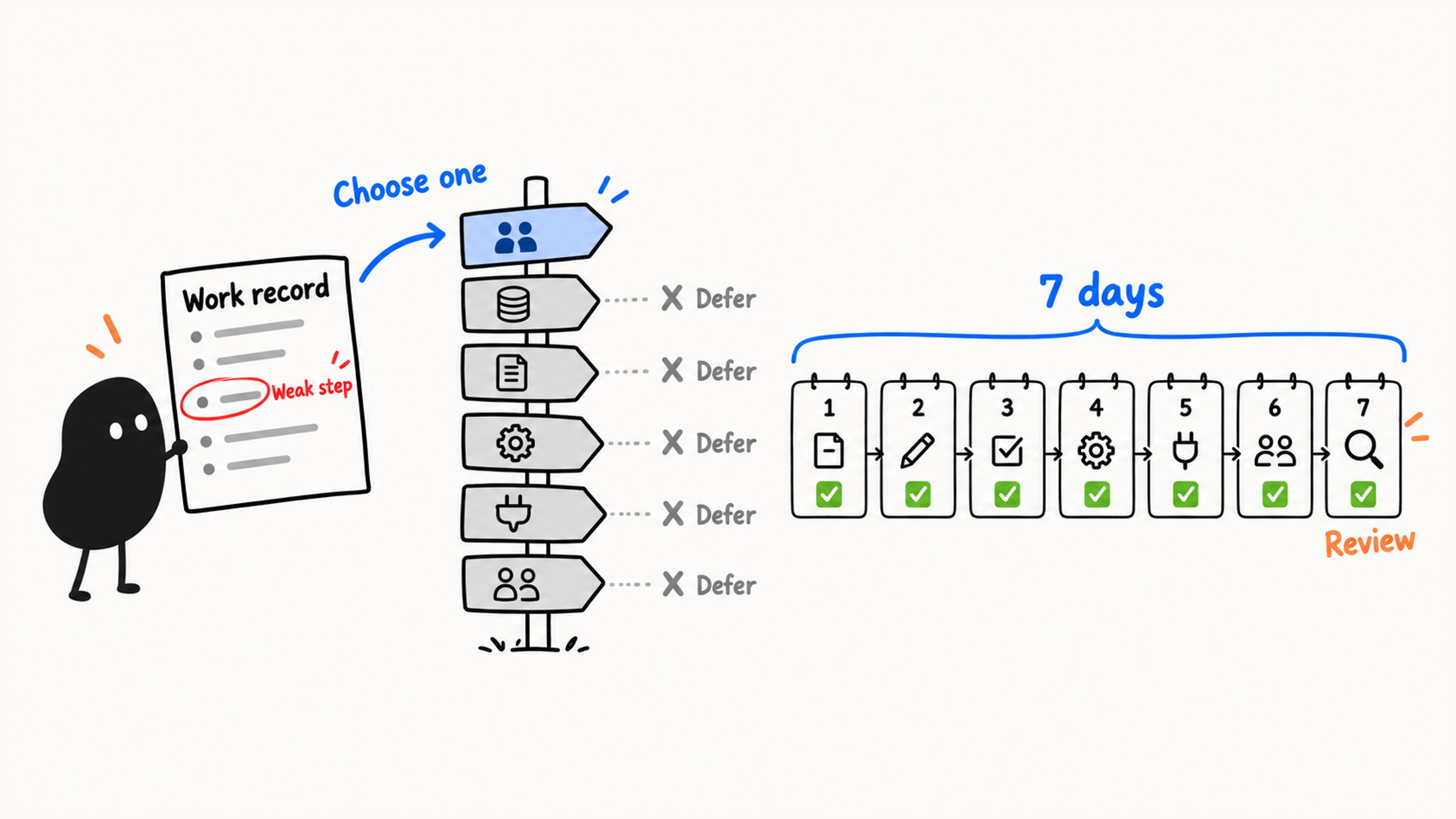
Piling new features onto a workflow that isn't steady yet makes problems harder to trace, because you can't tell which layer failed. You'll make faster progress by starting from where you actually get stuck:
- look back at your sessions to see which step is still shaky: reading the project, planning, making small changes, reviewing diffs, verifying, or reviewing the result;
- pick the one path out of six that matches it: everyday collaboration, project memory, context management, automation, external tools, or multi-agent and team workflows;
- spend seven days on that path, doing one small, checkable thing each day.
Everything else can wait. After a week, compare the results with the problem you started with, then decide whether to keep going, adjust, or switch paths.
01 Find Where You Get Stuck
Once your environment is set up and you understand context and permissions, you can work through this loop:
Read the project → plan → change in small steps → review the diff → verify → human reviewBefore moving on, look back at what actually happened in your sessions: which of these steps you've tried, and which still wobble. Finishing a tutorial doesn't mean the skills have stuck. If you don't have records to look at, do one small task you can check first.
Ask yourself five questions:
Do I keep re-explaining the project's rules?
Do I keep losing the thread in long sessions?
Do I keep running the same checks, formatting, and tests by hand?
Do I need Claude Code to connect to outside tools?
Do I want to bring it into my team's workflow?
Your answers point to different paths.
Back to "it keeps forgetting the tests." Check your sessions to see where it breaks down:
| What your sessions show | What to do first |
|---|---|
| It has to find the test command every time | Add the verified command to your project instructions |
| It found the command, then said it was done without running it | Practice actually running checks and recording the results |
| The check is already routine and stable | Now consider automating it |
Find the step that's missing, then learn the feature that addresses it. "Its memory is bad" isn't specific enough to tell you what to practice.
02 Path 1: Keep Practicing Everyday Collaboration
If your sessions show you still struggle to find the right files, write plans, or verify results, keep practicing the everyday workflow. Reading a project, tracing a flow, fixing a small bug, adding a test, and updating docs all count. You can also practice reviewing diffs and drafting PR descriptions on their own. Commits still go through you.
While the basic loop is still unsteady, more practice is the best investment, so put MCP, hooks, and subagents aside. Keep notes on each day's plan, checks, and what you learned, and you'll see where to practice next.
03 Path 2: Project Memory
If the basic loop works but the same friction shows up at the start of every task, look at project memory. You may catch yourself asking:
Why do I have to tell it the project's rules every single time?
Things like:
This project uses `pnpm`, not `npm`
Run `pnpm test` before committing
API files live in `src/api`
Components use 2-space indentation
Don't modify the `generated` folder
Retyping these every time means something eventually gets left out. Two features help:
CLAUDE.md: rules you write down yourself.- Auto memory: notes Claude writes for itself based on your corrections and preferences.
The official memory docs draw the same line between them. Auto memory can be incomplete or go stale, so any rule the project has to follow long term should be checked and written into CLAUDE.md. Treat its guesses as hints.
Read the existing rules first, then add the commands, dependencies, and folder conventions you've confirmed. When you restrict migrations or access to sensitive files, say where the rule applies, and keep the team's existing requirements.
CLAUDE.md gets the rules in front of Claude Code. To actually block an action, you need permission settings, isolation, or a tested blocking hook. Keep each rule specific: "Run pnpm test before committing" is much easier to follow than "test carefully." When the rules start piling up, see how to split a bloated CLAUDE.md by scope.
04 Path 3: Context Management
When long sessions keep bringing back approaches you already rejected, or forget limits you already agreed on, look at context. Those symptoms can also come from bad information or execution mistakes, so a long session is only one possible cause. Figure out which material still holds and which has gone stale, then decide how to keep track of where the task stands.
Start with three cheap habits:
When a task gets big, split it into smaller sessions
Hand research questions to a separate session or a subagent
After each stage, have Claude Code sum up the goal, the constraints, and where things stand
For example:
Summarize where this task stands:
1. What's been confirmed
2. What's been changed
3. What the check results are
4. What's left to do
5. What we no longer need to keep in mind
A summary on its own doesn't clear the history. When you switch sessions, write down the goal, the constraints, the changed files, the verification status, and the to-dos, then have the new session read them explicitly. After the handoff, check that the files match what you wrote down; that check is what makes a handoff reliable. For when to clear, compact, or hand off a long session, see how to clean up a long Claude Code session.
05 Path 4: Automation
When a check is the same every time and the steps have settled down, think about automating it. Make sure of three things first: the action really repeats, the trigger is clear, and the risk is manageable. Once it runs on its own, nobody may be around to judge the moment, so a fuzzy trigger can fire at exactly the wrong time.
A hook runs something you define at a specific point while Claude Code is working. The official hooks guide has examples like a desktop notification when Claude needs your input, auto-formatting after every edit, and blocking edits to protected files.
Start with low-risk reminders so you can see when hooks fire, then give them more to do a step at a time:
Notify me when Claude is waiting for input
Remind me to run the formatter after each edit
Remind me to run tests before committing
Once you understand the triggers, you can move on to blocking sensitive edits and dangerous commands, or running formatting and lint automatically.
When you set up a hook, make sure you've picked the event that actually fires. For a hook that blocks things, test both cases: one that should go through and one that should be stopped. Claude Code's tool hooks can't see commits you make by hand in another terminal. To check every commit, add a Git hook or leave it to your team's CI.
06 Path 5: Connecting Outside Tools
If your coding tasks keep depending on outside material like design docs, tickets, or team messages, you have a real reason to learn MCP. MCP (Model Context Protocol) is an open protocol for connecting AI tools to outside data sources, and it also lets Claude Code connect to your internal tools.
Once you connect something, be clear about what Claude Code may read and what it may write. Before taking this path, make sure you can review small local changes, have a real need for outside data, and can name the new read and write permissions involved. That makes it much easier to judge whether each permission is necessary.
MCP is a good fit when:
A coding task needs the product requirements doc
A bug fix needs the Jira issue first
A UI change needs the design doc first
The team wants Claude Code to call internal tools
07 Path 6: Multi-Agent and Team Workflows
When a task splits into independent pieces, or you're ready to bring Claude Code into team automation, look at subagents, parallel sessions, GitHub Actions, and the Agent SDK.
Subagents get their own context, prompt, and tool permissions. You can hand them heavy research, log digging, or lots of file reading, so all that output stays in the subtask and doesn't clutter your main session. For example, a read-only review subagent can check the diff against the plan and come back with concrete evidence of out-of-scope changes, missing checks, and risks. The main session still pulls the results together and checks the conclusions.
If your team uses GitHub, look at Claude Code GitHub Actions. It runs Claude Code inside GitHub Actions workflows, can turn issues into PRs and fix bugs from a comment, and follows your project instructions and existing code style. It also means dealing with repository permissions, PR permissions, and team process, so learn it once the basic workflow feels natural.
If you want to go further and build Claude Code's abilities into your own agent, look at the Agent SDK. It gives you the same tools, agent loop, and context management that power Claude Code, programmable in Python or TypeScript, so your agent can read files, run commands, and edit code.
Before adding agents, be clear about what they'll do for the task in front of you. Independent problems to investigate, team workflows, and building agents in code are three different needs, so choose based on your actual problem and what you can already do.
08 Seven Days, One Path
When you choose a path, fill this in from your actual sessions:
The real development problem I ran into:
The record that shows it:
My weakest step:
The path I picked:
What this path needs me to know first:
Features I'm deliberately putting off this week:
Spend all seven days on that one path. Each day, plan one small thing you can finish in the time you have, and leave behind something you can check: a file, a decision, or a test result. If a day's prerequisite is missing, fill it in first or shrink the task so you can still finish.
| Day | What to do | What you'll have |
|---|---|---|
| Day 1 | Confirm one specific problem from your records | A problem statement with evidence |
| Day 2 | Learn the most basic feature on this path | A note on what it does and doesn't cover |
| Day 3 | Do one read-only exercise somewhere low-risk | An analysis record |
| Day 4 | Write a minimal config, prompt, or workflow draft | A file or draft you can review |
| Day 5 | Try it on a small scale in a practice project | A record of what ran and how you checked it |
| Day 6 | Look at failures, risks, and what you put off | A list of fixes |
| Day 7 | Review whether the path solved the original problem | A decision to continue, adjust, or switch |
Say you picked project memory. On day 2, learn how CLAUDE.md and auto memory differ. On day 4, write a minimal CLAUDE.md. On day 5, open a fresh session and see whether it picked up the rules. Every path works the same way: learn only the feature you need right now, and save hooks, MCP, and subagents until the matching problem shows up.
At the end, go back to the original problem and your records. Does the path fit? Did you finish each day's task? Can you check the results? If the scope turned out too big, shrink it. After a week, whether you're saying "it keeps forgetting the tests" less often is how you decide to keep going, adjust, or switch.