
DeepDojo.AIPublished 2026-11-07Updated 2026-11-10中文
Midjourney vs. ChatGPT vs. ComfyUI: How to Choose
Plenty of tools can produce a beautiful image, so it's tempting to choose by popularity, demo quality, or the number of settings. The differences appear once you make a real image. One tool gives a great first draft and loses the subject after a few revisions.
Another gives a plain draft that suits the precise layout work that follows.
When you pick a primary tool, ask whether it can carry the whole task. Work out what you're drawing, how many rounds of edits you expect, and what you have to deliver, and only then look at product names.
One striking demo image shows a single slice of the process.
Five questions turn the need into selection criteria:
- where you start from
- how precisely you need to control
- how many rounds of edits you expect
- how it will be delivered
- what you can invest
Then look at what each common tool route carries. Routes are steadier than specific products, which change with versions and regions. To pick the primary route, go back to the requirement you can least give up: finding the mood quickly, keeping the product accurate, or making one character appear again and again.
Covers, product images, and picture books each divide the work differently, and a beginner who walks one route all the way through will see which step takes the most time.
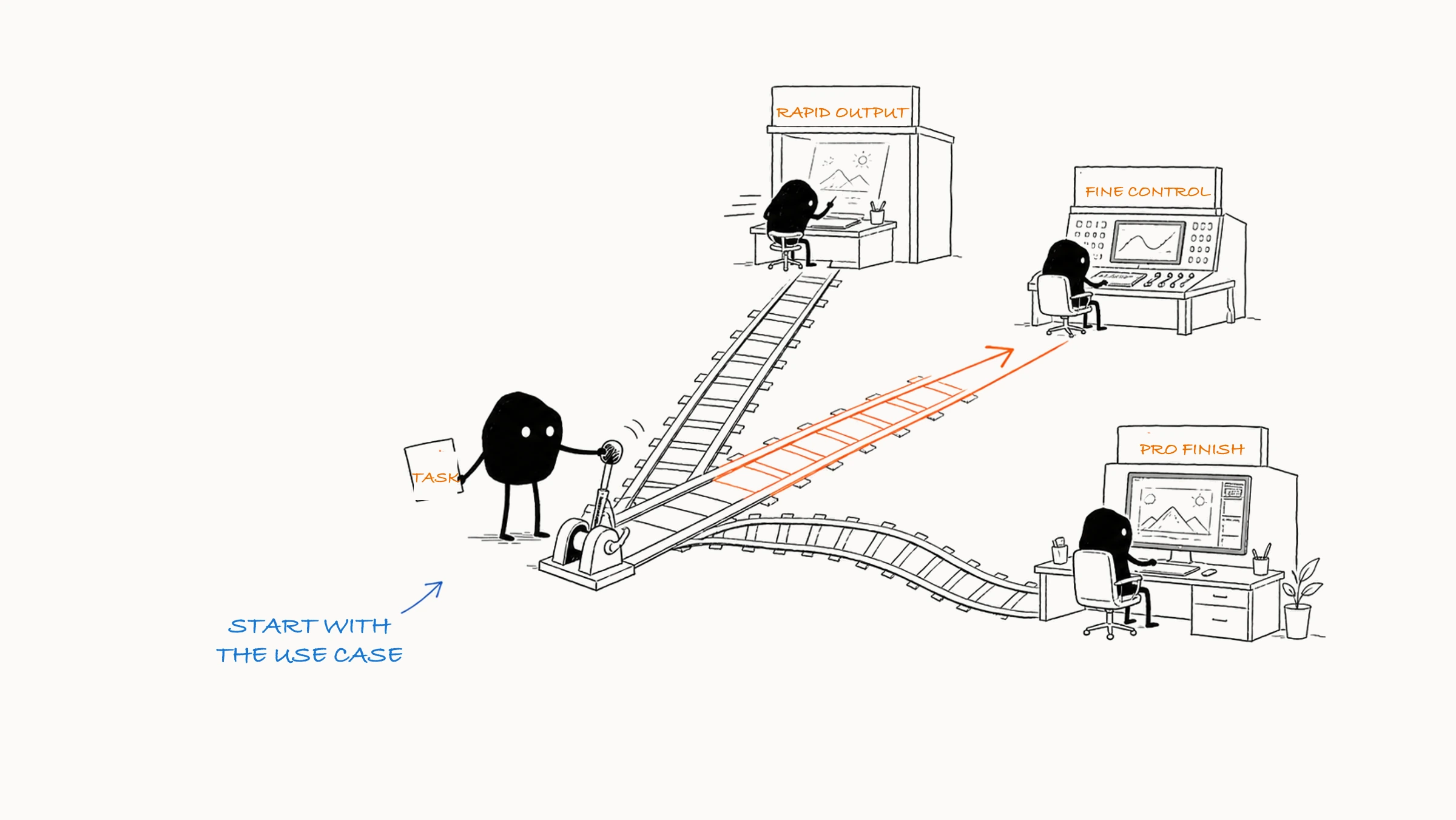
01 Five questions give you a reason for the choice
Before you open a tool, turn your need into selection criteria with five questions.
| Criterion | How it affects the choice |
|---|---|
| Starting point | Starting from nothing, look at generation quality. With a product, photo, or sketch to preserve, look at image editing, masks, and layers |
| Control precision | Concept art can vary. Products, series characters, and brand layouts depend more on references, structure control, or post-production |
| Number of revisions | A quick mood image needs a short workflow. Repeated changes to people, backgrounds, and sizes call for conversational editing and a canvas |
| Delivery requirements | A phone cover needs a title area. Commercial material also needs real products, official logos, source files, permission records, and multiple sizes |
| Learning and hardware cost | Online tools are usually quick to learn. Local workflows need installation, a graphics card, and upkeep, so let the project decide how much to invest |
Write your answers as one sentence, for example:
I'm starting from a product photo to make three vertical social media images. The cup's shape and label must be accurate, the background can change, and I'll add the English title in design software afterward.
In that sentence, the accurate cup and label come first. A product photo already exists, so keep it and let the background vary. The title waits for post-production and gets laid out in design software. Once you've stated what to keep, what to change, and what to leave for later, the division of tools is clear. To judge the scope of keeping and changing, see text-to-image, image-to-image, and inpainting.
02 Five common tool routes
Features change with versions, regions, and accounts, but the routes of work stay fairly stable. Learn the routes first, then pick whichever product is available to you.
| Route | What it mainly handles | Examples and limits |
|---|---|---|
| Fast visual exploration | Comparing concepts and moods using text, references, variations, and a few settings | Midjourney, for example. Exact text, product structure, and layered delivery need another tool |
| Conversational generation and editing | Changing subject, background, color, or whitespace in plain language, round after round | ChatGPT's image features, for example. You still check boundaries and kept content every time |
| Chinese all-in-one creation | Chinese input, generation, and canvas editing in one place, for covers and illustrations | Jimeng, for example. Test its language understanding, editing limits, export, and quota |
| Local open-source control | Fixed workflows, batch production, character and structure control, private environments | Stable Diffusion and ComfyUI, for example. You maintain models, plugins, hardware, and versions |
| Commercial design and post-production | Exact text, official logos, real products, layers, and source-file delivery | Photoshop and Adobe Firefly, for example. Generated images serve as material, and the final layout is finished in post |
There is also an API route. An API is an interface that programs call, so a website, app, or batch process can generate images automatically. It takes development, cost control, content moderation, and failure handling. As a beginner, just know what it can do, and learn it once you have a repeated task worth automating.
For example, Firefly’s post-generation options separate variations, local fill, upscaling, and opening the image in Photoshop or Adobe Express; try those steps when choosing a tool.
03 Go back to your hardest requirement and choose a primary route
After you review the routes, two or three may still seem able to do the job. Tool features do overlap. Return to the requirement you can least compromise on. Is it finding a mood quickly, keeping a product accurate, or making the same character reappear? The primary route has to solve that one first.
| Task | Most important requirement | Better primary route |
|---|---|---|
| Find three scene directions for a novel | Speed, mood, and variety | Fast visual exploration |
| Revise an illustration from a sketch over many rounds | Understanding instructions and continuous edits | Conversational generation and editing |
| Make everyday cover assets for a Chinese platform | Chinese-language experience and light editing | Chinese all-in-one creation |
| Generate one character in many poses in batch | Consistency, structure control, and reuse | Local open-source control |
| Finish an event poster with brand text | Layout, layers, and delivery specs | A generator plus commercial design and post-production |
| Auto-generate avatars inside a product | Stable calls, cost, and moderation | API integration |
The primary route is simply the main way the task gets done, and other tools fill in the remaining steps. A brand poster, for example, generates the main visual first and then goes to Photoshop for layout. A character project picks an art style first, then uses a process that keeps the look steady across the series.
Deal with hard constraints first. Real products, private material, batch production, and formal delivery rule out some routes outright. Taste, habit, and price come after those checks.
If you only do the task once and a few manual steps finish it, doing it by hand is faster than building a batch workflow. When you make dozens each week, templates, batch processing, and consistent file naming are worth the effort because they keep output stable. Let the number of repetitions decide how much to invest, and small jobs stay simple.
04 Four scenarios, four divisions of labor
Scenario one: a cover for reading notes
The cover is due today, the image only needs to convey quiet reading, and the title will be added later. Speed and direction matter most here, so fast generation or an all-in-one route fits. Generate a vertical image without text, leave room for the title, and finish the text in a layout tool.
Scenario two: a scene image for a real skincare product
The bottle, label, and colors must be accurate, and the background can vary. Keep the product photo, and build the scene with masks, background generation, and design tools. Redrawing the whole bottle to change the backdrop means rework whenever the packaging shifts. Keeping the product photo and generating only the background keeps rework to a minimum.
Scenario three: a ten-page children's picture book
Ten pages need the character's look, clothing, colors, and art style to hold throughout. Save the character sheet and fixed descriptions, and choose a route that supports image references, consistency control, or a reusable workflow. Layout and text go to separate, dedicated tools.
Scenario four: finding an art direction for a game scene
Early on you need to compare Eastern fantasy, industrial ruins, low-poly, and other directions quickly. Start with the visual exploration route and generate many candidates fast. Once the direction is set, switch to a more controllable workflow to lock structure and asset details.
Across the four tasks, what needs protecting keeps changing. The cover mainly needs title space, the skincare image needs fidelity, the picture book needs continuity, and the game scene needs many directions early on. Bring those differences into your tool choice and the split between primary and finishing tools gets easier to judge.
For the skincare scene, Adobe’s Generative Fill instructions show how to select an area first, then describe what should appear there.
05 Beginners: finish one complete route first
When you start, finish one route from end to end. Write the goal, generate, compare, revise, check, and save your records. Complete one common task and you'll see which step takes the most time. Keep the description, references, aspect ratio, and results together so you can pick the work up again later.
Before you learn a second tool, work out what it would add. Another set of controls costs effort, so it should make at least one step clearly easier. If images look good but Chinese text keeps going wrong, add a layout tool. If images arrive fast but the character keeps changing, learn reference control or a local workflow. When you want to replace your primary tool, count the costs first: see five switching costs to count before changing AI image tools.
An image task splits into four stages (exploration, control, refinement, and delivery), and each can use a suitable tool:
Explore: compare different directions
  ↓
Control: fix the subject and composition
  ↓
Refine: edit locally and finish the layout
  ↓
Deliver: check and export
Exploration values speed and variety. Control starts fixing reference images, aspect ratio, characters, or products. Refinement handles edges, hands, backgrounds, and color. Delivery adds exact text, brand elements, file sizes, and permission records.
When you combine tools, save the intermediate files. Keep the raw generations, the selected version, the text-free base image, the version with text, and the editable source file in separate places. Then rework can restart from the right point, and the editing history stays traceable.
To choose a tool, set a primary route from your assets, required accuracy, revisions, delivery, and budget, then add tools for whatever is missing.