
DeepDojo.AIPublished 2026-11-17中文
How Codex Differs From Chat AI and Autocomplete
You paste some login page code into a chat AI and ask how to change the button label from Submit to Log in. It quickly suggests an edit that looks fine. The real work starts when you try to put that suggestion into your project: find the file, check who else uses the button, make the change, then run commands in the terminal to see if it worked.
OpenAI's Codex takes part in that whole stretch. It can read files in your project, edit code, and run commands, then hand you results you can check. More capability brings a different kind of risk, though. When a chat AI gets something wrong, you ask a follow-up. When Codex gets something wrong, it may already have left real changes in your files.
So before your first Codex task, get two things straight:
- What Codex does beyond chat AI and autocomplete, and what each step leaves behind for you to check.
- Which decisions always stay with you: the goal, how much it may change, and what counts as done.
Once those are clear, start with something small that you can follow, check, and undo. That beats asking it to "build the whole project" on day one.
01 Chat AI, Autocomplete, IDEs, and Codex Do Different Jobs
Here, "chat AI" means a plain text conversation with no project access and no tools. It answers questions and explains code. Autocomplete predicts what comes next from your cursor position and nearby code, so its scope is even narrower.
An IDE (integrated development environment) gives you editing, search, debugging, and a terminal. Codex uses whatever tools it has access to and moves a task forward, locally or in the cloud. Split by the job at hand, it looks like this:
| Situation | Best fit |
|---|---|
| Ask about a concept, explain an error | Chat AI or Codex |
| Finish the line of code you're typing | Autocomplete |
| Search files, edit code, run commands | IDE / terminal |
| Read the project, change files, and verify the result for one task | Codex |
| Decide whether to ship, delete data, or accept a risk | You |
Codex is a coding agent. It works from your project files and uses the tools you allow to read files, edit code, and run commands. The official Codex CLI docs describe it the same way: it inspects code in your local repository, makes edits, and runs the tools already installed on your machine. Because it can act, you need to say up front what the goal is, where it may make changes, and which actions need your approval first.
02 Every Step in the Loop Leaves Something to Check
During a task, Codex usually works through a loop like this:
Understand: read relevant files and config to learn how the project works
  ↓
Plan: propose what to do and which files to change
  ↓
Execute: edit files, run commands
  ↓
Verify: run tests or commands, look at the results
  ↑          ↓
You review the diff and the evidence, then decide to continue, adjust, or stop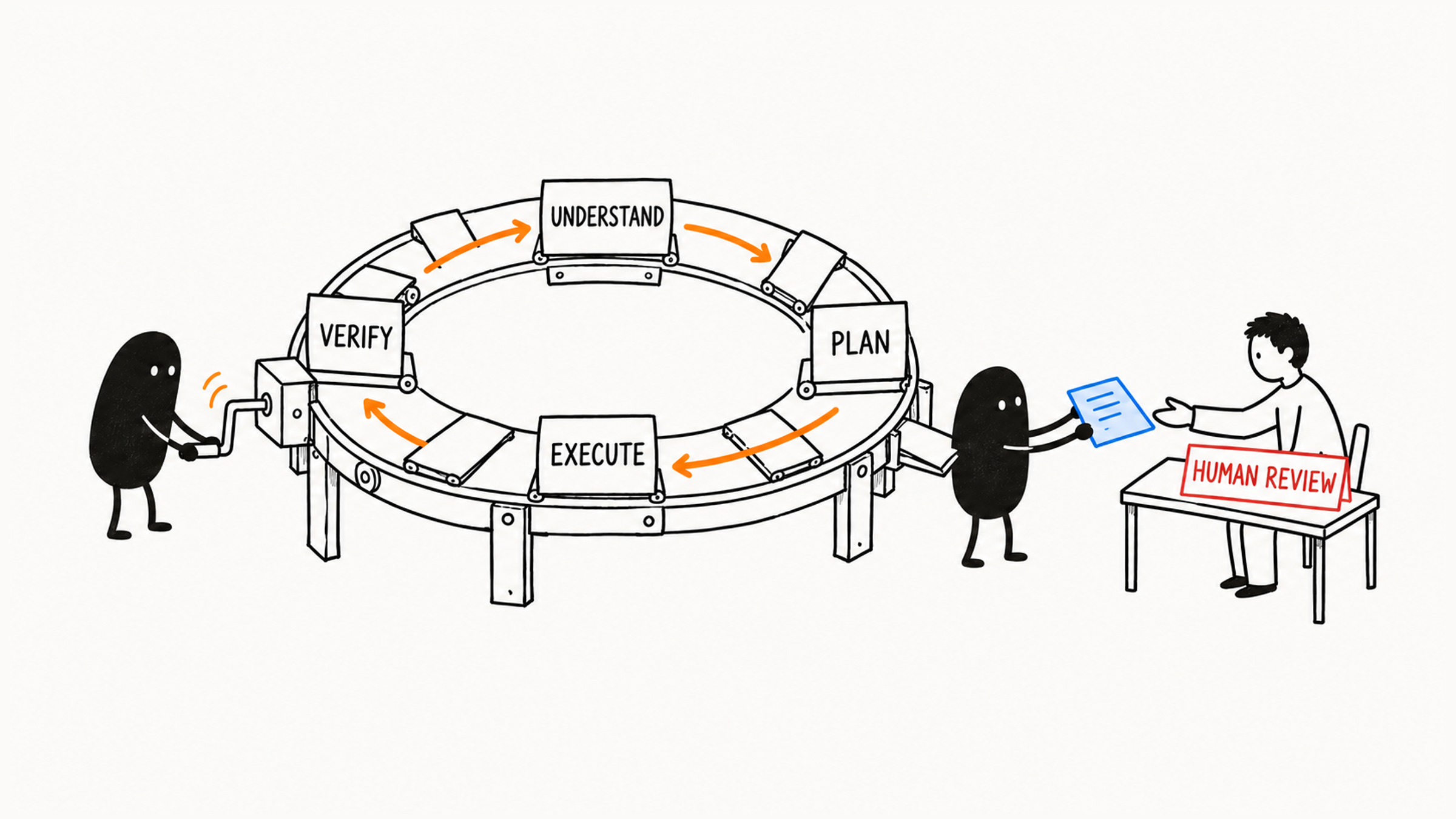
Each step gives you something concrete to check:
| Step | What to check |
|---|---|
| Understand | How it explains the project |
| Plan | What it will change, and why |
| Execute | The diff: the difference between the file before and after |
| Verify | The actual command output |
Compare its progress report against these records and you know how far the task really got. For how to check the verify step in detail, see Codex says the tests passed: here's how to check.
Back to that button. Say the login page uses a shared Button component. First find out whether the word Submit is passed in by the login page as a prop (a component parameter) or comes from the shared component's default value. That decides where the change goes. If the page passes the text in, change only the login page. Change the shared default, and every other page using that button changes too.
After the edit, the diff proves the text in the file changed. Whether the page shows it correctly takes a look at the page. If the app won't start, the honest report is "file changed, page display not yet verified." Clear limits and checkable results give you grounds to keep going.
03 Which Tasks Suit Codex
Following that loop, Codex works best on development tasks that have context, limits, and a way to verify them:
- Explain the project structure and find the key files for a page or feature.
- Trace an error to its cause and fix a small, well-scoped bug.
- Change some copy or styling, or build a small game or component.
- Add tests for a function, run checks, or review a small diff.
Each of these lands on specific files, behavior, commands, or checks.
Context is the information this decision needs. "The button is broken" is missing the page, the symptom, and the goal: is the text wrong, does clicking do nothing, or is the layout off? Fill those in and Codex can look at the right files and follow the call chain to the cause. The files sit on disk, but they only become evidence once it actually reads them and works out how they connect.
So you can start small. Give it the problem and the key clues, and let it follow the call chain. If what it finds supports the current decision, move on. If it still can't tell which code owns the button text, have it read more and say clearly what's still unknown.
"Optimize my project" is too vague. It doesn't say what to optimize, where, or how to judge the result, so the scope is unclear from the very first step. Try this instead:
Fix one bug in the login form with the smallest change you can stand behind:
when a user submits without entering an email, no error message appears.
Start with the login form components and their tests.
Fix only this issue. Don't refactor the login flow.
When you're done, list the files you changed and tell me how to verify the fix.
This request names the problem, where to look, what's off limits, and what to report at the end. That gives Codex a starting point, a boundary, and a basis for checking. Even if you ask it to "finish the whole project automatically," someone still has to set the goal and accept the result. For a finer way to decide whether a task can be handed over, and how far, see 4 checks before you hand a task to Codex.
04 The Decisions That Stay With You
Codex carries out the task. You own the goal, the scope, and acceptance. You decide what to do, how big the change may be, and what counts as done:
| You decide | What to state or check |
|---|---|
| The real goal | Business priority and the problem you actually want solved |
| Scope | Where it may make changes, and how large they can be |
| High-risk actions | A person explicitly approves deleting important data, overwriting existing work, or deploying; routine steps already approved can proceed as agreed |
| Acceptance | Codex's "done" gets checked against real results |
| Final call | Whether to accept the change, ship it, or keep expanding is a human decision |
Let Codex do the work and supply the evidence. You set the goal, accept the risk, and sign off on the result.
A wrong text answer costs you another question. A wrong action from Codex can leave real changes in your files. The more an agent can do, the clearer the limits need to be before it starts.
05 Start Your First Task Small
For a first run, try understanding a project, building a small example, or fixing a clearly defined bug. Get one small thing working that you can observe, verify, and undo. Save these broad or high-impact tasks for when your limits and checks are ready:
- Refactoring the whole project, optimizing all performance, or fixing every bug.
- Taking over a production issue or connecting to a database to clean up data.
- Committing and deploying as soon as the fix is in.
Safer first tasks look like this:
Tell me the main folders in this project and what each one roughly does.
Don't modify any files for now.
Or:
Find where the login button label is defined.
Just tell me which files are involved and why. Don't change any code.
One step further:
Change the login button label from `Submit` to `Log in`.
Only touch the code that renders it.
When you're done, tell me which file you changed and how to check it by hand.
These three requests allow read-only understanding, then locating, then a small edit. Watch how Codex finds its evidence, check the real change and result, and widen the scope one step at a time.
06 Four Common Mistakes
| Mistake | What to look at instead |
|---|---|
| Treating Codex as just a code writer | The whole process: reading code, planning, editing, verifying, explaining, and reviewing |
| Assuming more automation is better | Take small steps, check each one, then raise its autonomy |
| Trusting the "done" message | File changes, the diff, and command output |
| Handing over the final judgment too | Check against your real requirements and decide whether to accept |
Think back to that Submit button. A chat AI hands you a suggestion and leaves the rest of the road to you. Codex walks the road with you, but where to stop, and whether the finished work counts, is still your call.