
DeepDojo.AIPublished 2026-11-12中文
How to Verify a Subagent's Findings
You send a read-only subagent to investigate why an old refresh token can still be exchanged for a new one after the user logs out. A few minutes later it hands back a summary: logout only clears the cookie and never writes a revocation record, so the old token stays valid. It even cites session/refresh.ts:41 and a reproduction path. The conclusion looks settled; just apply the suggested fix.
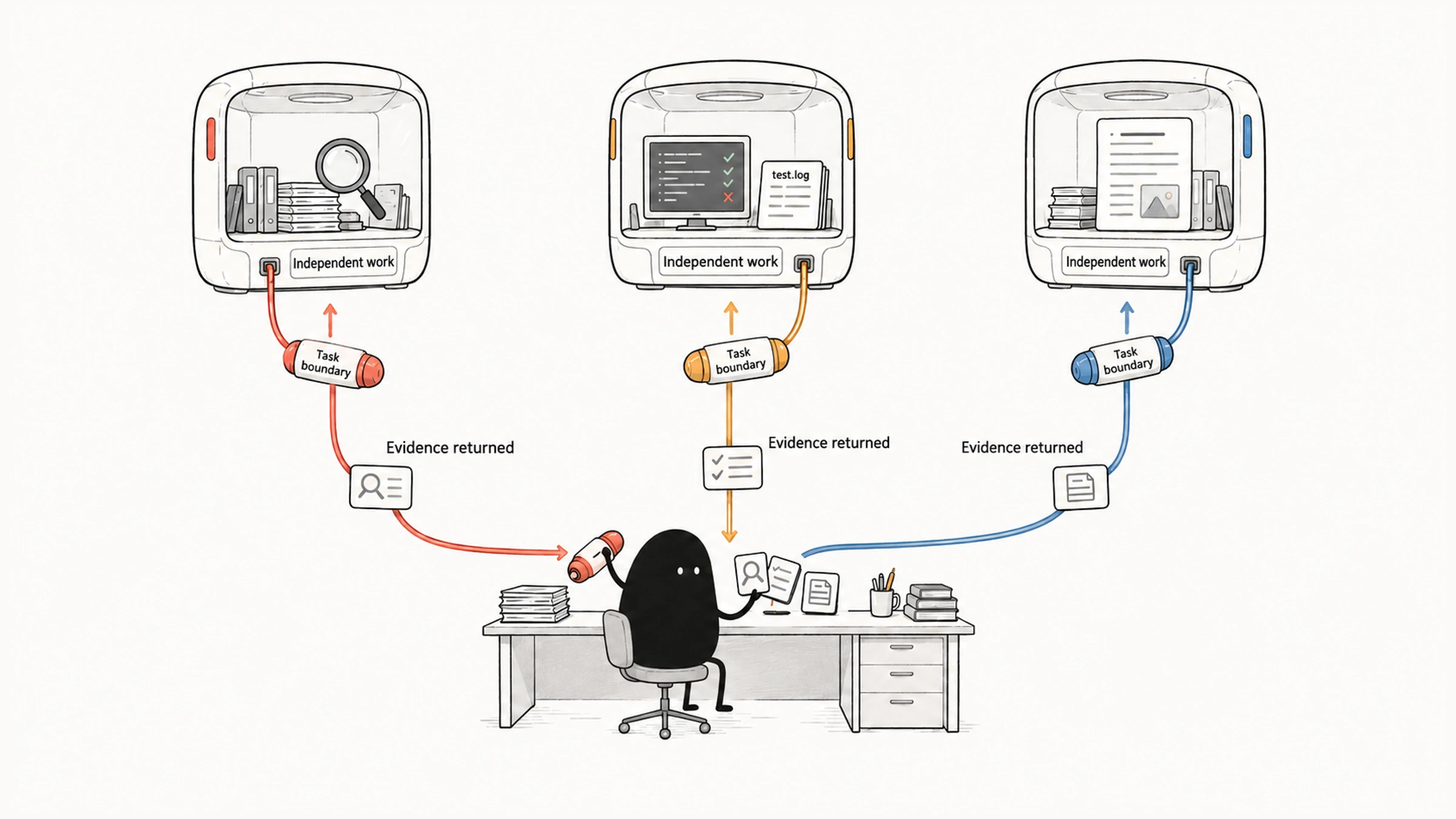
Hold off on the fix. The summary may be completely right, or only half right: the reproduction steps may never have actually run, and another subagent may think the cause is caching. Whether a subagent's conclusion holds up depends on both ends:
- On the way out: did it get enough background? An ordinary subagent can't see the main session, so any directory, reproduction condition, or constraint you didn't mention, it has to guess.
- On the way back: did you check the evidence? The shorter and cleaner the summary, the easier it is to forget to ask where each claim came from.
So write delegations as self-contained messages covering the goal, scope, known facts, constraints, and deliverable. When the result comes back, check files, line numbers, logs, and tests one by one, and keep verified conclusions apart from unverified guesses. We'll look at what a subagent can see during handoff, then how to write the delegation and check what comes back.
01 What a Subagent Can See
An ordinary subtask can't see the main chat, so the delegation message has to stand on its own. The Claude Code subagents documentation is explicit: each subagent starts with a fresh, isolated context window. It doesn't see your conversation history, the skills you've already invoked, or the files Claude has already read. Claude composes a delegation message that summarizes the task, and the subagent works from there.
Different ways of calling a subagent see different background:
| Method | Background It Sees |
|---|---|
| Ordinary subagent | Only the delegation message, not the main session history |
| Conversation fork | Inherits the whole conversation so far; its tool calls stay on its side, and only the final result comes back |
Skill with context: fork | Starts a new subagent with the Skill content as its prompt; doesn't see your conversation history |
| Built-in Explore and Plan | Start without CLAUDE.md and Git status to stay lightweight |
The last two rows cause the most trouble. The skills documentation says of context: fork that the subagent doesn't see your conversation history, so the skill's instructions have to stand on their own. Explore and Plan skip project rules, so restate any constraints during delegation, such as skipping vendor/. If project rules are needed, hand them over explicitly, or choose a custom agent or general-purpose, which load them.
02 Keep It in the Main Session or Hand It Off
By default, a Skill runs in the current session, so it can build on the discussion and work in progress. That suits ongoing changes and tasks that need several rounds of back-and-forth. These settings hand the task to a separate subagent:
context: fork
agent: general-purpose
A fork keeps searches, logs, and other intermediate work in its own context, which also means the new worker can't see the main session history. Put the goal, inputs, scope, constraints, result, and completion criteria in SKILL.md.
Take the read-only review again: if the main session has already decided to check only the auth changes, the fork's input should state that scope and the baseline. Whether you can hand all of that over is part of the cost of choosing a separate context.
Need to continue the current discussion → stay in the main session
Inputs and boundaries are complete, with lots of intermediate output → consider a fork
Whether the task is worth delegating at all is covered in when to use subagents in Claude Code.
03 A Delegation Message Needs Five Things
A workable delegation states at least:
- Goal: what question it ultimately has to answer.
- Scope: which directories, commits, or logs it may look at.
- Known facts: error messages, reproduction conditions, relevant decisions.
- Constraints: read-only or writable, and what not to touch.
- Deliverable: a summary, file locations, evidence, and open questions.
For example, instead of:
Have a subagent look at the auth problem.say:
Use a read-only subagent to investigate the session invalidation issue in `src/auth/` and `src/api/session/`.
The symptom is that after a user logs out, the old refresh token can still be exchanged for an access token.
Trace the call chain and report the root cause, the files involved, and a reproducible path. Do not modify code.
Keep the final result under 800 words.
The directories and reproduction condition point the subagent in the right direction, so it spends less time guessing the background. Agreeing on length and structure also keeps search logs inside the subtask, bringing back only what you need to decide. Still, when a short summary arrives, check where each finding came from. A short report isn't the same as evidence from the current project.
04 Check What Comes Back, Item by Item
Conclusions, line numbers, and reproduction steps in a summary all need checking. The main session should separate verification that actually ran from guesses that still need it, and check:
- whether each conclusion comes with real files, line numbers, logs, or test evidence;
- whether the subagent went beyond the agreed scope;
- whether changes were based on the right branch and the latest files;
- whether several agents' conclusions contradict each other;
- whether key tests were rerun by the main session or an independent check.
Back to the opening summary. It looks like a finished conclusion, but the main session still needs to take it apart:
- Open the code and confirm the line sits on the relevant call path and that logout really skips revocation.
- Check whether the reproduction steps have an actual run result. If there's only a description, mark it unverified and run the reproduction.
- If another agent says the cause is caching, compare the symptoms, call paths, and reproduction conditions. A missing revocation and a caching issue can both be real; one conclusion carrying a line number doesn't rule out the other.
Only conclusions backed by evidence are confirmed. Everything else stays a judgment to be checked.
05 Keep Asking or Start a Fresh Context
If doubts remain after checking, should you keep questioning the same subagent? The subagents documentation explains that built-in Explore and Plan are one-shot and return no agent ID, so they can't be resumed, while general-purpose and custom agents can be resumed in the same session with their full history. That helps when you're chasing the same problem; for a new question, start a fresh context.
When the same kind of investigation keeps coming up and you restate the role and format every time, write those fixed requirements into a custom agent, as shown in a read-only code review subagent for Claude Code.
Spell out the five things on the way out, and check the evidence on the way back. "Logout only clears the cookie" turns from a lead into a conclusion you can act on only after you've opened session/refresh.ts and run the reproduction once.