
DeepDojo.AIPublished 2026-11-09Updated 2026-11-09中文
The Hook Errored, but the Dangerous Action Still Ran
A PreToolUse Hook hits a missing dependency file, the script exits with status 1, and an error appears in the terminal. The protected operation runs anyway. Many people pause here. The script failed, so shouldn't that count as a rejection?
It is easy to assume that writing "read-only" in the instructions and configuring a Hook makes things safe. Dangerous actions can still happen, and what matters is whether the control covers the real behavior.
Claude Code has at least three layers of control, each covering a different part:
- a Hook runs checks at fixed events
- permissions decide whether a tool call is allowed
- a sandbox limits which files and network a command can reach
The Hook is the layer people most often make assumptions about. Whether it blocks an action depends on the event, the decision it returns, and what it covers, and exit code 1 means something different from exit code 2.
The way to confirm a control works is to follow the real action and ask three questions: what is checked before the call, what the action can reach when it runs, and how failure and timeout are expressed.
Asking them shows what the three layers each cover, how PreToolUse blocks an action with a structured rejection, and what happens when the script fails, times out, or the same goal runs through a different tool.
A set of scenarios you can test without side effects closes it out. What the configuration file says is only the starting point.
01 Know what each control covers
An incident investigation can run into long logs, conflicts over shared files, and diagnostic commands with side effects, all at once. Each needs a different control: a separate context for exploration, a separate working directory for experimental changes, and permissions and resource limits for real operations. Writing "read-only" in text states the task boundary. Whether writes are actually blocked depends on the tools, the permissions, and the execution environment.
Start by placing each boundary where it belongs:
| What to control | Main mechanism | Where control happens |
|---|---|---|
| Actions and checks at fixed events | Hook | Before or after tool calls, and at session lifecycle points |
| Whether a class of tool or operation is allowed | permissions | The permission decision at tool execution |
| What files and network a Bash command can reach | sandbox | The execution environment of the command and its child processes |
Two other isolation tools, Subagents for information and worktrees for file directories, are covered in Parallel subagents: decide who edits which file.
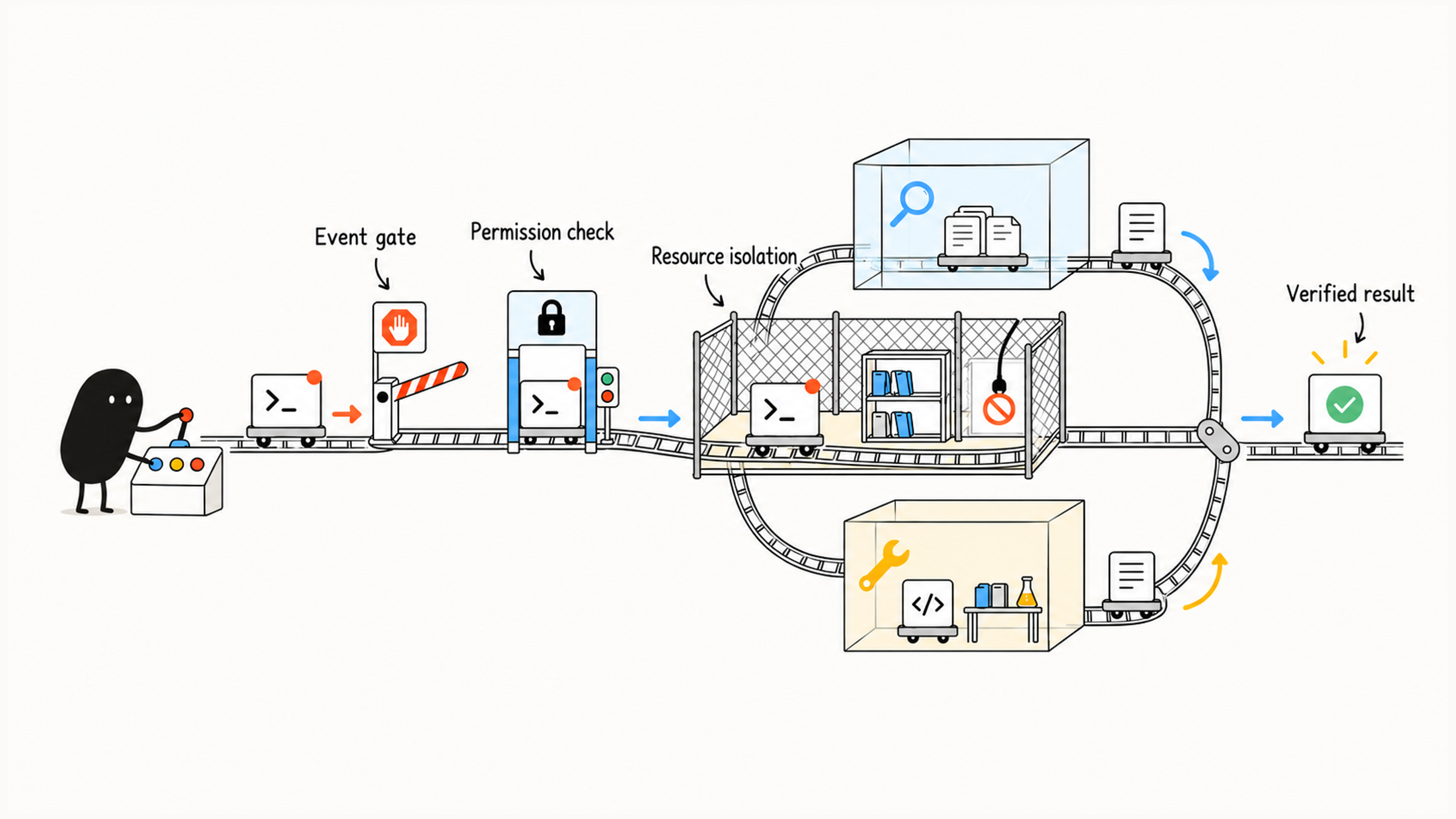
A control has to match the real behavior. If a task hangs with no notification, check timeouts and notification setup. If someone forgot to run lint, check the process and a suitable fixed checkpoint. Each symptom has its own control, and one more subagent only fixes a context problem.
02 Design what triggers a Hook and how it decides
A Hook runs when a specified lifecycle event happens and the configuration matches. Before using one, settle a basic question: do you want to prevent an action, or handle the result it has already produced? Each event defines its own input and decision format, so events and fields follow the Hooks reference.
The gates below mostly use command Hooks, which are handlers that run scripts. First decide whether the check comes before or after the action:
| Need | Matching moment | What it can achieve |
|---|---|---|
| Reject a dangerous tool operation that is about to run | PreToolUse | Gives a blocking decision before the action happens |
| Format or run a light check after an edit | PostToolUse | Handles a change that has already happened |
| Provide a summary of the current environment | SessionStart | Gives the session a short set of starting facts |
| Save state before compaction | PreCompact | Preserves needed handoff information before summarizing |
| Notify when the main session stops responding | Stop | Signals the end of this response stage; whether business acceptance passed is confirmed separately |
Take a Bash call as an example. A PreToolUse script reads the event JSON from standard input and checks tool_input.command. When it decides the operation is out of bounds, it can exit with code 0 and print the structured rejection the event expects:
{
  "hookSpecificOutput": {
    "hookEventName": "PreToolUse",
    "permissionDecision": "deny",
    "permissionDecisionReason": "Deletion outside the approved task scope."
  }
}
In hookSpecificOutput, hookEventName names the event, permissionDecision: deny means reject, and permissionDecisionReason gives the reason. This is what the handler returns when it runs, so the check happens when the script actually executes.
Matching rm -rf shows how this works, but deletion can also happen through other spellings, scripts, or tools. A script with a defined scope guarantees only the checks it covers. Permissions and the runtime environment should hold the broader resource boundaries.
03 Check how a gate fails
A command Hook has to specify four things: input fields, output format, exit status, and timeout. If these aren't handled well, the script can error out and the action can still go ahead.
For PreToolUse, you can block with exit code 2, as the event convention allows, and put the reason on stderr. You can also use the structured rejection from the previous section. If the script returns only a plain exit code 1 with no valid rejection decision, that's usually just a non-blocking execution error. To reject, return a rejection decision explicitly, which differs from the shell habit that "non-zero means failure." Newer versions of Claude Code also offer an onFailure: "block" setting so that a Hook's own failure blocks the action too. Whether it's available, and what the default is, depends on the documentation for your version. Events differ in behavior, and PostToolUse runs after the action, so the original action is already complete.
The opening example shows this: a missing dependency file made the script exit with status 1, which only says the check failed. Without a valid rejection decision, the protected operation can still run. When you verify, look at the handler's output and also confirm the tool action really didn't happen. An error only says the check failed, and a block shows up as the action not happening.
You can prepare the inputs below in a test environment with no real side effects, and check behavior with simulated stand-ins for the protected action:
| Input or fault | What to check |
|---|---|
| A clearly restricted target operation | Whether a valid rejection is returned and the tool action did not happen |
| A normal, approved operation | Whether the normal permission flow is preserved and other limits stay as they are |
| A missing field or unparseable input | Whether unknown states have a clear outcome that follows policy |
| A failed or timed-out dependency check | Whether the required control still holds; script errors need a separate check to know whether anything was blocked |
| The same goal through a different tool | Whether the original Hook covers it, and what limits the part it does not cover |
These are control-test scenarios. Run them with simulated objects, and keep real important files and production systems out of the test.
Give the Hook a timeout suited to short checks, and settle how the script handles cases it can't decide. If the policy says a failed check should also reject, return a valid rejection for the relevant event and test it with abnormal input. A timeout is itself a failure, and a security block has to be guaranteed another way.
Also tell apart exceptions the script can catch from cases where it never gets to return a result. A running script can catch a missing dependency file and return a valid rejection. A script that never started, or was killed by a timeout, has no chance to print deny. Access that must stay restricted at all times should also be limited by real permissions or resource boundaries, and you should test that the action is still stopped when the Hook is unavailable. Only then have you checked the control on both the normal and the abnormal paths.
Keep the output to the result, the key error, and an actionable reason. Long logs make the gate create noise of its own. To compress the raw output of a test command, do it in the command wrapper or the tool-output layer, because a Hook can't rewrite a result that has already been returned.
| Suited to short script checks | Judgments that need something else |
|---|---|
| Matching protected paths or clearly dangerous operations | Whether an architecture proposal is sound: a Skill or human review |
| Running a local formatter after an edit | A full release process: a Skill |
| Injecting an environment summary or sending a status notice | Long-running troubleshooting: a Skill plus separate exploration |
| Saving existing state and log locations | A semantic review of a whole PR: a Subagent or a review Skill |
Claude Code also has prompt and agent Hook types that can take part in semantic judgments. Even with a fixed trigger time, a model's judgment isn't deterministic. When choosing, tell apart "a fixed event will fire" from "the judgment is certain," and keep complex advisory workflows out of a gate that runs every time.
04 Permissions and resource limits each cover a part
permissions control whether a tool call is allowed, denied, or needs approval. A sandbox limits what a sandboxed command can actually reach. Automatic approval and prompting depend on the permission mode and configuration, so which actions prompt by default depends on your real configuration. See the permissions documentation.
A command name doesn't reveal its side effects. npm test may call database cleanup logic, so check the actual script and the target environment before approving.
A Bash sandbox limits the commands it covers and their child processes. MCP requests and remote writes need their own ways of being limited. The sandboxing documentation states that the sandbox covers shell commands only, and that file tools, MCP servers, and hooks run outside it. External services still need their resource permissions tightened at the connection and on the server.
permissions: whether this tool call is allowed
Hook: checks specific conditions at configured events
sandbox: which resources the controlled command can reach during execution
For example, allow edits to ordinary source files while permissions and path checks protect .env, keys, and production configuration. Allow tests to run in the sandbox while limiting the network and the writable directories they need. A Hook can add checks, and access it doesn't cover still depends on permissions and the sandbox.
For external writes, settle the specific object and what's about to run, then confirm within the actual authorization. Ordinary steps that are already approved can run back to back. A new impact or an undecided high-risk branch still needs an explicit decision. Put controls before the action. If you wait until after the output to say "that shouldn't have changed," the change has already happened.
05 Check the control plan along the real actions
Say the current authorization is only "find the likely cause." You may read sanitized logs and deployment records, and you may not change production state. First check that "read-only" really holds: the tool's access scope should match the task, and the credentials for production services should allow only the reads that are needed. If local Bash diagnostics run under a sandbox, also check the directories and network it allows. Writes by a remote MCP server sit outside the local sandbox, so control them at the connection and on the server.
Then consider fixed checkpoints. If a class of tool call needs an extra deterministic check, configure a matching Hook and test it with the scenarios above. What the Hook does when it errors has to meet the control requirement, so a Hook that has never been verified shouldn't be the only line of defense.
Suppose the log subtask suggests "a restart may be needed." It should still return the suggestion, the evidence, and the unconfirmed impact. The scope of authorization stays with the user.
When you check a control plan, follow the real actions and answer these questions: which conditions are checked before the call, what the action can reach when it runs, how a failure or timeout is expressed, and who verifies the result. The point is to make each control's role clear and to confirm that it really covers the action you meant to limit. For how rules, procedures, and gates fit together in layers, see Split a bloated CLAUDE.md with three questions.