
DeepDojo.AIPublished 2026-11-06Updated 2026-11-09中文
Starting with AI: How to Pick a First Task
New users of an AI assistant often start with their hardest, highest-stakes problem. The model answers with several polished paragraphs, and then they freeze: if something is wrong, where is it? Without reference material on hand, there is no way to check the details.
The most reliable way to start is to pick a small task you know well, where a mistake is affordable, the source material is enough, and the result is easy to check.
When the output arrives, you know what to look for. If the model gets something wrong, you can fix it on the spot and absorb the consequences yourself.
A small task may feel like too little to bother with, but going through the whole loop (give context, inspect the draft, ask for changes) beats hitting a wall on your first try.
A task you want to handle
  │
  ├─ Is the cost of an error manageable?
  ├─ Do you already have the necessary source material?
  ├─ Can the result be inspected manually?
  └─ Are the responsibilities of AI and human clearly divided?
          │
          ▼
A low-risk, well-resourced, verifiable small task
          │
          ▼
State the request → Inspect the draft → Request revisions → Verify manually
Three tests help you choose:
- whether you can absorb a mistake
- whether the material is enough
- whether the result is easy to check
A small job that passes all three, like turning a few event details into a notice for a parents' group chat, makes a good first try. Keep the roles straight too: the AI organizes, extracts, compares, and drafts, while the material, the checking, and the final decision stay with you.
If the task is too big, cut out a small, low-risk piece first.
01 Why Large Tasks Backfire
At the start, you most need to see whether your instructions work and whether the output really gets better. When a draft comes back, you compare it with your source material, spot what is missing, ask for a revision, and put the two versions side by side to see whether the problem was fixed.
Take a prompt like "Help me plan my career development." It sounds like one request, but it involves your past experience, changing industry trends, and your personal preferences. With that many moving parts, you can't verify the recommendations in a single round of revision, however convincing the AI sounds.
Narrow it to "Organize a comparison table matching my background against these specific job requirements," and the task has footing. You have the job description and your resume in front of you: did it miss a qualification? Are your experiences quoted accurately? Is the table easy to read? You can check each point in seconds.
You can only measure the effect of your revisions when the task is small and bounded:
Clear materials and bounded goals
  → See exactly what changed in the output
  → Pinpoint where problems come from
  → Know how to adjust the next prompt
02 Three Criteria for Good Tasks
1. Manageable Consequences of Error
Before you start, think through the worst case: what happens if the AI misunderstands the goal, states something false, or leaves out an important point?
Drafting a community group notice is a good example. You save it as a draft, check it against your original schedule, and only then post it. If the first draft misses a detail, you can add it back before anyone reads it. As long as you don't send it right away, you stay in control.
If you apply AI to contracts, medical prescriptions, or financial investments, one overlooked error can cost you your rights, your health, or your money. The US National Institute of Standards and Technology emphasizes in its Artificial Intelligence Risk Management Framework (NIST AI RMF) that high-stakes applications require strict human oversight and clear accountability. Beginners should not practice on high-consequence tasks. At most, ask AI to summarize background documents or draft preliminary questions. The decision itself stays with you, or with a qualified professional who validates it.
When you're unsure about the risk, ask yourself two plain questions:
- Can errors be spotted and corrected before the result is put to use?
- If an error goes unnoticed, is the fallout still within a range you can handle?
If either answer makes you uneasy, shrink the task: let the AI organize information, draft a preliminary version, or outline questions.
2. Necessary Source Material on Hand
Because AI writes fluently, people assume it knows everything. They toss in a quick prompt like "We have an event this weekend, write an announcement." But how would an AI know what your community is planning? It can't produce facts from nothing. Every fact in the output must come from material you provide or from reliable sources you specify and verify.
Anthropic makes this point in its official guide on reducing model hallucinations: giving clear reference text and explicitly allowing the model to say "I don't know" when information is missing are the most effective ways to prevent fabricated claims. An event notice needs an event name, date and time, location, target audience, preparation checklist, and registration details. If you only say "We have an event this weekend," the model will either stop to ask follow-up questions or fall back on generic templates and invent a time and place, which sounds credible but has no factual basis.
When you gather your materials, sort them into three groups:
| Material Status | How to Handle It |
|---|---|
| Already confirmed | Include directly in the prompt as factual ground truth |
| Temporarily unknown | Mark as "To be confirmed" for human follow-up |
| Essential for the task but missing | Gather the missing info before generating text |
Whether your material is "enough" depends on what the current step is meant to achieve:
The fee has not been confirmed yet
  ├─ Organizing known arrangements first → Mark as "To be confirmed"
  └─ Preparing the final announcement → Confirm whether there is a fee first
Make sure the information the current step strictly needs is in place before you begin. Background that isn't needed can stay out.
3. Easily Inspectable Results
There's a tension here: we use AI to save effort, yet the newer you are to AI, the less you can skip inspection. Once your materials are ready, decide how you'll review the draft before you generate it: what will you compare it against, and which details will you check? AI text flows so smoothly that without clear yardsticks it's easy to nod along and approve a flawed draft.
With an event announcement, the original schedule is on your desk. You can verify times and dates, spot omissions, and check whether the model added fees or capacity limits you never gave it. Finally, you read it through to see whether the tone suits a community group chat.
That's why beginners should start with tasks they understand well. If you don't know the original facts or the context where the result will be used, you won't notice when the AI drifts off course.
A result is only truly "inspectable" when you can name both the benchmark and the specific verification action.
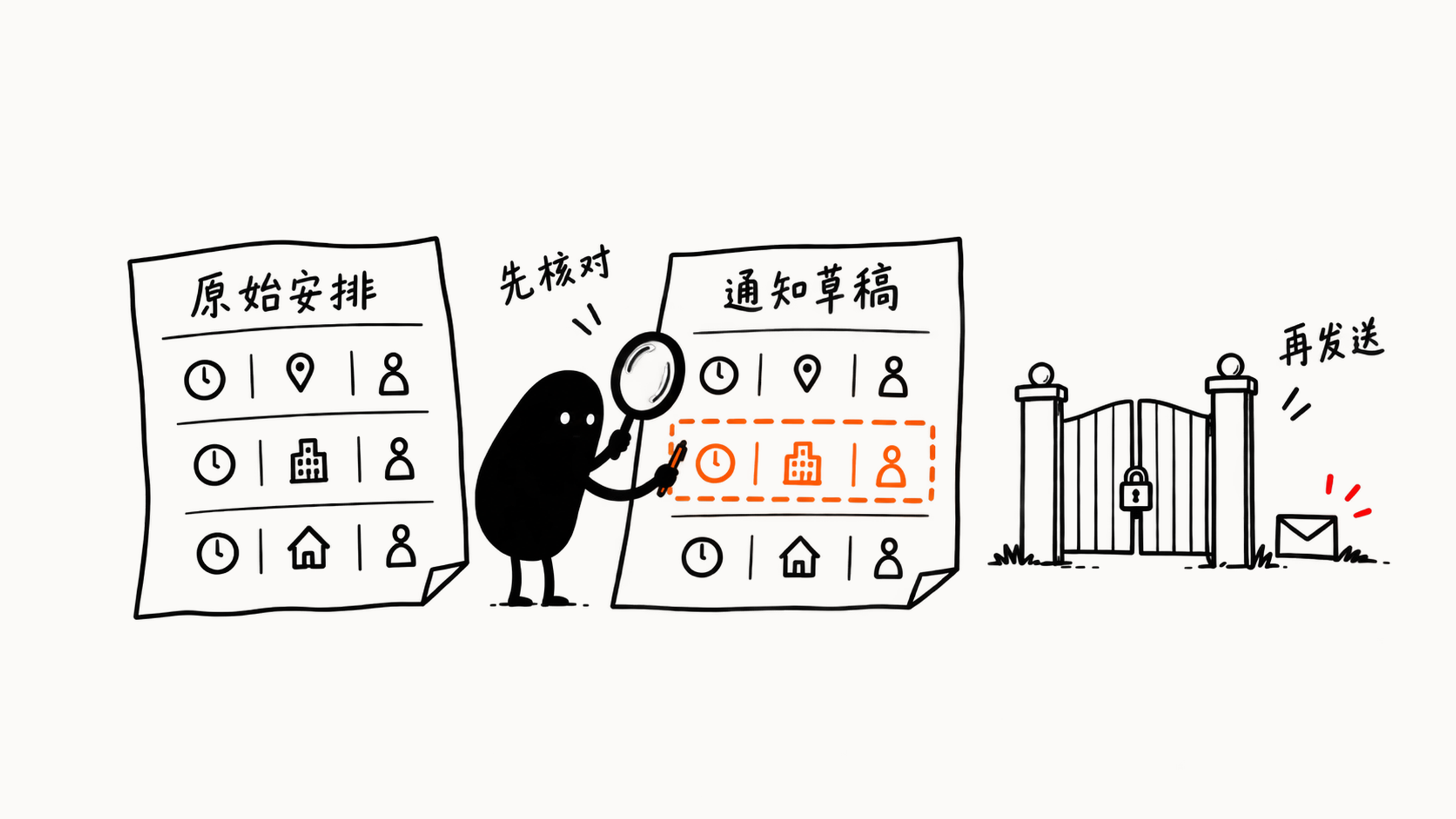
Keep the announcement as a draft until you've cross-checked it item by item against the original schedule, and control stays in human hands.
03 Separating Human and AI Responsibilities
Once a task has passed these three criteria, draw a clear line of responsibility. Don't expect AI to carry the load for you:
- AI helps you organize, extract, compare, rewrite, and draft.
- You provide authentic source materials and verify facts, privacy considerations, and usage risks.
- You make the final decision on whether to use the result.
In drafting an announcement, the division is clear: if the time was missing from your initial notes, that is a gap in your materials, so gather the facts first. If you provided the complete schedule and the AI skipped the end time, ask it to fix the draft. The AI drafts according to your instructions. Spotting issues, verifying facts, and deciding whether to hit "send" remain your job.
04 A Real-World Walkthrough
Let's test this framework on a concrete scenario. Suppose you are organizing a community reading session and have noted these details:
Event: Family Reading Session
Time: This Saturday, 3:00 PM to 4:00 PM
Location: Community Activity Room
Audience: Children aged 6 to 10 and their parents
Preparation: Bring a favorite book; arrive 10 minutes early
Registration: Sign up in the group chat by Friday, 6:00 PM
The goal is to turn these notes into an announcement for a parents' chat group. Run it through the criteria:
| Criterion | Evaluation | Reason |
|---|---|---|
| Consequences of error | Manageable | It is only a draft, not sent automatically; the organizer can catch mistakes |
| Source material | Sufficient | All six key factual categories needed for the notice are present |
| Inspection method | Clear | Can be checked item by item against original notes |
| Responsibility boundary | Clear | AI drafts; human verifies and decides to send |
These notes are enough to write the notice and give you an easy checklist for review. With a human checkpoint before it goes out, this makes an ideal starting task. Consider what changes if you automate it: if the AI writes the notice and publishes it to the group immediately, with no human review, the risk profile is completely different.
05 How to Scope Down Large Tasks
If your current task is too broad or carries heavy consequences, don't hand the whole problem to AI. Carve out a low-risk first step that is easy to check. For instance, start by having it organize the reference information you need to make an informed choice:
Original task: Tell me which investment product I should buy.
Narrowed task: Based on the product brochures I provide, list the fees, terms, and questions that require further clarification.
Once narrowed, you only need to watch three things: the AI works strictly from your provided materials, you know what deliverable to expect, and you can verify every item on the list. Choosing the product remains entirely up to you.
Next time you open an AI assistant, start with something familiar: organizing meeting action items, tidying resume bullets, or drafting a group announcement. Once you have a manageable task, the next step is packaging your goal and materials into a clear prompt. See Prompting AI: Four Elements of a Clear Request.